web
You’re offline. This is a read only version of the page.
close
Skip to main content

Notifications

Announcements

No record found.

Community site session details

Community site session details

Session Id :
Microsoft Dynamics AX (Archived)

Forecast In Project Management and Accounting Module

(0) ShareShare
ReportReport
Posted on by 4,624

Good Day Everyone,

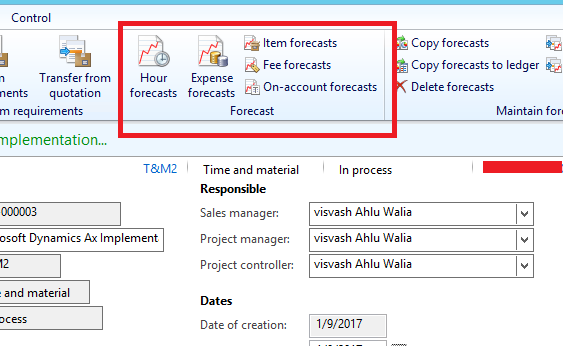
 I have created one Project in Project Module and  there is Forecast tab Action pane  see below:
1488.Project-forecast.PNG

Can anyone please explain , its uses and How can i use this ?

Thanks

Regards

Visvash walia

*This post is locked for comments

I have the same question (0)
  • Verified answer
    Ludwig Reinhard Profile Picture
    Microsoft Employee on at

    Hi Visvash walia,

    The forecast forms have several purposes:

    (a) If you want to make use of the production planning functionalities, you can create a hour forecast and do the job and operational scheduling from the hours forecast form. This is an alternative compared to making use of the project planning functionalities and has the advantage that it currently has more fetures, such as limited capacity planning, Gantt-Chart, etc.

    (b) If you make use of fix price projects you have to setup a forecast as the forecast is required for calculating the estimate, which are required for accruing the revenue for advanced fix price projects.

    (c) A third functionality of the forecast form is that they allow you preventing spending more money than originally budgeted. This third functionality overlaps with the recently added project budget functionality and is in my opinion no longer required. Yet, in ealier AX systems companies typically created a remaining budget amount that was automatically reduced as costs were recorded.

    Does this answer your question?

    Best regards,

    Ludwig

  • Rohin Profile Picture
    4,624 on at

    Hello Ludwig ,

    Thank you!

      For Time & Material Projects , no need to create Forecast really??

  • Verified answer
    Ludwig Reinhard Profile Picture
    Microsoft Employee on at

    Hi Visvash Walia,

    If you make use of the project budgets this is something that I would not do because you would have to maintain the same budget iInformation in 2 forms - the Project Budget and the forecast forms.

    I would go only for the Project Budget form in this case, as it is easier and simpler to maintain.

    Best regards,

    Ludwig

  • Rohin Profile Picture
    4,624 on at

    Thanks Ludwig,

    you mean to say Project Budget and forecast does the same thing ? then what are the differences between both ?

    Please clear to me

    Regards

    Visvash Walia

  • Verified answer
    Ludwig Reinhard Profile Picture
    Microsoft Employee on at

    Hi Visvash Walia,

    Yes, the project budget and the forecast forms do basically do the same.

    As I mentioned above, in prior AX systems, such as AX3, AX4 and AX2009 only the project forecast forms were available and this was the only chance for users to record and track project budget amounts.

    With AX2012, the project budget form was introduced, which took over most of the things that were previously done in the forecast forms.

    However, the forecast forms are still required - and has consequently not been removed - if

    (a) you make use of estimate for advanced fix Price Projects

    (b) you want to make use of the production scheduling Features instead of the Project scheduling functionalities.

    It is a bit confusing that you basically have 2 forms that mainly do the same but I hope that the comments above help to clarify that a bit :-)

    Best regards,

    Ludwig

  • Ludwig Reinhard Profile Picture
    Microsoft Employee on at

    Hi Visvash walia,

    Is there anything else open in regards to the project budget and forecast forms?

    If you have access to the Dynamics Learning Portal, please also have a look at the training videos available there, which illustrate the differences and commonalities between the two forms.

    Best regards,

    Ludwig

  • Rohin Profile Picture
    4,624 on at

    Hello Ludwig,

    Thank you!

      I have created One Forecast Model in Forecast models form (Project Module > Setup >Forecast Model) shown below :

    Project-Budget.PNG

    Now I have three questions  :

    1.  Does my Forecast model is correctly Setup ? what should/are be the Budget Type in this form ?

    2. As Created Forecast model  is not showing in Forecast Form( hour forecast, Expense Forecast , Item Forecast etc.. in Project List Page )

    3. Where to setup Project Budget for Project ? as It not Editable for my project shown below :

     Project-Budget.PNG

    Do i need to setup some parameter first ?

    Please help on this 

    Regards

    Visvash Walia

  • Verified answer
    Ludwig Reinhard Profile Picture
    Microsoft Employee on at

    Hi Visvash Walia,

    For 1:

    The forecast model that you set up can only be used in combination with the project budget form. You cannot use it in relationship with the forecast forms because you have a Budget type selected ('original budget'). I know that this is quite confusing but you need to create a forecast model that has no budget type associated if you want to use it in the forecast forms. Please setup a forecast model with the budget type 'none'.

    For 2:

    Please see under Point 1

    For 3:

    Open your project, select the budget and control tab and activate the Budget Control Parameter. Then the project button becomes active.

    Best regards,

    Ludwig

  • Rohin Profile Picture
    4,624 on at

    Thank you Ludwig ,

    I am fully satisfied with your answers.

    Thanks again!

    Regards

    Visvash Walia

Under review

Thank you for your reply! To ensure a great experience for everyone, your content is awaiting approval by our Community Managers. Please check back later.

Helpful resources

Quick Links

Responsible AI policies

As AI tools become more common, we’re introducing a Responsible AI Use…

Neeraj Kumar – Community Spotlight

We are honored to recognize Neeraj Kumar as our Community Spotlight honoree for…

Leaderboard > 🔒一 Microsoft Dynamics AX (Archived)

#1
Martin Dráb Profile Picture

Martin Dráb 4 Most Valuable Professional

#1
Priya_K Profile Picture

Priya_K 4

#3
MyDynamicsNAV Profile Picture

MyDynamicsNAV 2

Last 30 days Overall leaderboard

Featured topics

Product updates

Dynamics 365 release plans



