web
You’re offline. This is a read only version of the page.
close
Skip to main content

Notifications

Announcements

No record found.

Community site session details

Community site session details

Session Id :
Microsoft Dynamics CRM (Archived)

Email Tracking Everything...How to Track Selected Tracked Emails.

(0) ShareShare
ReportReport
Posted on by 110

Hi All,

I have been looking through the forums and have not found an answer to this question.

I have tried multiple people's suggestions to no luck.  Hoping someone can help me out.

We have Server-Side-Sync up and running for our users for both Incoming and Outgoing emails.
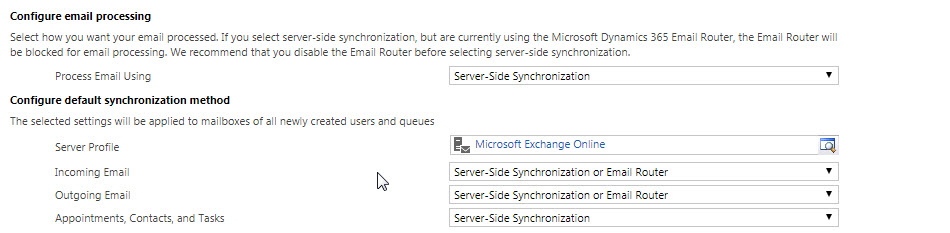
ServerSide.jpg

Goal:

What we want is to have the system only track emails in CRM that are designated by the user to be tracked through either the Plug-In Client or the Dynamics Outlook App. 

The Problem:

CRM is syncing all the emails for all users with approved mailboxes.

Current Email Settings for all users:

- Email messages in response to Dynamics 365 email

- Automatically created contacts is turned off
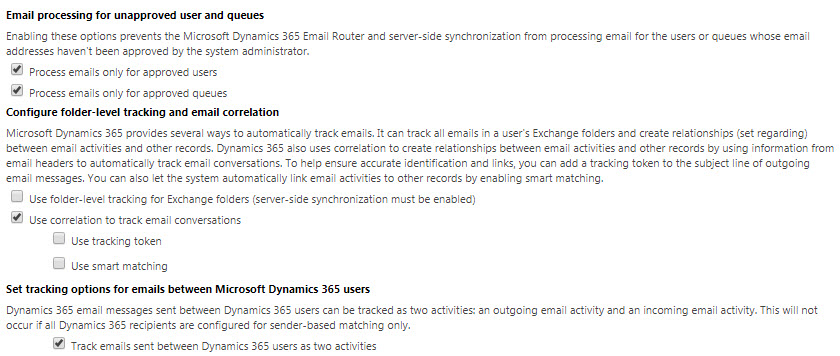
EmailSettings1.jpg

EmailSettings2.jpg

Areas we turned on and reasoning:

- Track emails sent between Dynamics 365 users as two activities - We turned this on because we manage an internal case management queue system.  Dynamics was not sending the emails from internal employees to the Queues unless we had this checked.

- Unchecked 'Use Smart Tracking' - This was causing issues for our external Queue boxes for auto case creation, where a supplier would send in a ticket with "Customer RFQ".  While that case was open, they would send in another "Customer RFQ".  CRM would then think it was the same case instead of creating a new one.

*This post is locked for comments

I have the same question (0)
  • Community Member Profile Picture
    on at

    Did you ever make any progress with this?  We're setup similarly but Many (not all) emails between employees is being tracked even though they're configured to only track messages in response to Dynamics 365 email.

  • Shidin Haridas Profile Picture
    3,497 on at

    can you check the following?

    1. Click on the gear icon on the top right of the screen.

    2. In the next window that open up, click on the 'Email' tab and verify which emails are being tracked.

    027287.Capture.PNG

  • Community Member Profile Picture
    on at

    It's set like you pictured "emails in response to dynamics 365 email".  We also have folder tracking, Tracking Token, and smart matching enabled.  The odd thing is that sometimes even first time messages from outside senders are tracked (like a train ticket receipt from Amtrak to one of our users).  I can't imagine that would match smart matching, and it doesn't have a tracking token, and I don't think that user manually tracked it using outlook app.

  • MS Helper Profile Picture
    110 on at

    We already have this set.  We used XRM Toolbox to set it for the entire organization and double checked with key users.  It is still tracking mostly everything.

  • MS Helper Profile Picture
    110 on at

    Alex, we have the same issue with random emails coming in to mailboxes that are server-side-synced, and it will track those emails from them coming in first time.  

    We've worked with MS on this with little help.

    As a temporary stopgap, we created a business process workflow that restricts emails from visibility from the organization if the email includes specific email addresses.  This addresses the issue for sensitive emails, but it does not fix the issue of too many emails coming into the system.

    We are also having an issue where we have disabled Server Side Sync on mailboxes for automated reports from our system.  However, they will still populate in CRM because they are being sent to individuals that have SSS up.  We have an open ticket with MS on this.

  • Community Member Profile Picture
    on at

    It's nice to know we're not alone.  We've also used XRM Toolbox to set that option for everyone.  Of course we thought "that'll fix it" and then kept seeing messages getting tracked.  We're looking into creating a plugin or workflow to delete messages that have no tracking code and have no Regarding set.  We may also create a case with MSFT.  I'll report back if we get anywhere.

  • Community Member Profile Picture
    on at

    Hi!

    In order to solve your problem of selective email tracking, you might consider using EmailScoop https://www.scnsoft.com/services/crm/microsoft-dynamics/add-ons/emailscoop-tracker. Initially, we at ScienceSoft created this tool for internal use to automatically track all incoming/outgoing emails. But it also allows making use of privacy settings, such as the possibility not to track emails sent to certain employees of the company according to internal policies, for example. Perhaps, EmailScoop can help you in your situation.

  • Suggested answer
    ScottbudNZ Profile Picture
    35 on at

    Hello,

    Each user has personal settings for their mail sync where they can select this. Click the user menu on the top right hand corner of the CRM window and select options.

    Then navigate to the email tab. Select the option that you require.

  • MS Helper Profile Picture
    110 on at

    Hi Scott,

    Thanks for the suggestion but we've already managed that portion of it. That didn't fix the issue. We've fixed some parts of the problem, but that has led to other issues where when they do track emails it doesn't always bring them over.

    MS still has not fully figured out server-side sync yet. It has gotten better but there are still a lot of issues.

  • Suggested answer
    digital marketing Profile Picture
    45 on at

    Heyy 

    by reading your query I would suggest that you should explore different tools like I usually do so far I can suggest you this vocus.io/.../ I hope you can this tool effective

Under review

Thank you for your reply! To ensure a great experience for everyone, your content is awaiting approval by our Community Managers. Please check back later.

Helpful resources

Quick Links

Responsible AI policies

As AI tools become more common, we’re introducing a Responsible AI Use…

Neeraj Kumar – Community Spotlight

We are honored to recognize Neeraj Kumar as our Community Spotlight honoree for…

Leaderboard > 🔒一 Microsoft Dynamics CRM (Archived)

#1
SA-08121319-0 Profile Picture

SA-08121319-0 4

#1
Calum MacFarlane Profile Picture

Calum MacFarlane 4

#3
Alex Fun Wei Jie Profile Picture

Alex Fun Wei Jie 2

Last 30 days Overall leaderboard

Featured topics

Product updates

Dynamics 365 release plans