web
You’re offline. This is a read only version of the page.
close
Skip to main content

Notifications

Announcements

No record found.

Community site session details

Community site session details

Session Id :
Microsoft Dynamics AX (Archived)

Analysis Service configuration component Installation error in ax 2012 R2 CU1

(0) ShareShare
ReportReport
Posted on by 65

Hi All, 

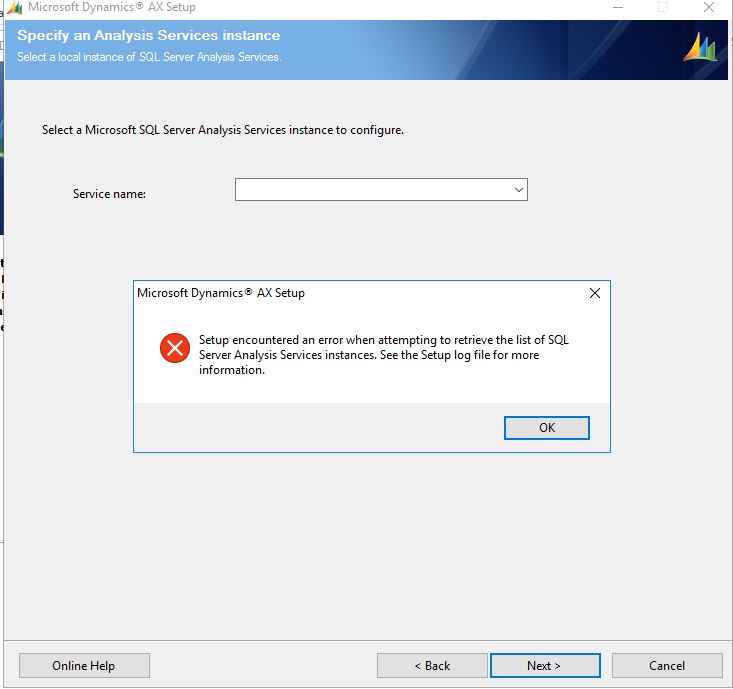
i am facing issue while installing SSAS component for ax 2012 R2 CU1.

Error : Setup encountered an error when attempting to retrieve the list of SQL Server Analysis Services instances. See the Setup log file for more information.

Here I am not able to select OLAP database instance. 

as i am using SQL server 2016, all other AX components are installed successfully. SSAS service is running with Service account.

Please guide me to resolve this issue,

Thanks in Advance.
8037.Error1.JPG

*This post is locked for comments

I have the same question (0)
  • Suggested answer
    Agha SirajulDola Profile Picture
    555 on at

    For ax 2012 R2 CU1, U should install SQL server 2010 or 2012. i dont think R2 may comply with SQL server 2016.

    Regards,

    Agha

  • Pratik Chitroda86 Profile Picture
    90 on at

    Hi Pravin

    Can you share error log file ??

  • pravin joshi Profile Picture
    65 on at

    Hi Pratik, i found this error msg in setup log.

    2018-02-13 20:06:45Z MSSQLServerOLAPService

    2018-02-13 20:06:45Z Could not load file or assembly 'Microsoft.AnalysisServices, Version=11.0.0.0, Culture=neutral, PublicKeyToken=89845dcd8080cc91' or one of its dependencies. The system cannot find the file specified.

    2018-02-13 20:06:45Z Setup encountered an error when attempting to retrieve the list of SQL Server Analysis Services instances. Verify that the server name was entered correctly and that you have permissions to access the SQL Server Analysis Services instances on the specified computer. If you encounter a WMI exception, the problem may be related to an issue in SQL Server. See  [View:http://go.microsoft.com/fwlink/?LinkId=207225:750:50] for more information about resolving the problem.

    2018-02-13 20:50:42Z Setup screen was intentionally closed by the operator or by Windows.

    2018-02-13 20:50:43Z === Setup was canceled or failed. For details see the previous messages in the log.

    2018-02-13 20:50:43Z === Setup logging ended: 2/13/2018 8:50:43 PM ErrorLevel/ExitCode: '1' ===

  • Sohaib Cheema Profile Picture
    49,438 User Group Leader on at

    You are on CU1

    probably you should have minimum of CU9 for R2 if you want to use SQL 2016. or else please use a lower version of SQL

    blogs.technet.microsoft.com/.../announcing-support-for-office-2016-and-sql-server-2016-with-ax-2012-r3-and-r2

Under review

Thank you for your reply! To ensure a great experience for everyone, your content is awaiting approval by our Community Managers. Please check back later.

Helpful resources

Quick Links

Responsible AI policies

As AI tools become more common, we’re introducing a Responsible AI Use…

Neeraj Kumar – Community Spotlight

We are honored to recognize Neeraj Kumar as our Community Spotlight honoree for…

Leaderboard > 🔒一 Microsoft Dynamics AX (Archived)

#1
Martin Dráb Profile Picture

Martin Dráb 4 Most Valuable Professional

#1
Priya_K Profile Picture

Priya_K 4

#3
MyDynamicsNAV Profile Picture

MyDynamicsNAV 2

Last 30 days Overall leaderboard

Featured topics

Product updates

Dynamics 365 release plans
