web
You’re offline. This is a read only version of the page.
close
Skip to main content

Announcements

No record found.

News and Announcements icon
Community site session details

Community site session details

Session Id :
Microsoft Dynamics AX (Archived)

Validation of two fields on form and making it mandatory

(0) ShareShare
ReportReport
Posted on by 230

Hi,

I have a very basic question if you can help with. I have the following form(Say form A) which has two fields(Attachment below) :

Two fields are Credit and Debit from a single datasource (Say Table B)
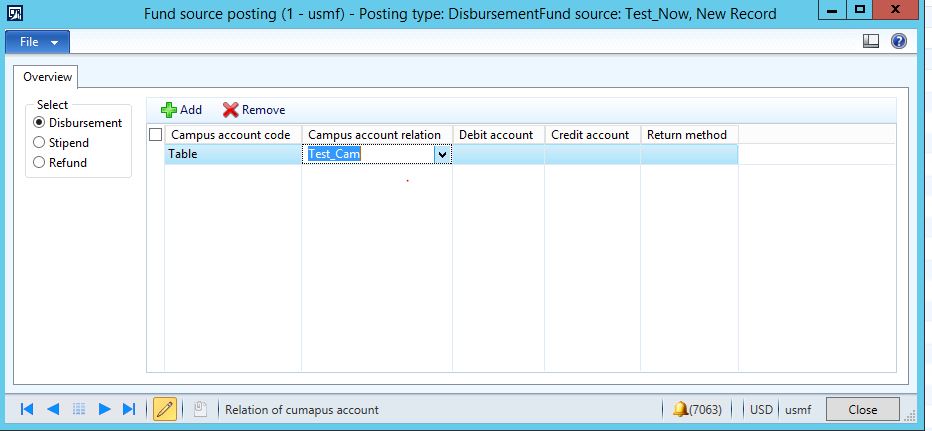
1832.Form.JPG

I have to fulfill the following condition:

a. If Debit is filled Credit field should become mandatory (Should not allow to close the form , which in turn save without filling Credit field)

b. If Credit is filled Debit field should become mandatory (Should not allow to close the form , which in turn save without filling Debit field)

c. If both(Debit and Credit) are left blank , should allow to save without any validation

I presume there are various way to achieve this. Please let me know both ways in form level and table level on how to write mandatory conditions. Any help will be appreciated

Regards,

Sourav

*This post is locked for comments

I have the same question (0)
  • Verified answer
    Martin Dráb Profile Picture
    239,451 Most Valuable Professional on at

    validateWrite() is the right method. If the same logic should run even if somebody uses the table in a different form (which seems likely), you should implement it on the tables. If it was logic specific to this particular form (and other forms could use the table differently), it should be implemented on the form datasource.

  • Saurav Profile Picture
    230 on at

    I wrote this code after i override Validatewrite method in the datasource:

    FundSourcePosting is the table LedgerDimensionDebit  and LedgerDimensionCredit are the field after super call..Not working .. Seems like i have to assign something on ret

    public boolean validateWrite()

    {

       boolean ret;

       ret = super();

       if(FundSourcePosting.LedgerDimensionDebit || FundSourcePosting.LedgerDimensionCredit)

       {

           FundSourcePosting_ds.object(fieldnum(FundSourcePosting,LedgerDimensionDebit)).mandatory(true);

           FundSourcePosting_ds.object(fieldnum(FundSourcePosting,LedgerDimensionCredit)).mandatory(true);

       }

       else

       {

            FundSourcePosting_ds.object(fieldnum(FundSourcePosting,LedgerDimensionDebit)).mandatory(false);

           FundSourcePosting_ds.object(fieldnum(FundSourcePosting,LedgerDimensionCredit)).mandatory(false);

       }

       return ret;

    }

    Could you clarify..

    Thanks

    Sourav

  • Verified answer
    Martin Dráb Profile Picture
    239,451 Most Valuable Professional on at

    You didn't get the purpose of validateWrite(). It decides whether the record can be saved or not - it returns true if the record can be saved and false if the data isn't correct. You code wouldn't meet your requirements that the record can't be saved and the form can't be closed.

    Your code should look like this (assuming that you put it on the table):

    public boolean validateWrite()
    {
        boolean ret = super();
    
        if (ret)
        {
            if ((this.LedgerDimensionDebit == 0) ^ (this.LedgerDimensionCredit == 0)
    	{
                ret = false;
            }
        }
    
        return ret;
    }
    

    You can also add the visual indication by setting form controls as mandatory, but the validation is much more important. It guarantees data consistency.

  • Saurav Profile Picture
    230 on at

    Hi Martin,

    This really worked. I have overriden the validateWrite method in table level as below:

    public boolean validateWrite()
    {
    boolean ret;

    ret = super();

    //Validation for Credit and Debit account in Fund source posting
    if (ret)
    {
    if ((this.LedgerDimensionDebit == 0) ^ (this.LedgerDimensionCredit == 0))
    {
    ret = false;
    checkFailed("@CMC1440");
    }

    }

    return ret;
    }

    Its working fine with the following message coming (Attached as infolog) on the form when i Click on Close button and the Cross button on the form.

    ALTF4.JPG

    However, when i press the key Alt+F4(Which is also a way to close the form)  , the validation message comes two times as below:

    ALTF4.JPG

    This was found by my QA while doing a scenario. I have debugged it and the code is iterating two times when i click on ALT+F4 . However its only once when i close the form by clicking on Close button or click the cross button on Form. Any suggestion

    Regards

    Sourav

  • Saurav Profile Picture
    230 on at

    Apolozise , the code in validatewrite is as below:

    public boolean validateWrite()

    {

       boolean ret;

       ret = super();

       //Validation for Credit and Debit account in Fund source posting

       if (ret)

       {

           if ((this.LedgerDimensionDebit == 0) ^ (this.LedgerDimensionCredit == 0))

           {

               ret = false;

               checkFailed("@CMC1440");

           }

       }


       return ret;

    }

    But the ALt+F4 button while closing the form has the same behavior, throwing the validation error message twice

  • Saurav Profile Picture
    230 on at

    Hi,

    Anybody who can respond to my above issue

  • Verified answer
    Martin Dráb Profile Picture
    239,451 Most Valuable Professional on at

    What's the call stack in those two cases?

    By the way, checkFailed() returns false, therefore you can simply write ret = checkFailed("@CMC1440"). It's why there is checkFailed() in addition to warning().

Under review

Thank you for your reply! To ensure a great experience for everyone, your content is awaiting approval by our Community Managers. Please check back later.

Helpful resources

Quick Links

Introducing the 2026 Season 1 community Super Users

Congratulations to our 2026 Super Stars!

Meet the Microsoft Dynamics 365 Contact Center Champions

We are thrilled to have these Champions in our Community!

Congratulations to the April Top 10 Community Leaders

These are the community rock stars!

Leaderboard > 🔒一 Microsoft Dynamics AX (Archived)

#1
CP04-islander Profile Picture

CP04-islander 39

#2
Michel ROY Profile Picture

Michel ROY 14

#3
imran ul haq Profile Picture

imran ul haq 8

Last 30 days Overall leaderboard

Featured topics

Product updates

Dynamics 365 release plans
