web
You’re offline. This is a read only version of the page.
close
Skip to main content

Announcements

News and Announcements icon
Community site session details

Community site session details

Session Id :
Small and medium business | Business Central, N...
Answered

Cannot Print Assembly Order

(0) ShareShare
ReportReport
Posted on by 245

Hi,

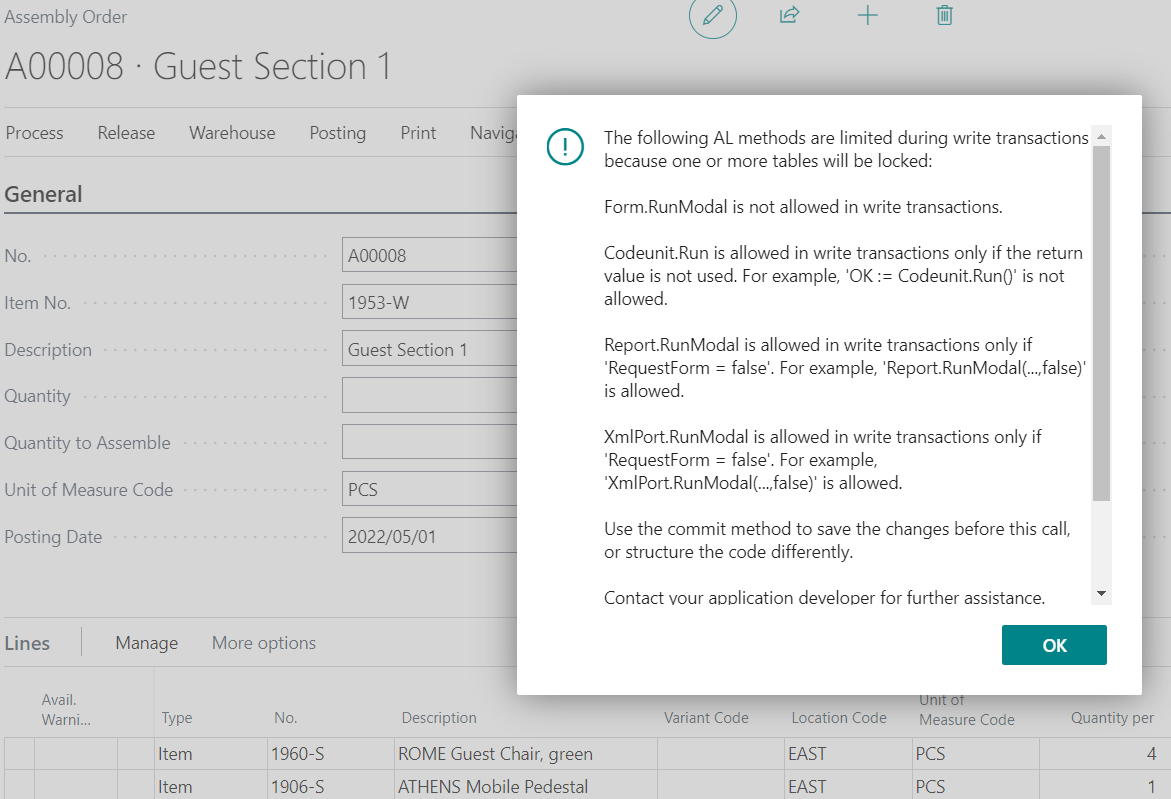
I am trying to print Assembly Order on BC v19.5. But the error below comes out and I cannot print Assembly Order.

Did I miss some setups? The company I am testing is CRONUS. I have no extension installed.
pastedimage1647510010826v1.png

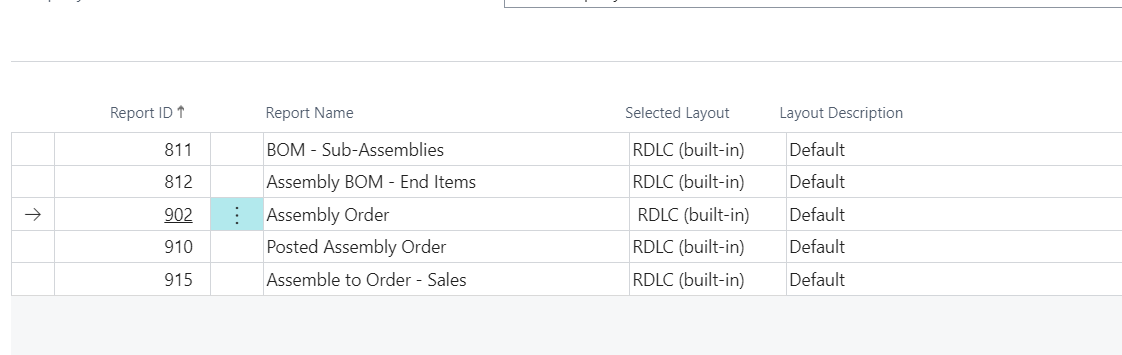
I can post Assembly Order and can print Posted Assembly Order. I checked the Report Layout Selection.
pastedimage1647510326477v2.png

On v19.4, I suppose Assembly Order could be printed.

Thank you.

I have the same question (0)
  • OliWall Profile Picture
    180 on at

    We are experiencing the same problem, looks the be an issue with 19.5

  • Suggested answer
    IB-29041624-0 Profile Picture
    1,191 Moderator on at

    I think you should raise a supportcase with Microsoft through your CSP partner around this issue.

  • robkaplan Profile Picture
    35 on at

    We are having same issue with our clients as well.  looks to be an issue in report selections function.  

  • Suggested answer
    MahGah Profile Picture
    15,613 on at

    Hi 

    I can confirm that this is the issue in 19.5 SaaS as well. 

  • robkaplan Profile Picture
    35 on at

    I just opened a support request with Microsoft.  Let's see what they say.

  • Suggested answer
    YUN ZHU Profile Picture
    102,925 Super User 2026 Season 2 on at

    Hi, just to add some info.

    I tested it in Version: W1 20.0 (Platform 20.0.36694.0 + Application 20.0.36751.0). The same issue.

    pastedimage1647560815107v2.png

    pastedimage1647560800176v1.png

  • Verified answer
    robkaplan Profile Picture
    35 on at

    I heard back from Microsoft, see below:

    The issue was reported yesterday in Europe and Development immediately began working on a correction due to the high impact and multiple tenants already impacted by the issue.  It is an issue that stems from an issue with the 19.5 release. The Hotfix was completed and has been currently released into the pipeline as of the morning, so the deployment process for all tenants has already begun. However, it may take from to 2-4 days for all rollouts to complete.  The Build Number for Hotfix Correction is 19.5.36567.37664.  As soon as you see this build (or higher) build on the Extension Management page for Base Application extension, then the problem should be resolved.    

    In the meantime, you can have users go to report layout selection, find the report for assembly order, base is 902, and run the report.

  • yohi2020 Profile Picture
    245 on at

    Thank you guys!

    Now Assembly Order can be printed.

    pastedimage1647662976607v1.pngpastedimage1647662994617v2.png

Under review

Thank you for your reply! To ensure a great experience for everyone, your content is awaiting approval by our Community Managers. Please check back later.

Helpful resources

Quick Links

Season of Sharing Community Challenge Winners!

Congratulations to our community stars!

Women in Power Builds Momentum

Expanding mentorship, skilling, and AI innovation

Congratulations to the July Top 10 Community Leaders

These are the community rock stars!

Leaderboard > Small and medium business | Business Central, NAV, RMS

#1
OussamaSabbouh Profile Picture

OussamaSabbouh 572 Super User 2026 Season 2

#2
YUN ZHU Profile Picture

YUN ZHU 331 Super User 2026 Season 2

#3
Grigorios Mavrogeorgis Profile Picture

Grigorios Mavrogeorgis 330 Super User 2026 Season 2

Last 30 days Overall leaderboard

Featured topics

Microsoft Training Manuals

Product updates

Dynamics 365 release plans
