web
You’re offline. This is a read only version of the page.
close
Skip to main content

Notifications

Announcements

No record found.

Community site session details

Community site session details

Session Id :
Small and medium business | Business Central, N...
Answered

Prepayment status update only daily

(0) ShareShare
ReportReport
Posted on by 3,263

Hi All,

When creating prepayments - say purchase order, status changes to pending prepayment.  Once the actual payment is made status does not update till next day, by a scheduler.  Is it possible to get the system to change status immediately?

Thanks

I have the same question (0)
  • Suggested answer
    JAngle Profile Picture
    133 on at

    The prepayment mgt. codeunit just creates a job queue entry for codeunit Upd. Pending Prepmt. Purchase so you could have an entry on the job queue recurring. The function in the prepayment mgt. codeunit is a global but not event sub exists.

  • Suggested answer
    Vanessa Garcia Profile Picture
    on at

    Hello Samantha73,

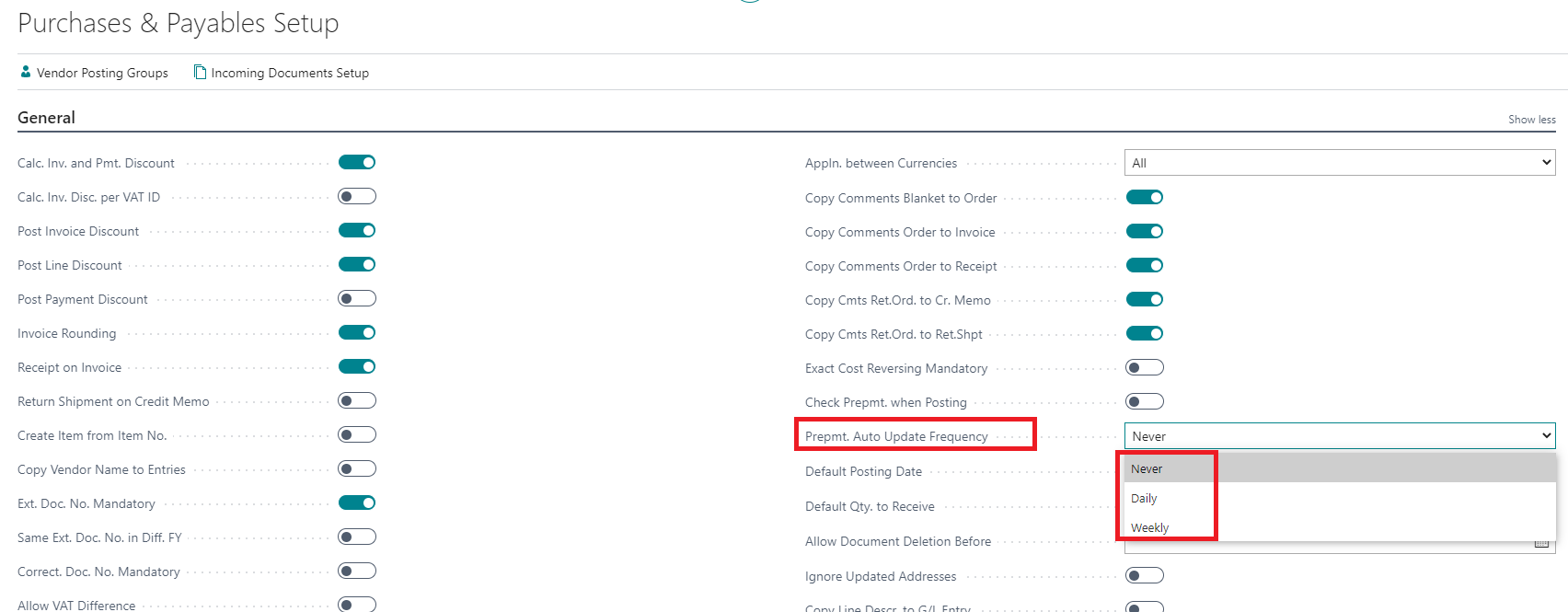
    There is a field in Purchases & Payables Setup (same for Sales) to control this: "Prepmt. Auto Update Frequency", but unfortunately it contains fixed values to: Never, Daily, Weekly
    pastedimage1614926930096v1.png

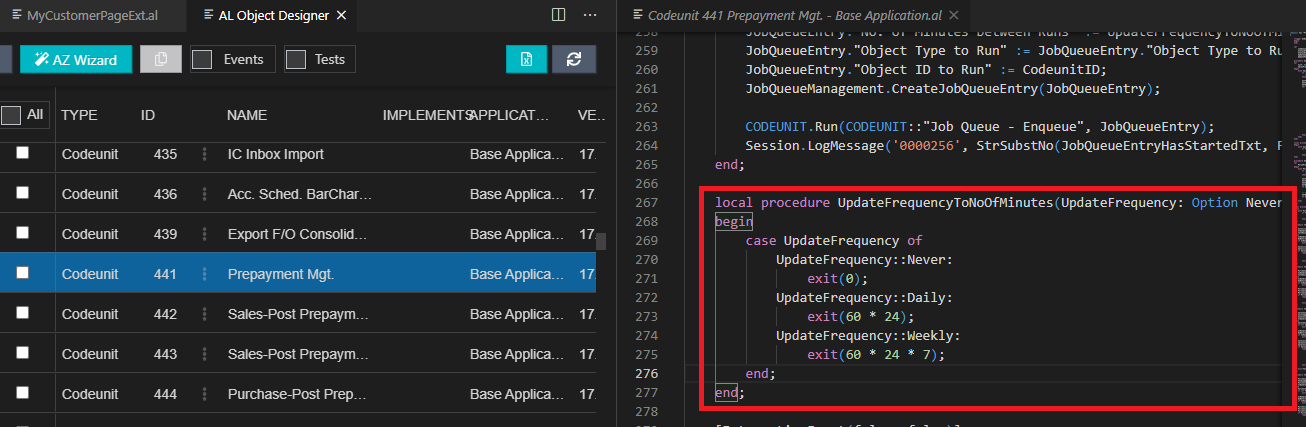
    I guess this could be achieved with a customization by adding a new option to that field in setup and checking the function UpdateFrequencyToNoOfMinutes in Codeunit 441 Prepayment Mgt., and all the references to UpdateFrequency in other functions like CreateAndStartJobQueueEntry, etc.
    pastedimage1614927470696v2.png

    I hope it helps,

  • Vanessa Garcia Profile Picture
    on at

    You are right, so to achieve this, then a new event sub could also be required via GitHub.

    Or ask Microsoft via IDEAS to add this possibility.

    Thanks :)

  • Verified answer
    Community Member Profile Picture
    on at

    Samantha,

    Adding to the replies above, in the Job Queue you can add one related too Codeunit 384 and set the run time to every minute or so. See my setup below:

    pastedimage1614951045446v1.png pastedimage1614951109297v2.png

    Hope this helps.

    Thanks,

    Steve

  • Samantha73 Profile Picture
    3,263 on at

    Awesome..this is the easiest solution without any coding. I cannot seem to figure out why anyone doesn't want to instantaneously update prepayment status so cannot explain the logic around default system settings but for now its fixed

Under review

Thank you for your reply! To ensure a great experience for everyone, your content is awaiting approval by our Community Managers. Please check back later.

Helpful resources

Quick Links

Responsible AI policies

As AI tools become more common, we’re introducing a Responsible AI Use…

Neeraj Kumar – Community Spotlight

We are honored to recognize Neeraj Kumar as our Community Spotlight honoree for…

Leaderboard > Small and medium business | Business Central, NAV, RMS

#1
OussamaSabbouh Profile Picture

OussamaSabbouh 1,775

#2
Khushbu Rajvi. Profile Picture

Khushbu Rajvi. 745 Super User 2025 Season 2

#3
YUN ZHU Profile Picture

YUN ZHU 538 Super User 2025 Season 2

Last 30 days Overall leaderboard

Featured topics

Product updates

Dynamics 365 release plans
