web
You’re offline. This is a read only version of the page.
close
Skip to main content

Notifications

Announcements

No record found.

Community site session details

Community site session details

Session Id :
Finance | Project Operations, Human Resources, ...
Answered

SalesTax(VAT) after importing Open Purchase Orders

(0) ShareShare
ReportReport
Posted on by 46

Hi all,

I have been following this tutorial for importing open orders into AX 2012 which I found here in this forum.

And from our old Axapta3.0 system I have managed to import all open Purchase Orders (PO) by only importing the Saleslines RemainPurchPhysical quantity. I dont know if the smartest way when change from one systems to another but This is what I have so far:) 

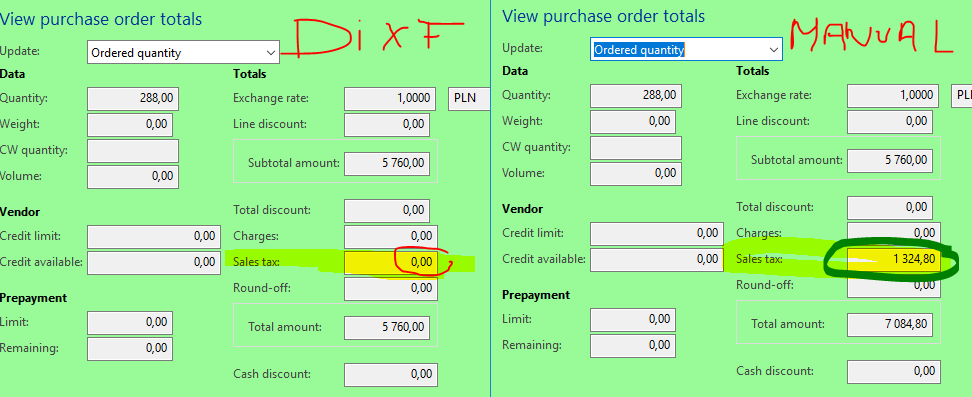
The problem I am facing right now is that when PO headers and PO Lines are already into AX2012 the Sales Taxes(VAT in my case) are not reflected in the totals when the suppliers are in the domestic suppliers group. Not even by posting PO confirmation. 

I already tried making the same sales order manually with same items and supplier and it works fine. but not when doing import from DIXF.
pastedimage1604567521234v1.png

You help as always is greatly appreciated

thanks a lot in advance

I have the same question (0)
  • Verified answer
    Ludwig Reinhard Profile Picture
    Microsoft Employee on at

    Hi,

    Did you import your sales tax groups and item sales tax group that are related to your PO lines together with the other information that you imported?

    If this is the case then I would expect that the sales tax is calculated.

    Best regards,

    Ludwig

  • Suggested answer
    Ludwig Reinhard Profile Picture
    Microsoft Employee on at

    Hello Nestor C.,

    Have you been able to test the import with the sales tax groups/item sales tax groups?

    Did that fix your issue?

    Would be great if you could keep us updated on whether some additional help is still needed.

    Many thanks and best regards,

    Ludwig

  • CBNestor Profile Picture
    46 on at

    Hi Luwig,

    I have been fighting a little bit with it, thats why I did not confirm the solution. But I have found the way out (kinda).

    You were 100% completely right. I have added the ->TaxGroup & TaxItemGroup as you suggested and now the taxes are working perfectly :).

    One thing that is still missing in the tutorial is that for the Product masters it is neccesary to import the Dimension of the product. otherwise the error log will show somthing like "Inventory dimension Color. is a product dimension and must consequently be specified." or "The Color ## has not been assigned to the product #####'

    Thanks a lot for your help!

Under review

Thank you for your reply! To ensure a great experience for everyone, your content is awaiting approval by our Community Managers. Please check back later.

Helpful resources

Quick Links

Responsible AI policies

As AI tools become more common, we’re introducing a Responsible AI Use…

Neeraj Kumar – Community Spotlight

We are honored to recognize Neeraj Kumar as our Community Spotlight honoree for…

Leaderboard > Finance | Project Operations, Human Resources, AX, GP, SL

#1
Martin Dráb Profile Picture

Martin Dráb 704 Most Valuable Professional

#2
André Arnaud de Calavon Profile Picture

André Arnaud de Cal... 570 Super User 2025 Season 2

#3
BillurSamdancioglu Profile Picture

BillurSamdancioglu 408 Most Valuable Professional

Last 30 days Overall leaderboard

Product updates

Dynamics 365 release plans
