web
You’re offline. This is a read only version of the page.
close
Skip to main content

Notifications

Announcements

Community site session details

Community site session details

Session Id :
Small and medium business | Business Central, N...
Suggested Answer

If I don't ship directly to the customer, a dropship order, but rather the vendor does, should item be "Inventory" or "Non Inventory"?

(0) ShareShare
ReportReport
Posted on by 81

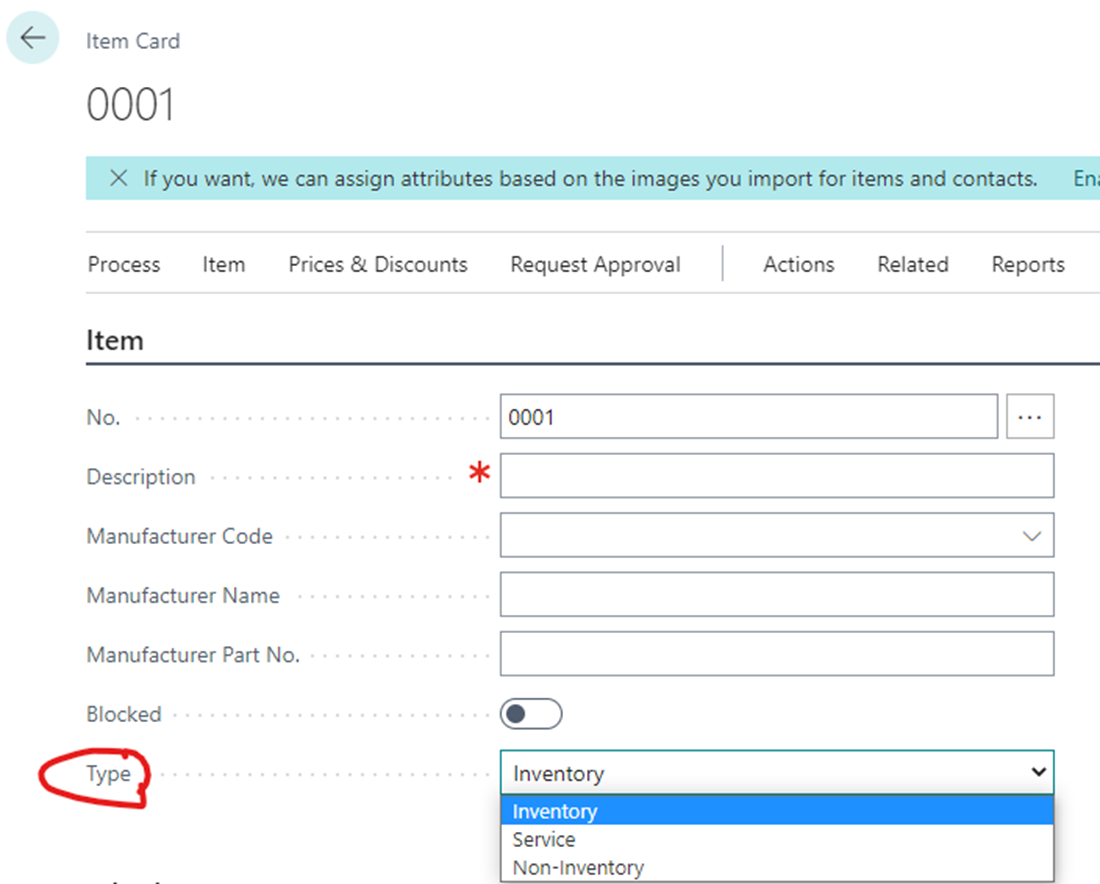
If I don't carry the items in my inventory(marked as drop shipped), it seems obvious to select the type as Non-Inventory, but for some reason, I was told to mark them as type "Inventory". Why? pastedimage1663968899209v2.png
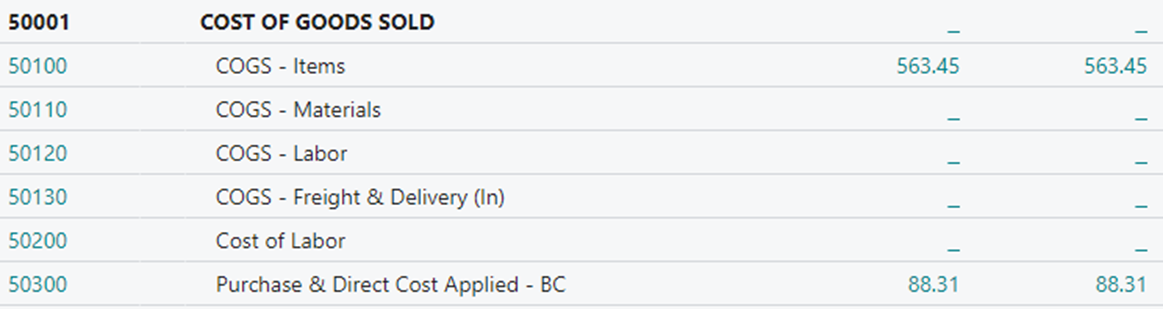
Also, in the chart of accounts, my inventory goes down negative, which is to be expected as I don't have inventory for my item, when I post the sales invoice, and once the purchase invoice is posted, it goes back to 0. Which reflects a change in COGS(Items), which is what I need it to do, but that is ONLY WHEN THE item is marked as type "Inventory", when I change the type to "Non-Inventory", there is no change in COGS(Items).
pastedimage1663969685549v3.png

50100 has an Item as type "Inventory"

50300 has an Item as type "Non-Inventory", but I would like it to reflect as COGS - Items as it seems right to be reflected there.

I have the same question (0)
  • Suggested answer
    Elle123 Profile Picture
    10 on at

    Can you please elaborate on it?

    As per the above discussion, I feel the item should be marked as non-inventory. But the issue is with COGS.

  • Suggested answer
    JAngle Profile Picture
    135 on at

    Held or not it is physical goods making it’s way to a customer. Non-inventory has a true use case in manufacturing. Dropship makes the postings so seamless and above all how you want to reflect the books

  • tshannon Profile Picture
    55 on at

    I believe setting the item as "Inventory" is what allows BC to leverage the interim COGS accounts to accrue the cost at the same time as the revenue upon posting of the sales invoice.  We do quite a bit of drop ship, and our drop ship items are all set to Inventory.  It's been a couple years since we set it all up, but I'm pretty sure that's the reason.  

  • Suggested answer
    Amit Baru Profile Picture
    3,037 on at

    hi,

    It should be inventory. Because In drop shipment case. When you create sales order, system automatically create purchase order. And when you receive the Purchase order, then system auto ship the order from the Purchase receipt location. So in drop shipment case Item type must be Inventory.

    Regards

    Amit Sharma

    www.erpconsultors.com

  • Suggested answer
    Dallefeld Profile Picture
    211 User Group Leader on at

    I agree with everyone here, your item should be inventory. You can enhance functionality but entering a Purchasing Code on the item card for Drop Ship so that this automatically populates on your sales and purchase orders.

  • Elle123 Profile Picture
    10 on at

    I think it should be inventory. Anyways I hope these forums, posts can guide you better. Please refer them.

    Links:

    intuit forum

    Oracle forum

    dropship code

    accountingseed forum

Under review

Thank you for your reply! To ensure a great experience for everyone, your content is awaiting approval by our Community Managers. Please check back later.

Helpful resources

News and Announcements

Season of Giving Solutions is Here!

Quick Links

Responsible AI policies

As AI tools become more common, we’re introducing a Responsible AI Use…

Neeraj Kumar – Community Spotlight

We are honored to recognize Neeraj Kumar as our Community Spotlight honoree for…

Leaderboard > Small and medium business | Business Central, NAV, RMS

#1
OussamaSabbouh Profile Picture

OussamaSabbouh 1,651

#2
Khushbu Rajvi. Profile Picture

Khushbu Rajvi. 808 Super User 2025 Season 2

#3
YUN ZHU Profile Picture

YUN ZHU 718 Super User 2025 Season 2

Last 30 days Overall leaderboard

Featured topics

Product updates

Dynamics 365 release plans
