web
You’re offline. This is a read only version of the page.
close
Skip to main content

Notifications

Announcements

No record found.

Community site session details

Community site session details

Session Id :
Finance | Project Operations, Human Resources, ...
Answered

How to create a recurring data job for a Data Management export to BYOD

(0) ShareShare
ReportReport
Posted on by 5

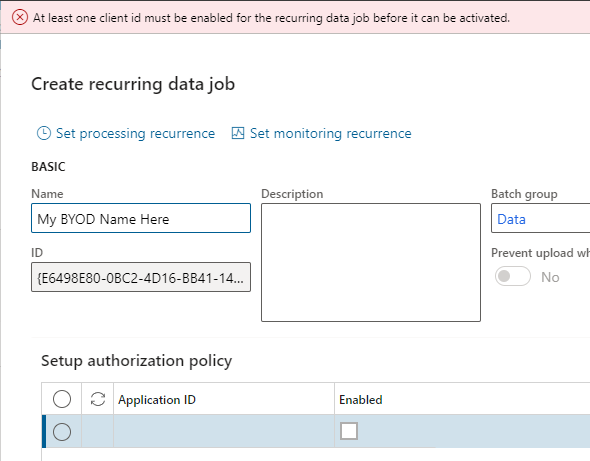
Using D365 F&O, I created a Data Management project that exports Data Entities successfully to my BYOD database when I manually click the Export button.  However, I need to run this on a daily schedule.  So, I click on "Create recurring data job", provide the relevant information and click OK.  I get an error message "At least one client id must be enabled for the recurring data job before it can be activated."

Some posts in this forum suggest that maybe the Application ID is required and that is the cause of this error message.  I'm not sure why this would be the case if I can run it manually, or how to generate an Application ID for an export that isn't really using an application, only a database.

Please help.  Thanks.
pastedimage1664490485685v1.png

I have the same question (0)
  • Verified answer
    Alireza Eshaghzadeh Profile Picture
    14,679 Super User 2025 Season 2 on at

    Hi jallred,

    When you create a export data project, set 'Target data format' to the AzureSQLDB. You can activate 'Export across all companies' to export data for all companies.

    pastedimage1664522798989v1.png

    Then click on Export options > Export in batch and create a recurrence. 

    pastedimage1664522887936v2.png

    pastedimage1664522994064v3.png

  • Suggested answer
    Alireza Eshaghzadeh Profile Picture
    14,679 Super User 2025 Season 2 on at

    Regarding creating recurring data job (the screenshot that you have attached), you need to add the application ID of the app registration. Ref. to my previous feedback, you can apply batch job to export data to AzureSQLDB.

Under review

Thank you for your reply! To ensure a great experience for everyone, your content is awaiting approval by our Community Managers. Please check back later.

Helpful resources

Quick Links

Responsible AI policies

As AI tools become more common, we’re introducing a Responsible AI Use…

Neeraj Kumar – Community Spotlight

We are honored to recognize Neeraj Kumar as our Community Spotlight honoree for…

Leaderboard > Finance | Project Operations, Human Resources, AX, GP, SL

#1
Martin Dráb Profile Picture

Martin Dráb 646 Most Valuable Professional

#2
André Arnaud de Calavon Profile Picture

André Arnaud de Cal... 529 Super User 2025 Season 2

#3
Sohaib Cheema Profile Picture

Sohaib Cheema 285 User Group Leader

Last 30 days Overall leaderboard

Product updates

Dynamics 365 release plans


