web
You’re offline. This is a read only version of the page.
close
Skip to main content

Notifications

Announcements

No record found.

Community site session details

Community site session details

Session Id :
Microsoft Dynamics CRM (Archived)

Make a Timestamp when single field is modified

(0) ShareShare
ReportReport
Posted on by

I want to add a 'modified on' date field for some custom fields. I want it to record the last date a specific field was altered and saved.

I tried using a business rule but it didn't work how I wanted. It just shows the current date. I want the time to only reflect the date it got modified, and remains that date until the field is modified again. A timestamp like what's on the notes section would be good. I just need the date not time. 

I used this as my business rule:
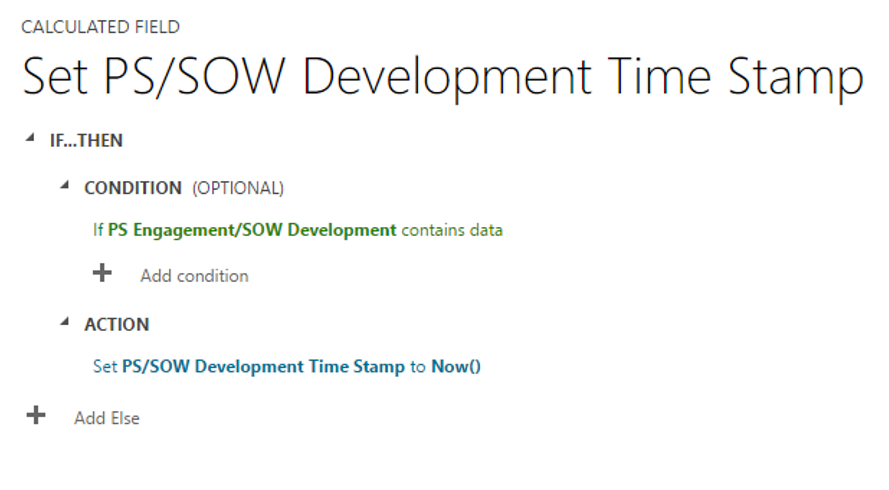
timestamp1.png

Does anyone know how to do this? would it be a workflow? is there a step by step tutorial somewhere, I'm not sure how to enter a date variable into it. A date based on the current date, but not keep changing as days pass.

Thanks

*This post is locked for comments

I have the same question (0)
  • Verified answer
    Drew Poggemann Profile Picture
    4 on at

    Hi Cynthia, have you looked at turning on auditing for the fields you are looking at?  This will track the history of changes for the fields you want to track with prior and new values along with time stamp.

    crmbook.powerobjects.com/.../auditing-in-microsoft-dynamics-crm

    Thanks,

  • Suggested answer
    Gary Letter Profile Picture
    1,267 on at

    You could record the date using a workflow:

    1. Create your custom "Field_x Modified On" fields as Date fields.

    2. Create a background workflow that runs on the entity. A change to Field_x will be the trigger to start the workflow. Create an Update step to set "Field_x Modified On" to Local Values: Process/Execution Time.

    The date will be updated each time the field is changed and will remain static until the next field change.

    You will need to do this for each field where you want to track the "Modified On" date. This method has the advantage of displaying the date on the form and making it available for Advanced Finds and reports.

  • Suggested answer
    PS Profile Picture
    23,577 on at

    Change the format of your new field 'PS/SOW Development Time Stamp' to date only

    3301.3.PNG

  • Community Member Profile Picture
    on at

    Thanks, I may try this method if the client feels like the audit history view isn't sufficient. I was trying to go for something like this with a time stamp field, but it was crowding my form layout as well, possibly leading to confusing the sales person entering info.

Under review

Thank you for your reply! To ensure a great experience for everyone, your content is awaiting approval by our Community Managers. Please check back later.

Helpful resources

Quick Links

Responsible AI policies

As AI tools become more common, we’re introducing a Responsible AI Use…

Neeraj Kumar – Community Spotlight

We are honored to recognize Neeraj Kumar as our Community Spotlight honoree for…

Leaderboard > 🔒一 Microsoft Dynamics CRM (Archived)

#1
SA-08121319-0 Profile Picture

SA-08121319-0 4

#1
Calum MacFarlane Profile Picture

Calum MacFarlane 4

#3
Alex Fun Wei Jie Profile Picture

Alex Fun Wei Jie 2

Last 30 days Overall leaderboard

Featured topics

Product updates

Dynamics 365 release plans



