web
You’re offline. This is a read only version of the page.
close
Skip to main content

Announcements

No record found.

News and Announcements icon
Community site session details

Community site session details

Session Id :
Microsoft Dynamics AX (Archived)

Purchase Order Workflow

(0) ShareShare
ReportReport
Posted on by 2,487

I have a basic PO workflow that first checks the orderer, and based on the orderer, submits the PO for approval to a user group.

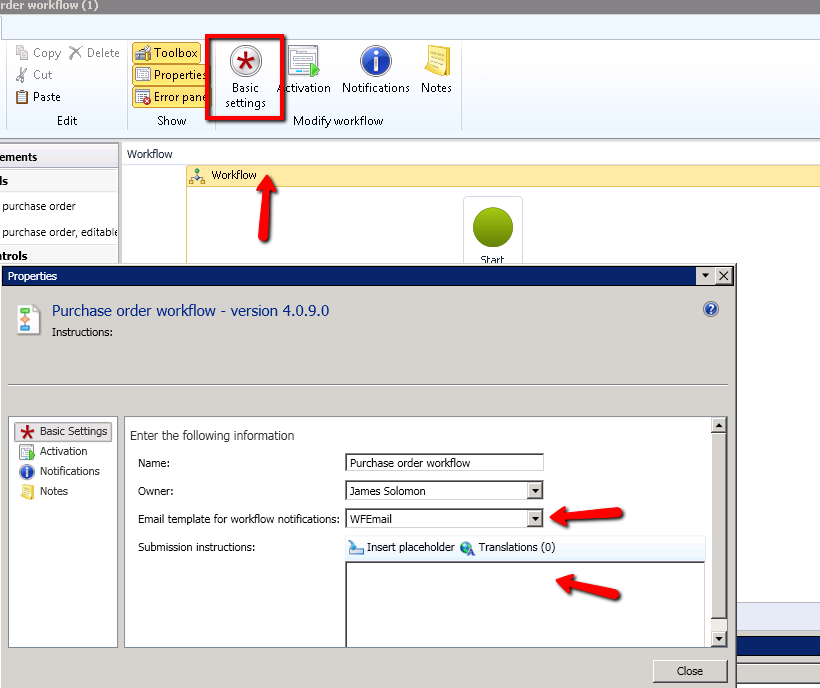
I have setup an email template with the subject %subject% and the body referencing %message%:
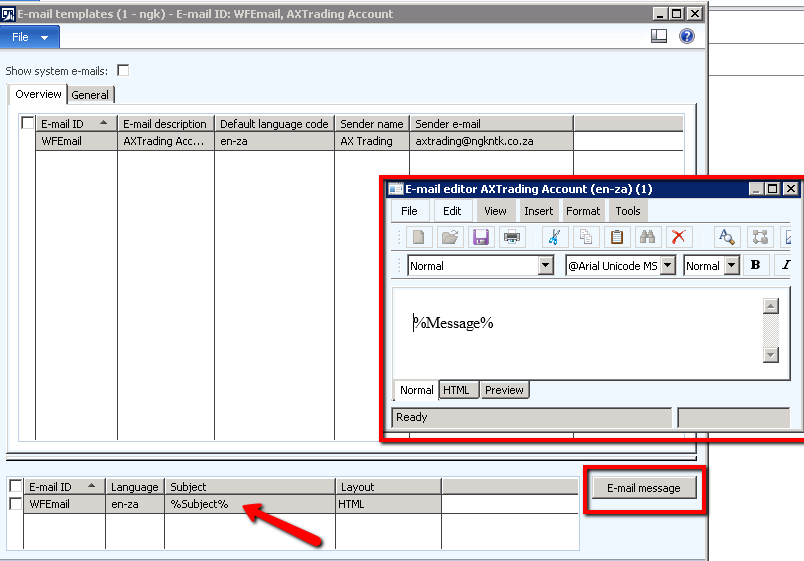
2017_2D00_06_2D00_12_5F00_1655.png

My workflow is setup as such:

2017_2D00_06_2D00_12_5F00_1657.png

2017_2D00_06_2D00_12_5F00_1658.png

2017_2D00_06_2D00_12_5F00_1658_5F00_001.png

2017_2D00_06_2D00_12_5F00_1659.png

In short, I would like to setup 1 approval message (i.e. "Please Approve PO# 13455")

and 1 rejection email (i.e. "Your PO# 12311 was rejected")

can anyone assist?

*This post is locked for comments

I have the same question (0)
  • Khaled Alloud Profile Picture
    3,658 on at

    Dear James,

    What i can see from the above is that you are doing a good job defining the workflow.

    Can you please share with the result from the above? what stage you are in now?

    When the PO is submitted is an email generated to the recipient?

    regards,

  • SU-22040800-0 Profile Picture
    2,487 on at

    Hi Kaled

    Thanks for the reply.

    Yes, I'm receiving an email based on the last screen shot ("Step 1"), but nothing else.

    Is there something I'm missing?

  • Suggested answer
    Khaled Alloud Profile Picture
    3,658 on at

    Please check this:

    Please approve, PO number: "%Purchase orders.PurchId%", For Vendor: "%Purchase orders.InvoiceAccount%" with Amount: "%Purchase orders.Invoice amount% L.L.", For Department: "%PurchTable.PurchLine.HcmWorker.HcmPositionWorkerAssignment.HcmPositionDetail.DirOrganizationName.Name%" ,Requested By: "%Purchase orders.Requester%"

    take the needed fields.

    Hope this helps.

  • SU-22040800-0 Profile Picture
    2,487 on at

    Hi Kaled

    After some testing I think I have narrowed down the confusion. Just confirm that I am correct in the below:

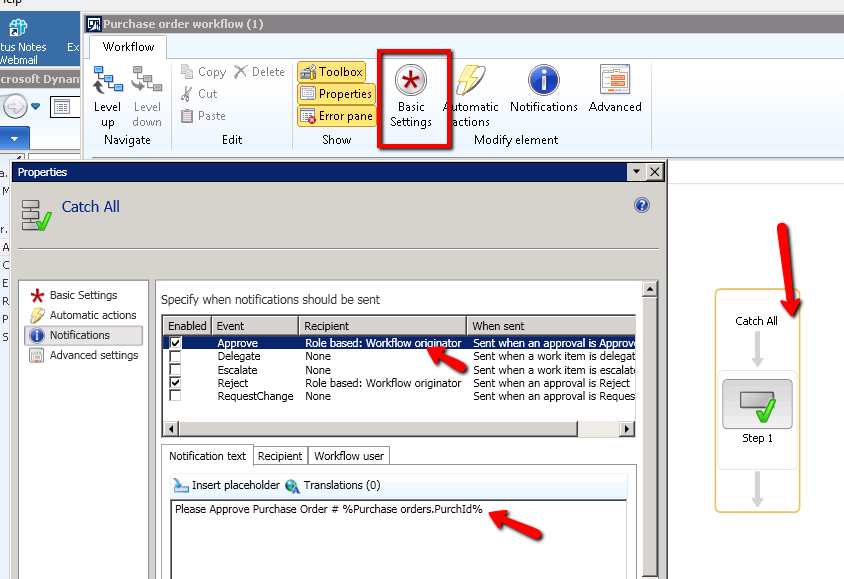
    I am working on the 'Catch All' approval step in the screen shot below:

    3364.8.png

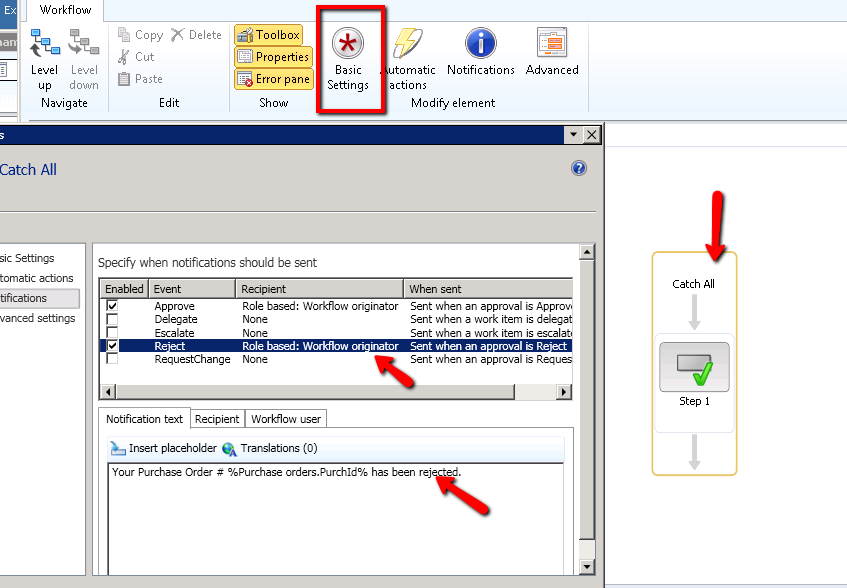
    When I edit the 'Catch All' approval, I can edit the notification/message. This is for the a notification to be sent to the workflow originator, notifying them that the PO has been approved/rejected. This notification is NOT meant for the approver. Am I correct?

    2703.2.png

    1145.3.png

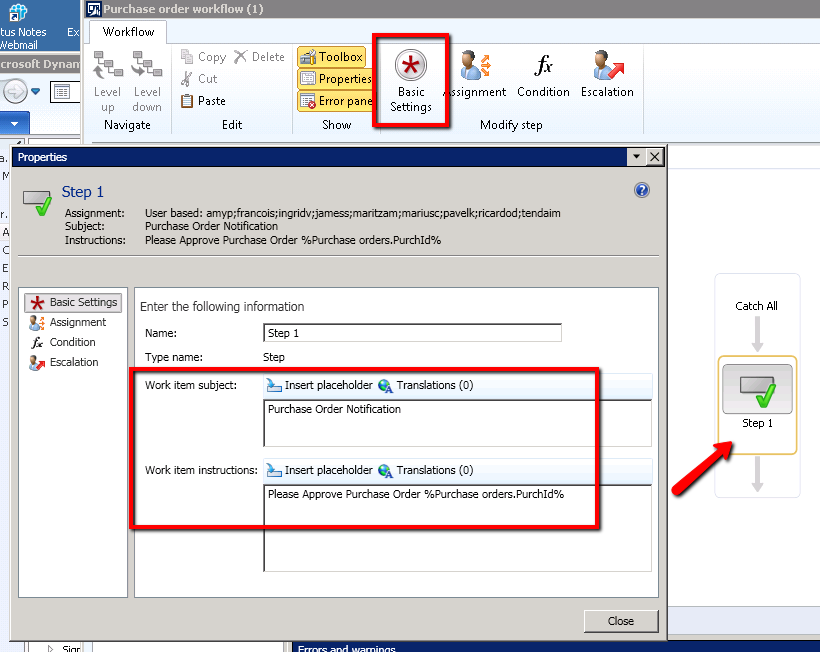
    When I drill down to the actual STEP, and open the settings:

    4760.4.png

    These notifications are specifically for the APPROVER. Am I correct?

    7573.5.png

    I have setup my template as follows:

    6835.6.png

    The APPROVER receives an email 100%:

    0640.7.png

    The PO is then rejected, and the below emails are sent:

    3364.8.png

    Can I not have the below email sent??

    3364.9.png

    Then after the re-submitting, a new email is sent to the approver (as above), and once it's approved, a confirmation of approval is sent to the originator.


    So I think (besides the double rejection email), all in the above is correct..?

  • Khaled Alloud Profile Picture
    3,658 on at

    I need to get back to you tomorrow hopefully, in this time try to test it.

  • SU-22040800-0 Profile Picture
    2,487 on at

    Thanks

  • Khaled Alloud Profile Picture
    3,658 on at

    Dear James,

    I have the above quickly, and i didn't find anything to comment on. Note that we use another setup for the workflow hence cannot really validate the above without testing.

    Best :)

Under review

Thank you for your reply! To ensure a great experience for everyone, your content is awaiting approval by our Community Managers. Please check back later.

Helpful resources

Quick Links

Introducing the 2026 Season 1 community Super Users

Congratulations to our 2026 Super Stars!

Meet the Microsoft Dynamics 365 Contact Center Champions

We are thrilled to have these Champions in our Community!

Congratulations to the April Top 10 Community Leaders

These are the community rock stars!

Leaderboard > 🔒一 Microsoft Dynamics AX (Archived)

#1
CP04-islander Profile Picture

CP04-islander 24

#2
Michel ROY Profile Picture

Michel ROY 14

#3
Jagadabi Profile Picture

Jagadabi 6

Last 30 days Overall leaderboard

Featured topics

Product updates

Dynamics 365 release plans