web
You’re offline. This is a read only version of the page.
close
Skip to main content

Announcements

No record found.

News and Announcements icon
Community site session details

Community site session details

Session Id :
Customer experience | Sales, Customer Insights,...
Suggested Answer

LinkedIn Lead Gen - Form submissions

(0) ShareShare
ReportReport
Posted on by 30

Hi all,

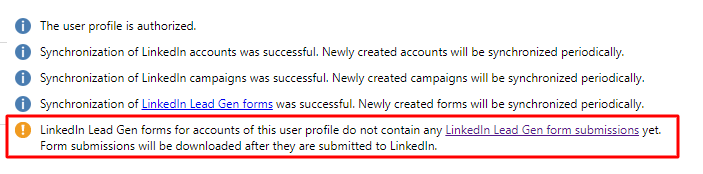
I linked my LinkedIn account to Dynamics Marketing some time ago, but when I click on my account I get the following warning.
pastedimage1660570448629v1.png

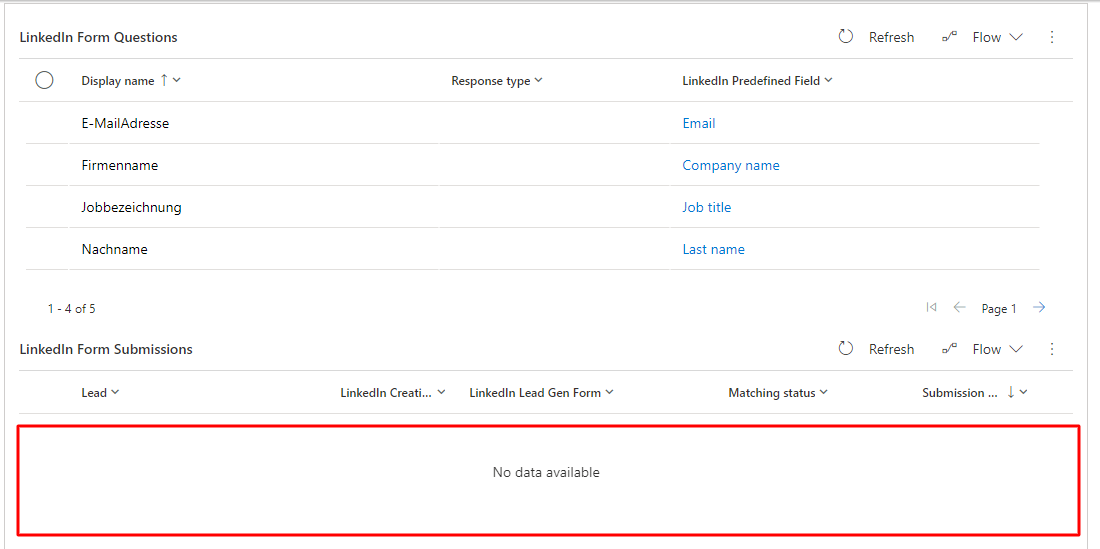
I have to manually enter the newly acquired contacts into the system every time. Unfortunately, when I look at my active forms, I don't see any leads/contacts under linked in form submission. Does anyone have an idea where my error lies?
pastedimage1660570549197v2.png

Thanks in advance for your help.

I have the same question (0)
  • Susanne Sauer Profile Picture
    45 on at

    Hi - have you checked (on LinkedIn in the campaign manager) if there are any leads that have been submitted yet?

    As far as I understand the message only says that there have not been any submissions yet but when there are, they will be linked. 

    Regards, Susanne

  • Suggested answer
    Community Member Profile Picture
    on at

    Hi maximeroessle,

     You can try to sync it:

    1. Navigate to the LinkedIn Lead Gen menu, and click User profiles.

    2. Click Reset Synchronization to re-sync all accounts, campaigns, forms, and form submissions for your LinkedIn account.

    3. Click the name of your edited form to confirm that Dynamics shows the most recently updated questions or fields.
  • maximeroessle Profile Picture
    30 on at

    Hi all,

    yes I checked on LinkedIn in the campaign manager and there are also some leads. Only unfortunately I can't sync them in Dynamics Marketing. Currently I have to add them all manually via an excel file.

    @Leah Ju I've tried that as well, but to no avail. It loads a bit and gives me the same error message.

    Does anyone have any other ideas where the error might be?

Under review

Thank you for your reply! To ensure a great experience for everyone, your content is awaiting approval by our Community Managers. Please check back later.

Helpful resources

Quick Links

Introducing the 2026 Season 1 community Super Users

Congratulations to our 2026 Super Stars!

Congratulations to our 2025 Community Spotlights

Thanks to all of our 2025 Community Spotlight stars!

Leaderboard > Customer experience | Sales, Customer Insights, CRM

#1
ManoVerse Profile Picture

ManoVerse 164 Super User 2026 Season 1

#2
Jimmy Passeti Profile Picture

Jimmy Passeti 51 Most Valuable Professional

#3
NeerajPawar Profile Picture

NeerajPawar 42

Last 30 days Overall leaderboard

Product updates

Dynamics 365 release plans
