web
You’re offline. This is a read only version of the page.
close
Skip to main content

Announcements

No record found.

News and Announcements icon
Community site session details

Community site session details

Session Id :
Microsoft Dynamics AX (Archived)

Insufficient quantity when activating shipment. Output orders being created for S/O lines that have InventTrans record with location assigned. How to clean-up?

(0) ShareShare
ReportReport
Posted on by 847

Symptom:  When we try to activate a shipment, AX stops the activation process with a notice about some items not having sufficient quantity on hand to reserve.

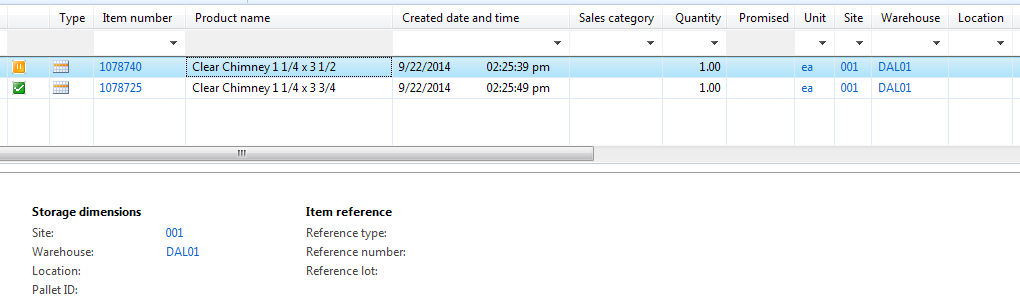
Problem: The items in question show a location assigned in the InventTrans record.  This InventTrans records are included in the picking list generation process, which creates output orders that are assigned to shipments.  Conversely, there are InventTrans records for the same Item ID that do not have a location assigned (just a warehouse), and those records do not trigger Output orders to be created, which is correct.

Question: How do we clean-up the InventTrans records with Issue status "Open order" and have a location already assigned?  The end result that we need is for the InventTrans record to show just a Warehouse (no Location).  We have a large number of records in this state, so cleaning it up one by one is not very feasible.

4431.Example1.png

7144.Example2.png

Note: So far my only idea is to collect a list of InventTrans RecIds in this state for this particular warehouse, and then create an X++ job to update the InventDimId field.

I look forward to better the suggestions from the community.  Thanks in advance.

*This post is locked for comments

I have the same question (0)
  • Daniel Zook Profile Picture
    847 on at

    Here is the X++ job I wrote in the test environment.  I tested it for a single item and it appears to do the trick.

    Let me know what you think.

    static void CleanupInventTransOpenOrderHasDal_In_01(Args _args)

    {

       InventTrans inventTrans;

       ;

       ttsBegin;

       update_recordSet inventTrans

           setting InventDimId = 'LHA-007451'

           where inventTrans.inventDimId == 'IDN-002168'

           && inventTrans.StatusIssue == StatusIssue::OnOrder;

       ttsCommit;

       info(strFmt('Number of records updated: %1', inventTrans.RowCount()));

    }

  • Verified answer
    Daniel Zook Profile Picture
    847 on at

    Updated script to only modify sales transaction records:

    static void CleanupInventTransOpenOrderHasDal_In_01(Args _args)

    {

       InventTrans         inventTrans;

       InventTransOrigin   inventTransOrigin;

       ;

       ttsBegin;

       update_recordSet inventTrans

           setting InventDimId = 'LHA-007451'

           join inventTransOrigin

           where inventTrans.InventTransOrigin == inventTransOrigin.RecId

           && inventTrans.inventDimId == 'IDN-002168'

           && inventTrans.StatusIssue == StatusIssue::OnOrder

           && inventTransOrigin.ReferenceCategory == InventTransType::Sales

           ;

       ttsCommit;

       info(strFmt('Number of records updated: %1', inventTrans.RowCount()));

    }

Under review

Thank you for your reply! To ensure a great experience for everyone, your content is awaiting approval by our Community Managers. Please check back later.

Helpful resources

Quick Links

Introducing the 2026 Season 1 community Super Users

Congratulations to our 2026 Super Stars!

Congratulations to our 2025 Community Spotlights

Thanks to all of our 2025 Community Spotlight stars!

Leaderboard > 🔒一 Microsoft Dynamics AX (Archived)

#1
Joris dG Profile Picture

Joris dG 5

#2
Alexey Lekanov Profile Picture

Alexey Lekanov 2

#2
Henrik Nordlöf Profile Picture

Henrik Nordlöf 2 User Group Leader

Last 30 days Overall leaderboard

Featured topics

Product updates

Dynamics 365 release plans
