web
You’re offline. This is a read only version of the page.
close
Skip to main content

Announcements

No record found.

News and Announcements icon
Community site session details

Community site session details

Session Id :
Finance | Project Operations, Human Resources, ...
Answered

query can use views but i can't get grouped and aggregate value

(0) ShareShare
ReportReport
Posted on by

Hi,

I created a query, I had used that query in a form it's showing correctly, but when I used in views it's showing not as expected,(grouped and aggregate function are not working).

this query structure
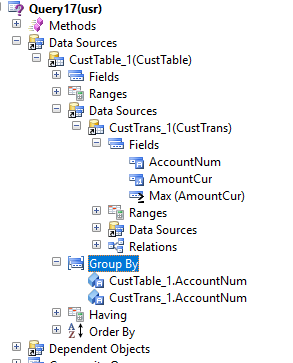
8078.query.PNG

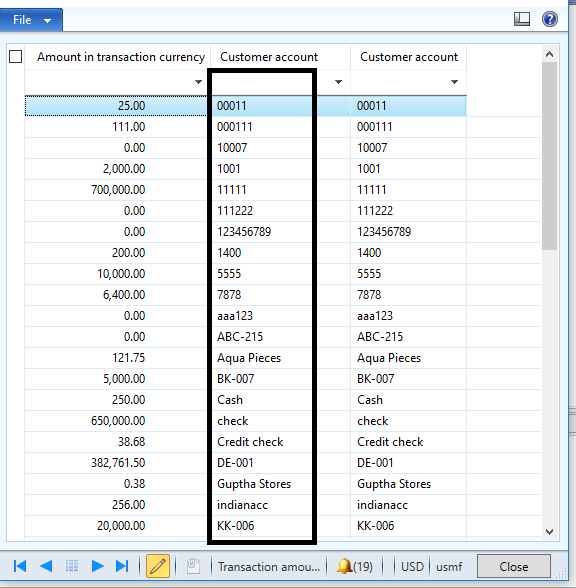
form result, It's come as expected

36882.PNG

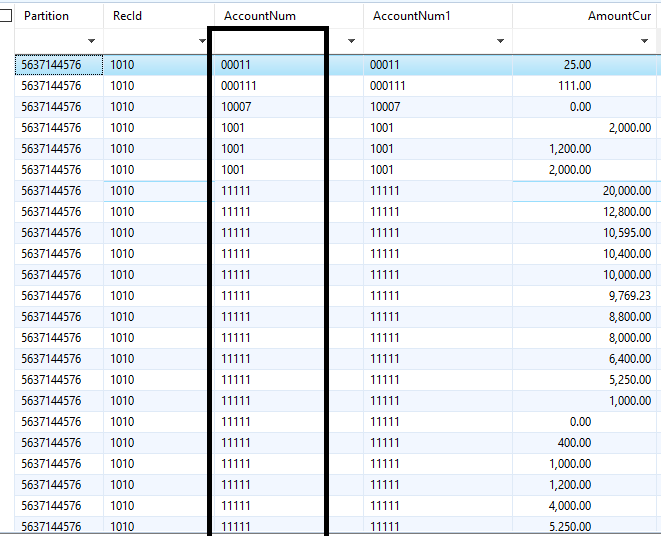
but views have not come as expected

0511.PNG

Why is not showing correctly, anyone gives an idea 

Thanks in advance

Ashokkumar M.

I have the same question (0)
  • Martin Dráb Profile Picture
    239,451 Most Valuable Professional on at

    A useful technique is reviewing the actual view definition in database. When you know how it differs from what you wanted to achieve, it's easier to fix it.

    The second field - AmountCur without any aggregation - shouldn't be there. It won't have any value because it's neither grouped by nor aggregated.

    By the way, the category of this thread should be Development / Customization / SDK instead of Other. Let me change it for you.

  • Community Member Profile Picture
    on at

    Hi, martin,

    Thanks for your reply, I used groupby and aggregate function in a query, I am using the same query in view.

    5732.query.PNG

  • Martin Dráb Profile Picture
    239,451 Most Valuable Professional on at

    Yes, you said that before.

  • Community Member Profile Picture
    on at

    Hi martin,shall you give some idea how to use group by and aggregate function in views

  • Verified answer
    Martin Dráb Profile Picture
    239,451 Most Valuable Professional on at

    've attached a sample view with grouping, but I don't think it's going to help you. Your approach is correct, but you have some kind of problem in your implementation. That's why I talked about a way of debugging.

    DemoView.zip

  • Community Member Profile Picture
    on at

    Thanks martin, It's working

Under review

Thank you for your reply! To ensure a great experience for everyone, your content is awaiting approval by our Community Managers. Please check back later.

Helpful resources

Quick Links

Introducing the 2026 Season 1 community Super Users

Congratulations to our 2026 Super Stars!

Meet the Microsoft Dynamics 365 Contact Center Champions

We are thrilled to have these Champions in our Community!

Congratulations to the April Top 10 Community Leaders

These are the community rock stars!

Leaderboard > Finance | Project Operations, Human Resources, AX, GP, SL

#1
Giorgio Bonacorsi Profile Picture

Giorgio Bonacorsi 620

#2
André Arnaud de Calavon Profile Picture

André Arnaud de Cal... 521 Super User 2026 Season 1

#3
CP04-islander Profile Picture

CP04-islander 430

Last 30 days Overall leaderboard

Product updates

Dynamics 365 release plans