web
You’re offline. This is a read only version of the page.
close
Skip to main content

Notifications

Announcements

No record found.

Community site session details

Community site session details

Session Id :
Microsoft Dynamics GP (Archived)

Clearing FX invoice through Payables Manual Payment Entry

(0) ShareShare
ReportReport
Posted on by

Hello,

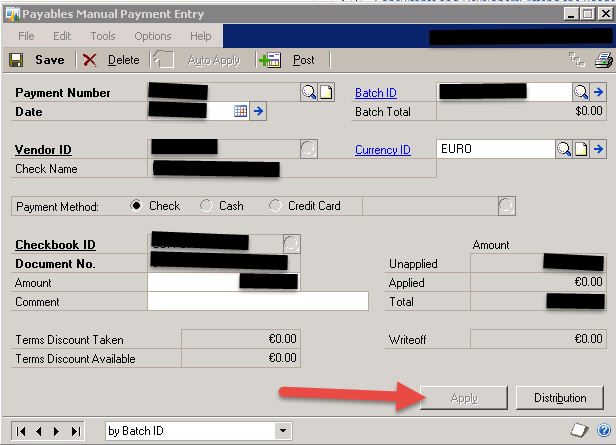
We're trying to clear a wire payment using the Payable Manual Payment Entry screen. This is a process that we've done in the past, however the person who normally does this is out of the office. The issue we're running into is whenever we choose a foreign currency ID the Apply button grey's out so we're unable to apply the open invoices. We use the same function for USD payments and do not into the issue. Is there a step we're missing or should we be using a different screen to clear FX wire payments? Thank you
*This post is locked for comments

I have the same question (0)
  • Verified answer
    Heather Roggeveen Profile Picture
    9,146 on at

    Hi

    In versions earlier than 2015 (or 2013R2 - I can't remember which) - you can't apply a foreign payment at the time of entry.

    Enter the manual payment in the foreign currency, ensuring correct exchange rate.

    Post the payment.

    Go to Transactions --> Purchasing --> Apply Payables Documents

    Enter the Creditor / Vendor ID, select your payment and tick to apply it to the invoices.

    Any MC gain or loss will post when you close the window.

    Let me know if you need more details.

  • Suggested answer
    Mahmoud Saadi Profile Picture
    32,738 on at

    Heather is definitely right,

    Clients always struggle with this specific scenario which seems not quite familiar for too many

    Post the payment, and then proceed with applying it on the "Apply Payables Documents" window, you will be just fine.

    Please let us know if you have any further inquiries,

  • Community Member Profile Picture
    on at

    You're a lifesaver! Thank you!

Under review

Thank you for your reply! To ensure a great experience for everyone, your content is awaiting approval by our Community Managers. Please check back later.

Helpful resources

Quick Links

Responsible AI policies

As AI tools become more common, we’re introducing a Responsible AI Use…

Neeraj Kumar – Community Spotlight

We are honored to recognize Neeraj Kumar as our Community Spotlight honoree for…

Leaderboard > 🔒一 Microsoft Dynamics GP (Archived)

#1
Community Member Profile Picture

Community Member 2

#2
mtabor Profile Picture

mtabor 1

#2
Victoria Yudin Profile Picture

Victoria Yudin 1

Last 30 days Overall leaderboard

Featured topics

Product updates

Dynamics 365 release plans



