web
You’re offline. This is a read only version of the page.
close
Skip to main content

Notifications

Announcements

No record found.

Community site session details

Community site session details

Session Id :
Microsoft Dynamics AX (Archived)

Axapta 2009 Client on Terminal server

(0) ShareShare
ReportReport
Posted on by

I have recently migrated an Axapta environment from a physical machine to several Virtual Machines.

Previously each user had the Axapta client installed on their local PC's, but due to moving from Active Directory to Novell eDirectory, the local PC's are not joined to a domain anymore.

Therefore I have installed a Terminal Server (Windows Server 2008R2) and installed the Axapta 2009 client (with SP1 & Rollup 7).
Each user now connects via Remote Desktop (Windows 7 SP1 with RDP version 6.3.9600) to the Terminal Server and launches the Axapta Client there.

However some instensive flickering occurs while moving the cursor inside the Axapta client, although it seems to be limited to the area highlighted in red:
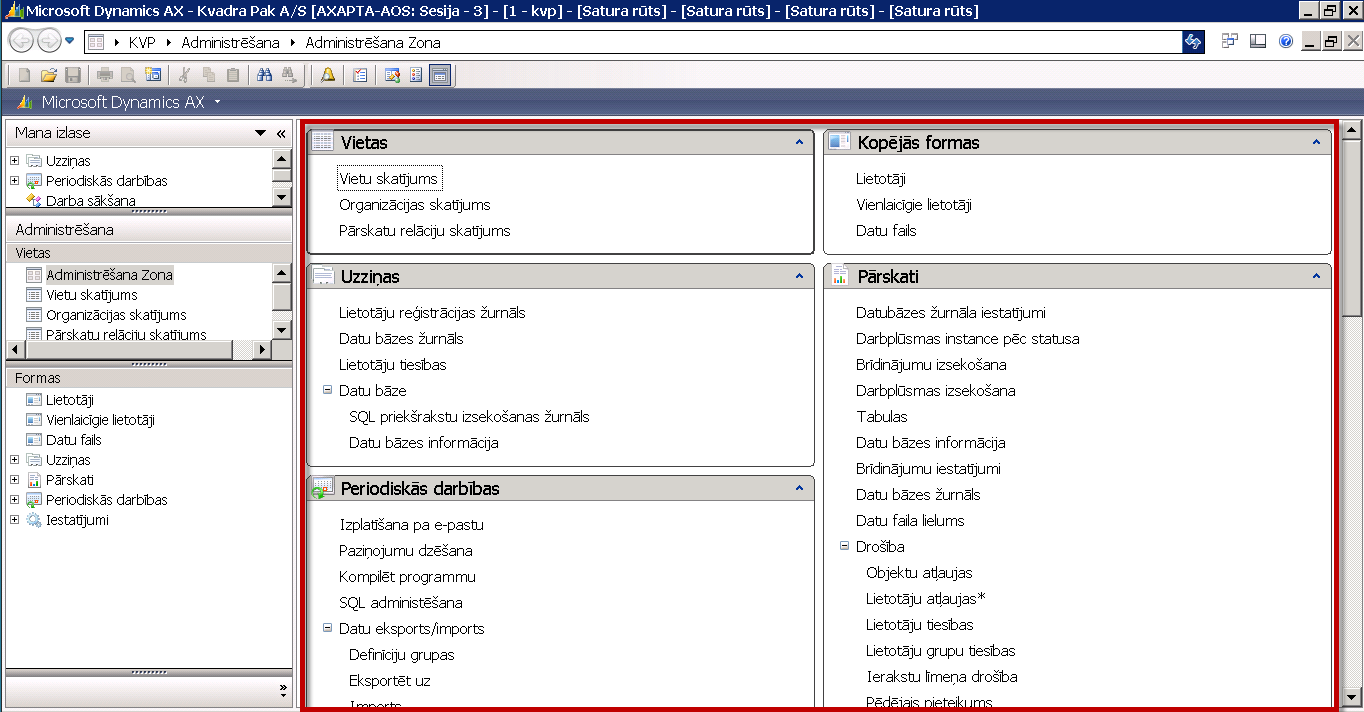
29_2D00_01_2D00_2016-8_2D00_50_2D00_37.png


Summary of the client/server situation:

Clients: Windows 7 SP1 64bit
             RDP versions: 6.1.7601 / 6.2.9200 / 6.3.9600

Terminal Server: Windows Server 2008 R2 with all updates installed
                           Axapta client: Axapta 2009 Service Pack 1 + Rollup 7

Does anyone have any experience with this?

*This post is locked for comments

I have the same question (0)
  • Verified answer
    Brandon Wiese Profile Picture
    17,788 on at

    Yes, flickering was an issue in 6.1 and 6.2 versions of RDP.  It's really best to use the most recent RDP client at all times.  They typically are not available through Windows Update and you'll have to go find them.  I'm using mstsc.exe version 6.3.9600.16415 right now.

    If you've turned on RDP over UDP, turn it off and use TCP full time.  I can't even tell you how much headache we endured at the hands of UDP over WAN links, wireless networks, and both at the same time.

    If you see odd visual effects, especially if they take the form of little squares, clear the RDP cache files on the client machine.  These are typically found under the following path.  Delete the .bmc and .bin files.

    C:\Users\<userprofile>\AppData\Local\Microsoft\Terminal Server Client\Cache

    There are things you can do on the terminal server also to improve flicker and redraw issues.  Others in the community will probably chime in with a few of those.  You may want to consider Windows Server 2012 R2 as your remote desktop host.  At least try it with an evaluation version and compare side by side before you invest any capital.

  • Community Member Profile Picture
    on at

    Thank you for replying Brandon.

    All my latest tests have been with 6.3.9600 (not sure which minor version)

    I did search for the 16415 update, which I downloaded and applied to the client test PC.

    Also cleared any Cache files prior to connecting again.

    It seems to be slightly less flickering, still annoying though.

    When connecting from a Windows 10 PC the flickering is almost completely gone. (but unfortunatly, it's not an option)

    Was actually considering to set up a Windows Server 2012 R2, but wasn't sure it would be worth the hastle.

    I will give it a go and post back with the results.

    Any other suggestions for Windows Server 2008 R2 TS host are also welcome.

  • Suggested answer
    Community Member Profile Picture
    on at

    I have installed a Windows Server 2012 R2 as Terminal server, like you suggested.

    It does seem to improve the flickering a lot. It's not completely gone yet, but it is much more workable this way.

    So thank you for suggesting it.

Under review

Thank you for your reply! To ensure a great experience for everyone, your content is awaiting approval by our Community Managers. Please check back later.

Helpful resources

Quick Links

Responsible AI policies

As AI tools become more common, we’re introducing a Responsible AI Use…

Neeraj Kumar – Community Spotlight

We are honored to recognize Neeraj Kumar as our Community Spotlight honoree for…

Leaderboard > 🔒一 Microsoft Dynamics AX (Archived)

#1
Martin Dráb Profile Picture

Martin Dráb 4 Most Valuable Professional

#1
Priya_K Profile Picture

Priya_K 4

#3
MyDynamicsNAV Profile Picture

MyDynamicsNAV 2

Last 30 days Overall leaderboard

Featured topics

Product updates

Dynamics 365 release plans
