web
You’re offline. This is a read only version of the page.
close
Skip to main content

Announcements

No record found.

News and Announcements icon
Community site session details

Community site session details

Session Id :
Microsoft Dynamics 365 | Integration, Dataverse...
Unanswered

select dynamics crm document template in populate word template in flow

(0) ShareShare
ReportReport
Posted on by

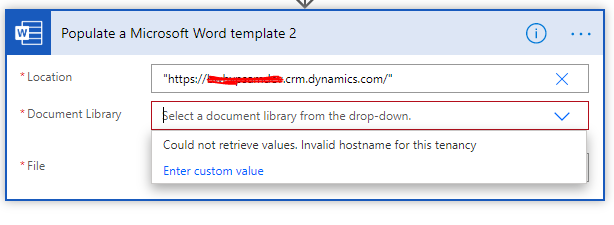
I have created word templates using Developer tab. As i am working with client, client does not wish to share word templates on onedrive or sharepoint. I could upload the word templates into crm. (I downloaded word template for Task entity and added custom fields in word template. and uploaded the document into CRM. Otherwise it gives error as 'the templates is not compatible with the layout'). But now i am not finding a way to populate the word template which I have uploaded in CRM. Can any one help me with the locations of Dynamics crm 365 which can be used in 'Populate word template' of Word online; other options of location such as "me", "sites" etc?
pastedimage1591968051783v1.png

I have the same question (0)
  • Linn Zaw Win Profile Picture
    3,407 on at

    Word Online connector can only interact with the documents in the OneDrive/SharePoint document libraries. The files uploaded to CRM are stored in the file storage in base64 format and there is no way to access with direct URL.

    If the client really does not want to keep the word templates on OneDrive/SharePoint, the only workaround solution would be uploading the word template temporarily and delete at the end of the flow.

    1. "List records" to retrieve the Notes entity where the document is uploaded
    2. Take the "Document" (base64 file content of the attachment)
    3. Create a file in SharePoint with Base64string to temp folder
    4. Populate a word template to the temp file in step 3
    5. Delete the temp file in SharePoint using Delete File action
  • Community Member Profile Picture
    on at

    Thank you Linn, this at least confirmed the assumption that we can not use templates from dynamics. Could you also elaborate little more on Locations field in Populate Word template? such as option "me"? About temp use of sharepoint also we need location which client agrees to so not sure about that also. Will check. Thanks again.

  • Linn Zaw Win Profile Picture
    3,407 on at

    The most common usage of Location field in Populate Word template action is the "SharePoint Site URL" as demonstrated in the blog post below.

    https://www.briteglobal.com/blogs/community/generate-document-templates-in-cds-using-flow/

    I have never tried the other options specified in the MS Docs site. (- "me" - "users/someone's UPN" - "groups/group Id" - "sites/SharePoint Site URL:/teams/team name:")

    - "me" or - "users/someone's UPN" seems like the OneDrive of the current user who trigger the flow (or flow owner for automated flows)

    https://docs.microsoft.com/en-us/connectors/wordonlinebusiness/#populate-a-microsoft-word-template

Under review

Thank you for your reply! To ensure a great experience for everyone, your content is awaiting approval by our Community Managers. Please check back later.

Helpful resources

Quick Links

Introducing the 2026 Season 1 community Super Users

Congratulations to our 2026 Super Stars!

Meet the Microsoft Dynamics 365 Contact Center Champions

We are thrilled to have these Champions in our Community!

Congratulations to the March Top 10 Community Leaders

These are the community rock stars!

Leaderboard > Microsoft Dynamics 365 | Integration, Dataverse, and general topics

#1
11manish Profile Picture

11manish 176

#2
ManoVerse Profile Picture

ManoVerse 56 Super User 2026 Season 1

#3
Niki Patel Profile Picture

Niki Patel 42

Last 30 days Overall leaderboard

Product updates

Dynamics 365 release plans
