web
You’re offline. This is a read only version of the page.
close
Skip to main content

Notifications

Announcements

No record found.

Community site session details

Community site session details

Session Id :
Microsoft Dynamics CRM (Archived)

Custom button is not displayed on Unified Interface form

(0) ShareShare
ReportReport
Posted on by 160

Hi All,

I have a custom button which not visible on Unified Interface and visible on CRM form. 

Can someone help me to solve this issue?

Button present in below screenshot
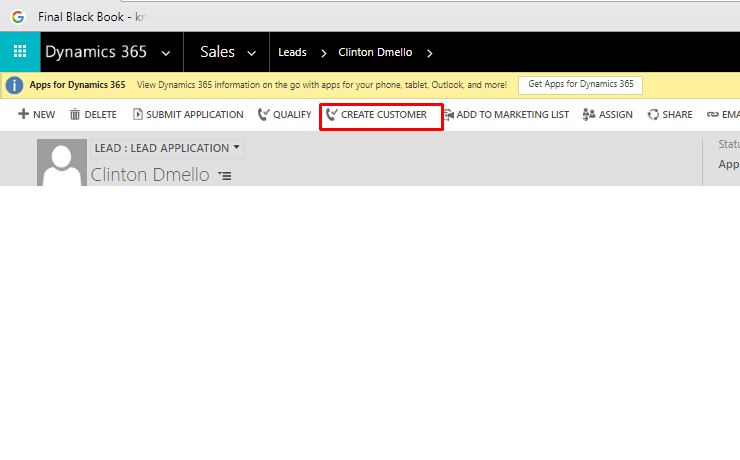
3487.Button1.png

Button not present in Unified Interface
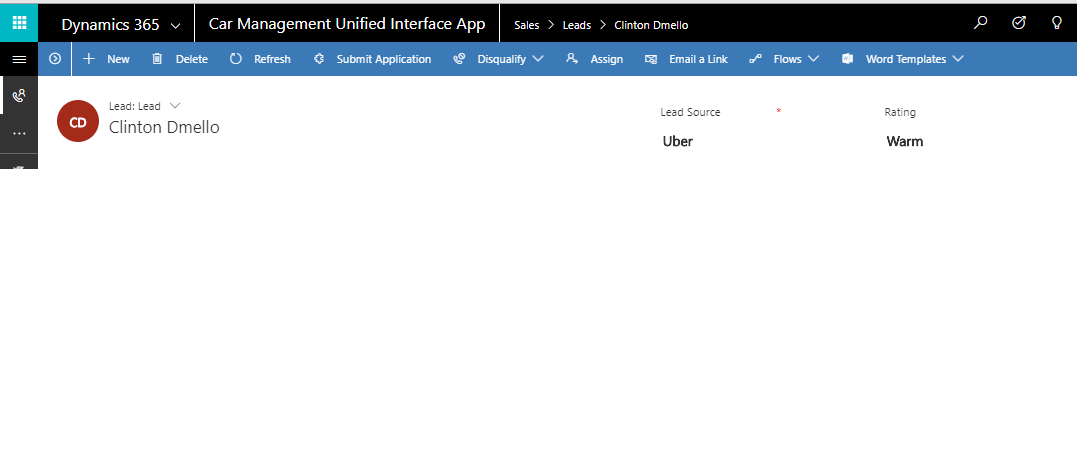
0647.Button2.png

Thanks in advance.

*This post is locked for comments

I have the same question (0)
  • ganesh198715 Profile Picture
    545 on at

    Any idea on this issue, having same with custom entity. A button is displayed in classic view but not visible in unified interface

  • Suggested answer
    Rabi Profile Picture
    75 on at

    Hi Krishna,

    How did you add the custom button. if it is using ribbon workbench, go and check the button display rule. there are rule about hide on modern and Hide for tablet Experience

    3058.Ribbon-workbench.PNG

  • Community Member Profile Picture
    on at

    For me different issue.

    -> Classic UI: I have enable rule which will display in custom button for existing record and for new record it will be hidden.

    -> Unified Interface: In Unified Interface the custom button is getting displayed for new record also.

    Any suggestions what to do for this??

    Thanks in advance.

    Sreenath

  • Suggested answer
    Aliona Profile Picture
    126 on at

    Some of the standard buttons are hidden in the Unified Interface. Please find a step by step instruction how add buttons to the Unified Interface: skylineconsultantsllc.com/.../add-buttons-to-the-unified-interface-ms-dynamics-hub

    Hope it helps. Best, Aliona

  • Suggested answer
    Aliona Profile Picture
    126 on at

    Some of the buttons are hidden in the Unified Interface. Please find a step by step instruction how to add buttons to the Unified Interface: skylineconsultantsllc.com/.../add-buttons-to-the-unified-interface-ms-dynamics-hub

    Hope it helps. Best, Aliona

  • uahmed Profile Picture
    310 on at

    Link you mentioned not working.

  • Suggested answer
    JandostKhoso Profile Picture
    266 on at

    The reason behind this behavior is the way buttons are defined. The enable rules must exist to show the buttons.

    I have had a similar issue before. In my case, the buttons were created using RibbonWorkBench. When I switched to the UCI, I was not able to see the buttons. It turned out that for some reasons the Enable rules were messed up.

    My recommendation is to have a look at your Customization.xml file and ensure that Enable Rules exists. The Customization.xml is should be your ultimate source of truth.

  • HartmutE Profile Picture
    28 on at

    Looks like they moved the blog around. Try this link.

    skylineconsultantsllc.com/.../

  • DIRAICK Profile Picture
    10 on at

    the link doesn't work

  • Suggested answer
    krishna Profile Picture
    30 on at

    Hi Krishna,

    Please check with below link

    develop1.net/.../Adding-Ribbon-Workbench-SmartButtons-to-the-Unified-Client

    Regards,

    Chaitanya

Under review

Thank you for your reply! To ensure a great experience for everyone, your content is awaiting approval by our Community Managers. Please check back later.

Helpful resources

Quick Links

Responsible AI policies

As AI tools become more common, we’re introducing a Responsible AI Use…

Neeraj Kumar – Community Spotlight

We are honored to recognize Neeraj Kumar as our Community Spotlight honoree for…

Leaderboard > 🔒一 Microsoft Dynamics CRM (Archived)

#1
SA-08121319-0 Profile Picture

SA-08121319-0 4

#1
Calum MacFarlane Profile Picture

Calum MacFarlane 4

#3
Alex Fun Wei Jie Profile Picture

Alex Fun Wei Jie 2

Last 30 days Overall leaderboard

Featured topics

Product updates

Dynamics 365 release plans



