web
You’re offline. This is a read only version of the page.
close
Skip to main content

Notifications

Announcements

No record found.

Community site session details

Community site session details

Session Id :
Small and medium business | Business Central, N...
Answered

Depreciation Table Card and depreciation Method user defined not working

(0) ShareShare
ReportReport
Posted on by 187

Hello BC-Forum,

I want a depreciation of 30% of the bookvalue every year.  Example: 

2744 * 30% = 823.20 / 12 months = 68.60 per month depreciation. Next year:

1920.80 * 30% = 576.24 / 12 months = 48.02 per month depreciation. And so on.

I tried different depreciation methods, but I cannot get to 68.60 per month. So I tried user defined with a depreciation table code.  See my print screens.

When I try to fill in an ending date, I get an error which is understandable because of the choosen method.

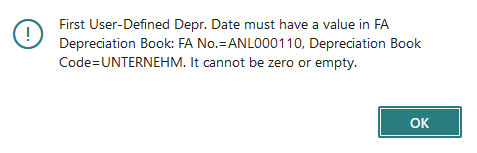
When I calculate depreciation I get the error: fill in a date...

How can I get 30% per Year of book value (823.20) and 68.60 per month automatically booked every month?

Thanks in advance!

Greetings,

John

pastedimage1627213691724v1.png

pastedimage1627214035839v3.png

pastedimage1627214005013v2.png

I have the same question (0)
  • Marco Mels Profile Picture
    on at

    Hello John,

    You may have seen this one already:

    Depreciation Methods for Fixed Assets - Business Central | Microsoft Docs

    If not then that is a good start.

    Thanks.

  • Verified answer
    TWBlaisdell Profile Picture
    on at

    Hi John,

    Thank you for posting on the Forum.

    You should not need to add a Depreciation Table for this. On the FA Card, click Add More Depreciation Books:

    pastedimage1627330119363v1.png

    From the reflected options, select Declining Balance 1, where the 1 indicates that the Declining Balance annual depreciation should be equally allocated per month. pastedimage1627330232742v2.png

    Then, enter the 30% and Depreciation Starting Date of 01/01/2021, for example.

    Make sure Fixed Asset Depreciation Book is not using rounding to get the decimal calculation.

    pastedimage1627330519629v3.png

    As you run Calculate Depreciation for each month, the Fixed Asset General Journal will populate with the correct allocated monthly depreciation.

    pastedimage1627330661111v5.png

    pastedimage1627330602767v4.png

    I hope this helps.

  • JohnnyLM Profile Picture
    187 on at

    Hello Marco, 

    thanks for your short answer. Yes I have seen this article and tried all the methods. None of them give me the calculation required. That is why I have posted my question on the BC Forum...

    Greetings, 

    John

  • Verified answer
    JohnnyLM Profile Picture
    187 on at

    Hello Tom,

    This answer is exactly what I needed. Especially the do not round and the Declining Balance 1 option was very helpful.

    Thanks a lot!

    Greetings,

    John

Under review

Thank you for your reply! To ensure a great experience for everyone, your content is awaiting approval by our Community Managers. Please check back later.

Helpful resources

Quick Links

Responsible AI policies

As AI tools become more common, we’re introducing a Responsible AI Use…

Neeraj Kumar – Community Spotlight

We are honored to recognize Neeraj Kumar as our Community Spotlight honoree for…

Leaderboard > Small and medium business | Business Central, NAV, RMS

#1
OussamaSabbouh Profile Picture

OussamaSabbouh 2,135

#2
YUN ZHU Profile Picture

YUN ZHU 733 Super User 2025 Season 2

#3
Sumit Singh Profile Picture

Sumit Singh 612

Last 30 days Overall leaderboard

Featured topics

Product updates

Dynamics 365 release plans