web
You’re offline. This is a read only version of the page.
close
Skip to main content

Notifications

Announcements

No record found.

Community site session details

Community site session details

Session Id :
Customer experience | Sales, Customer Insights,...
Answered

How to open entities instead of their connections

(0) ShareShare
ReportReport
Posted on by 80

Hello everyone,

When I open opportunity from connected opportunity from contact record it open connection with this opportunity instead of opportunity

directly. It started after transition to UCI, can I fix it somehow?

Best regards and wishes,

pastedimage1609790289681v1.png

pastedimage1609790336752v3.png

Bohdan

I have the same question (0)
  • Community Member Profile Picture
    on at

    If you make your screen size smaller (in the browser) do you then see more area to click?  Or is it the same Connection record?

  • cloflyMao Profile Picture
    25,210 on at

    Hi Bohdan,

    In my Marketing application and recent opportunities sub-grid of Contact form, it will navigate me to opportunity directly after clicking a row.

    chrome_2D00_capture-_2800_1_2900_.gif

    It is possible that the sub-grid has been customized by some user in your team before, its source entity was changed to Connection instead of Opportunity.  

    So please go to Advanced Settings > Customizations > Customize the System > Entities > Contact > Forms > Contact form to check configuration of your sub-grid.

    5543.JPG

    Regards,

    Clofly

  • Bohdan_Y Profile Picture
    80 on at

    Hello Clofly,

    Yeah, you right but connection was added here on purpose few months ago because when I`ve been choosing related opportunity the sub grid was empty and it still doesn`t show related opportunities. Maybe I just didn`t noticed but I think it opened the opportunity record in legacy client. Is there any way to fix it?

    Thank and best regards,

    Bohdan

  • cloflyMao Profile Picture
    25,210 on at

    Hi Bohdan,

    Please check following settings:

    1. Whether data source of the sub-grid is set to show only related records and the source entity is set to the correct.(There are two 1:N relationships between Contact and Opportunity, here it should be Opportunity(Contact)):

    5287.x1.JPG

    2. Whether the default Recent Opportunities view is also modified by yourself before, here is filter criteria of the view of my environment:

    pastedimage1609912142886v1.png

    3. Whether the opportunities are actually associated with your contact:

    8546.x3.JPG

    Regards,

    Clofly

  • Bohdan_Y Profile Picture
    80 on at

    Hi Clofly,

    The settings looks the same but it doesn`t work.

    Settings:

    pastedimage1609942737261v1.png

    pastedimage1609942852351v2.png

    And how they look.

    pastedimage1609943061914v5.png

    pastedimage1609943033492v4.png

    Also i've noticed that if I add contact directly instead of connection the contact can`t be added as stakeholder to more than 1 opportunity.

    pastedimage1609942962459v3.png

    Best regards,

    Bohdan

  • cloflyMao Profile Picture
    25,210 on at

    Hi Bohdan,

    It seems that you also customized stakeholder sub-grid of opportunity form before.

    Please change the source entity to Connections(Connected From) instead, to restore its default setting.

    8468.x1.JPG

    An opportunity can only has single parent contact, so it will throw error if we add contact directly instead of connection.

    Actually a sub-grid corresponds to a specific 1:N relationship and a specific look up field of child entity, make sure that you have chosen the correct relationship for Recent Opportunities sub-grid of Contact form.

    E.g: You might created a custom lookup field to represent parent contact of opportunity, so in Opportunity form, please use the default Contact lookup field(logical name of the field: parentcontactid, relationship name: opportunity_parent_contact) to associate opportunity with contact.

    Regards,

    Clofly

  • Bohdan_Y Profile Picture
    80 on at

    Hi Clofly,

    So as I understand Oportunity Stakeholders should have Connections in sub-grid and Contact Recent Oportunities should have

    Related opportunity(contact) records from recent opportunities view. But if opportunity can't have many contacts then how can contact have many opportunities

    through stakeholder? And it also doesn`t really solve problem with going to connection from Opportunity from.

    Thanks,

    Bohdan 

  • cloflyMao Profile Picture
    25,210 on at

    Hi Bohdan,

    Opportunity Stakeholders sub-grid is irrelevant to N:1 relationship of Opportunity and Contact.

    Let me show another specific example to help you understand:(with default sub-grid settings)

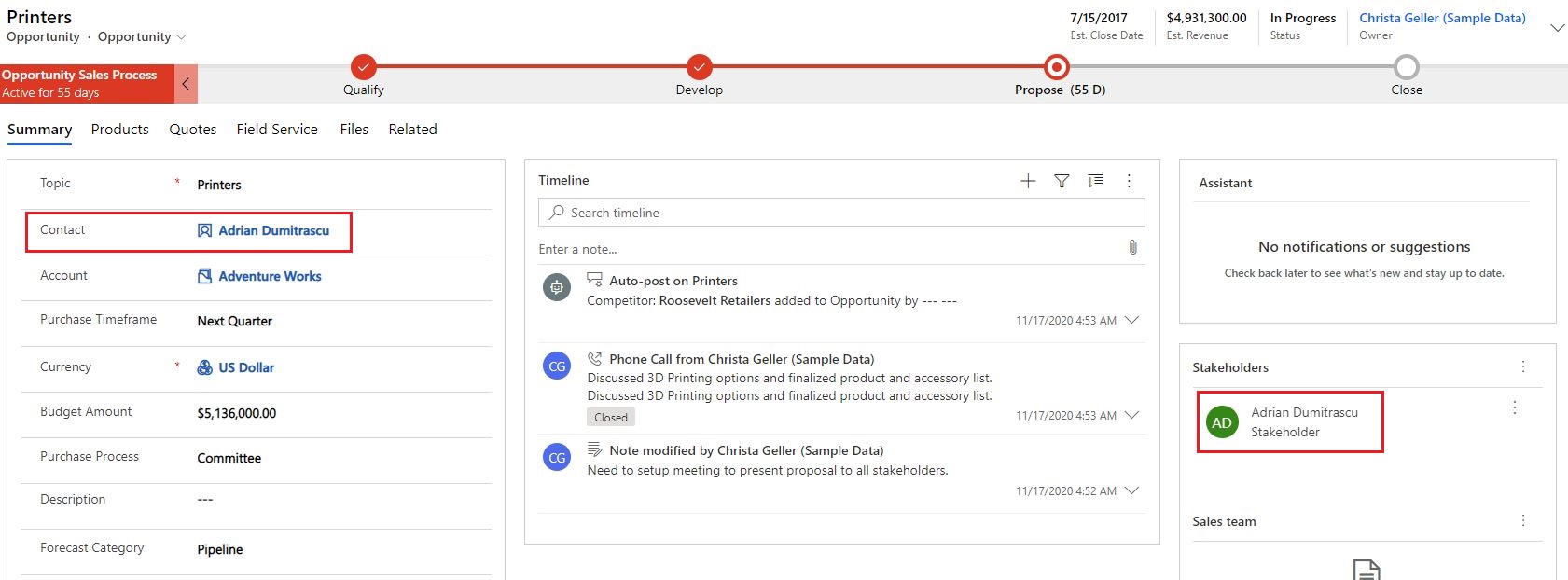
    1. There is an opportunity called "Printers", its contact and stakeholder are both Adrian Dumitrascu.
    m1.JPG

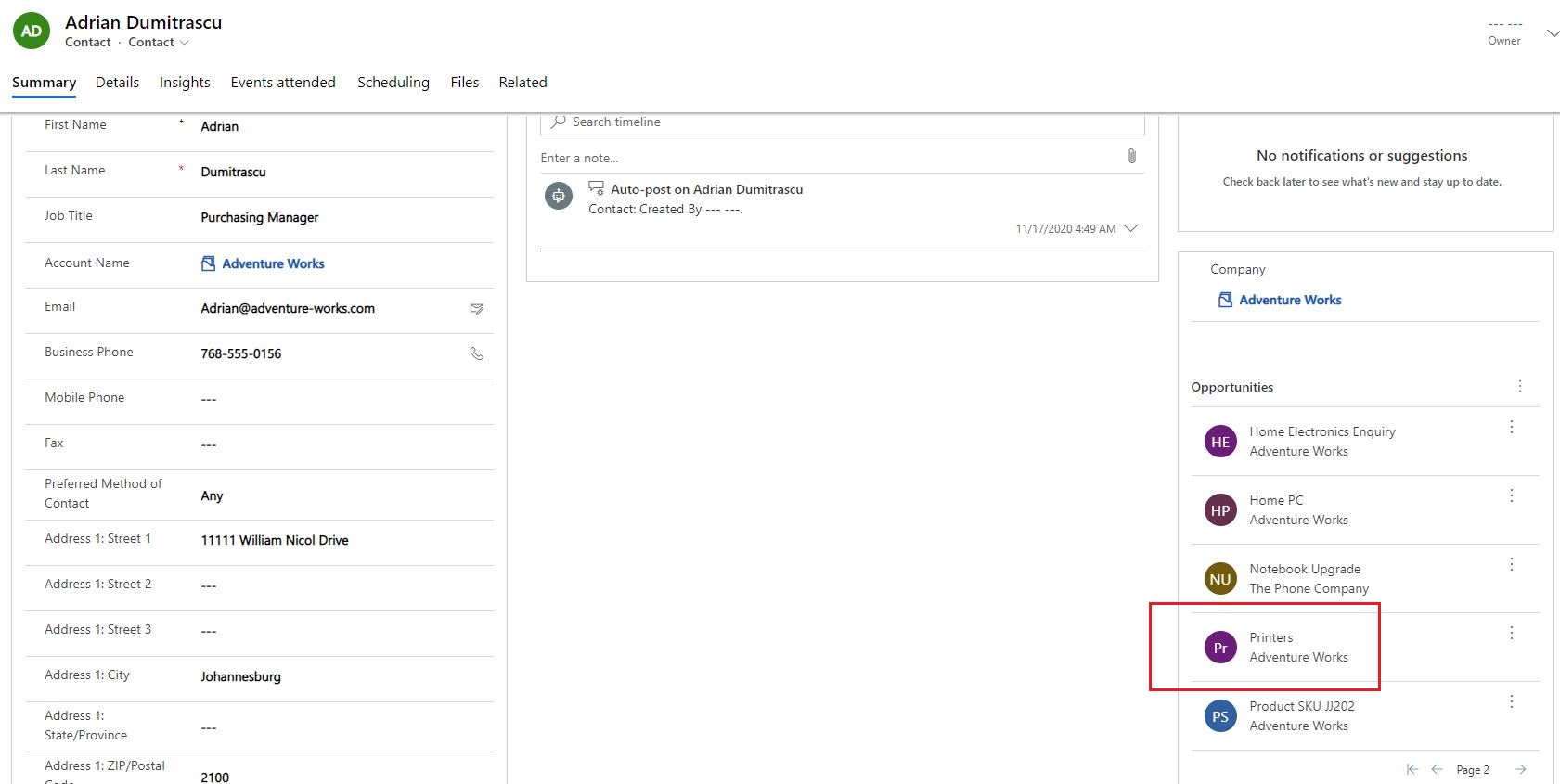
    2. When viewing Adrian Dumitrascu profile, we can see the opportunity is available to his recent opportunities.
    m2.JPG

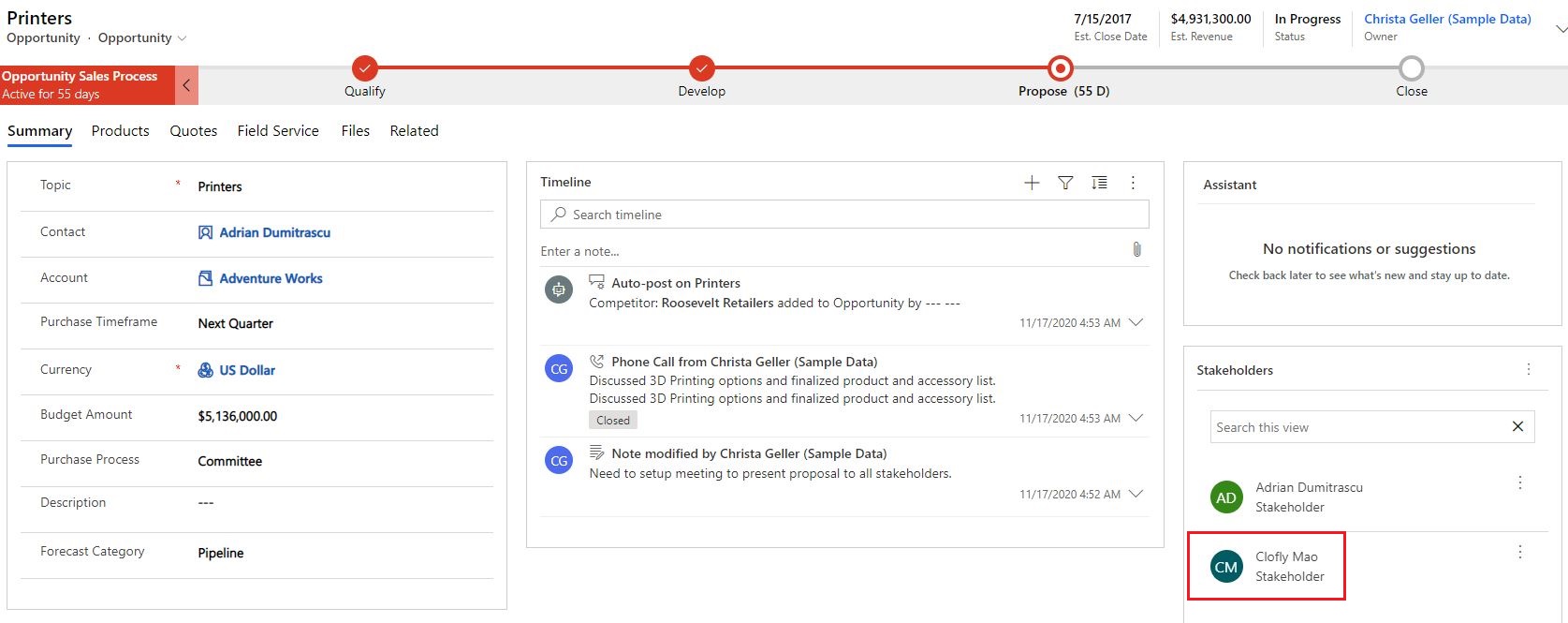
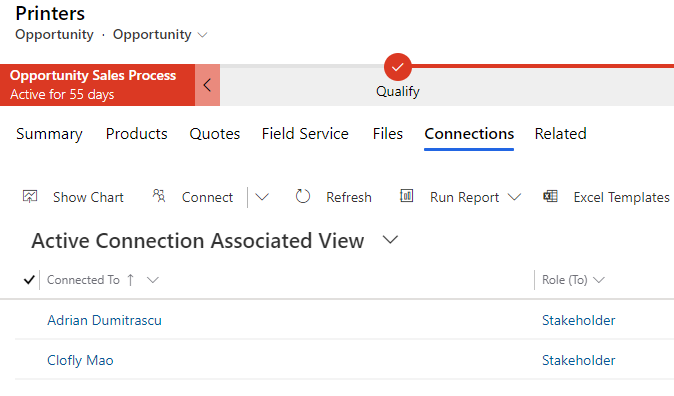
    3. Back to the opportunity, we add Clofly Mao as its another stakeholder, then the opportunity has two contacts.

    However, they are associated with connection, we can expand its related connections in associated view.
    m3.JPG

    pastedimage1610349561738v2.png

    4. Open Clofly in form, we can see that Clofly has its own opportunity, while "Printers" is not available to the sub-grid.
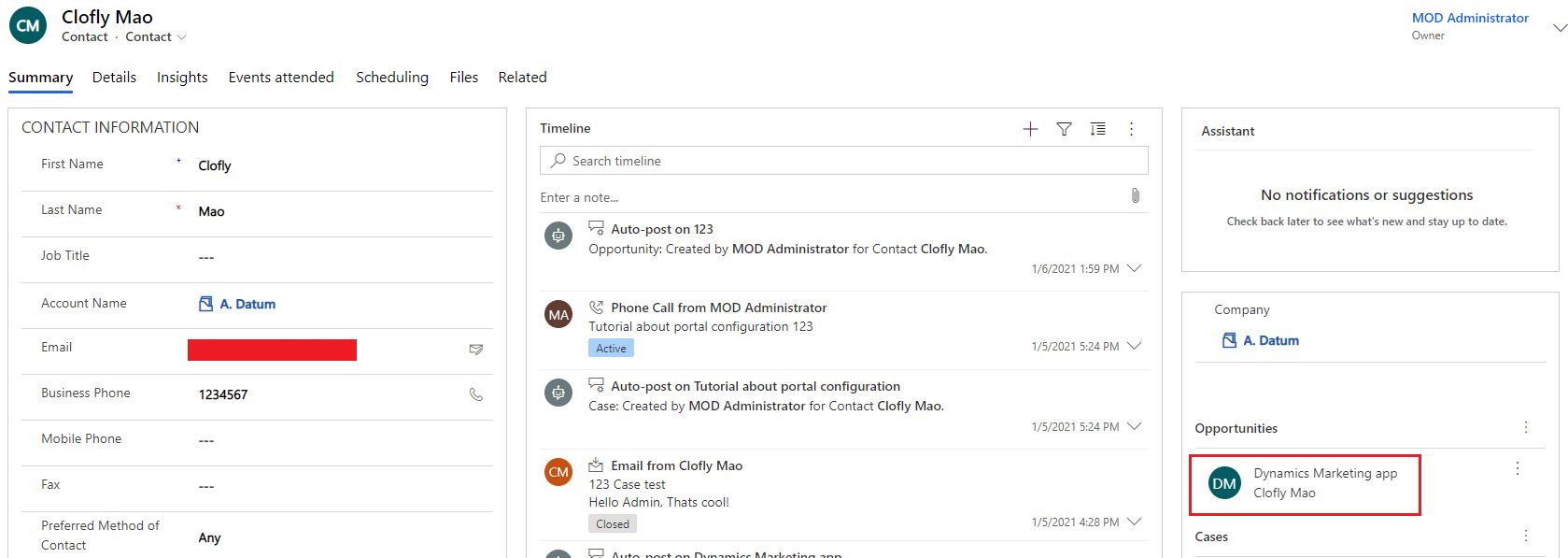
    m4.JPG

    Similarly, the associated "Printers" of Clofly can be found in associated connections view:
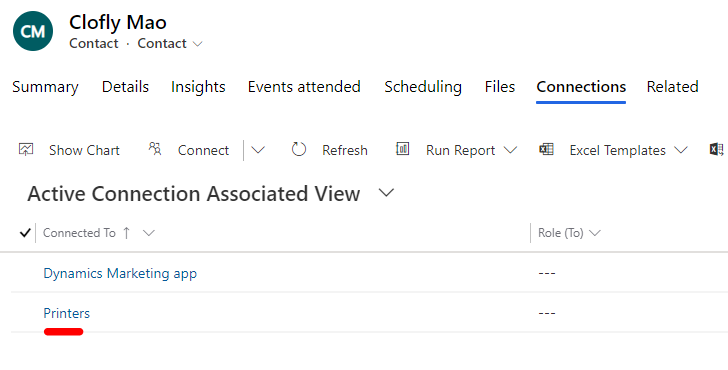
    pastedimage1610349897817v3.png

    5. Opportunity "Dynamics Marketing app" is owned by Clofly, 
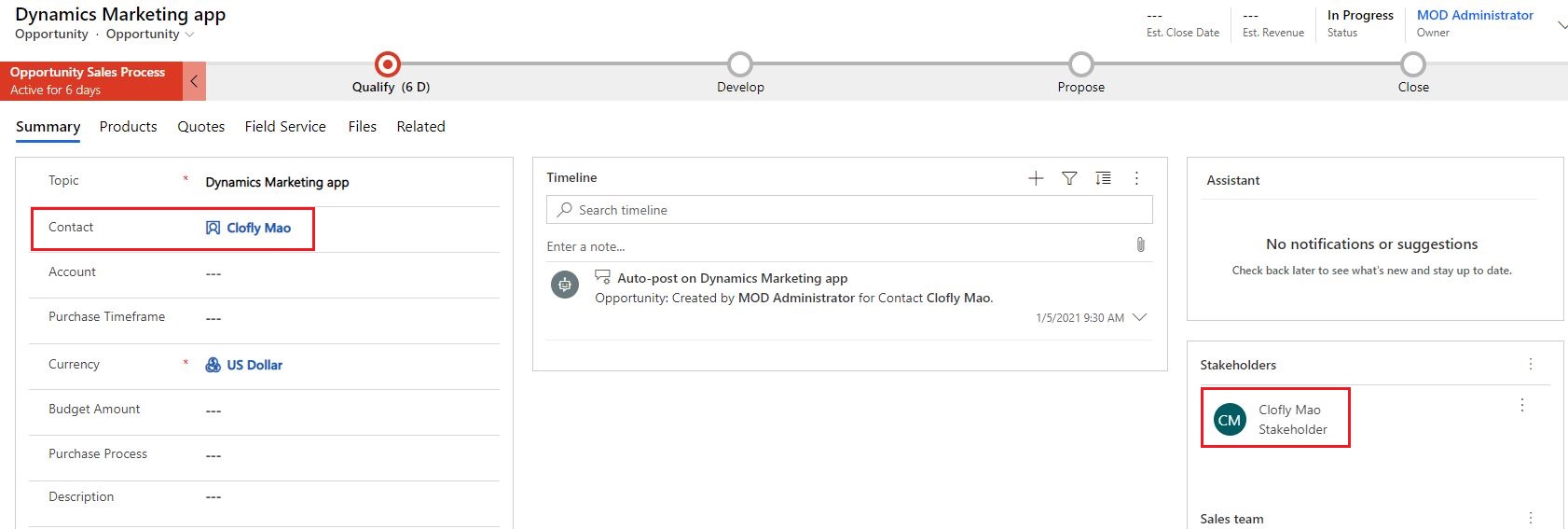
    m5.JPG

    while "Printers" is owned by Adrian Dumitrascu. 

    In other word, there is no direct relation between contact Clofly and opportunity "Printers", but "Printers" can still be associated with Clofly through connection.
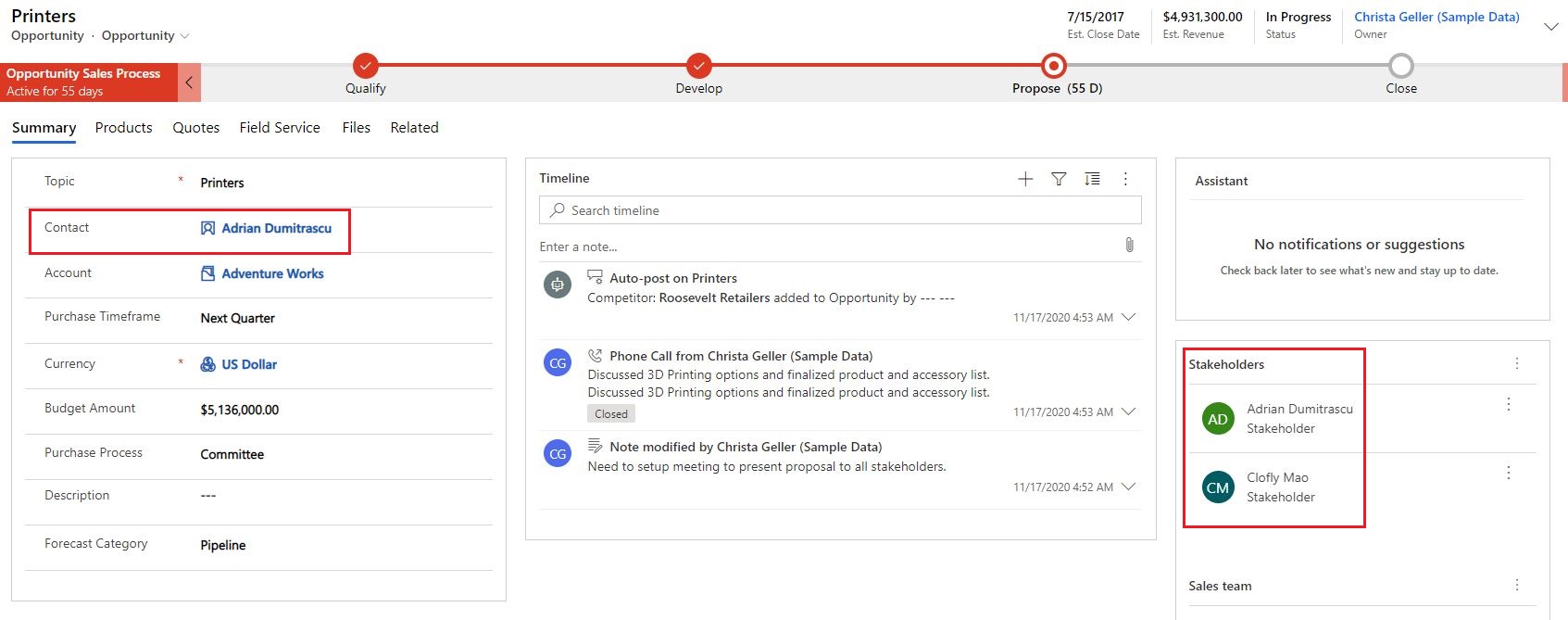
    m6.JPG

    Regards,

    Clofly

  • Bohdan_Y Profile Picture
    80 on at

    Hello Clofly,

    Thanks for detailed explanation it clarified some things but what I want to do is - If an opportunity has stakeholder then the

    stakeholder should has the opportunity in his Recent opportunities sub-grid and if it's possible to transfer directly to this opportunity

    on click, not to connection. And ideally but not necessary some behavior in Stakeholders. 

    Best regards,

    Bohdan

  • Verified answer
    cloflyMao Profile Picture
    25,210 on at

    Hi Bohdan,

    Actually  Connection(stakeholder) is the third entity to make an opportunity to be able to associate many contacts, however, for an opportunity itself, it can only has a single parent contact.

    Here are default relationships:

    Opportunity <-> Connection 1:N (Stakeholders)

    Contact <-> Connection 1:N

    Contact<-> Opportunity 1:N (Recent opportunities)

    According to your description, you may need to create a manual custom N:N relationship between Opportunity and Contact to meet the requirement.

    Regards,

    Clofly

Under review

Thank you for your reply! To ensure a great experience for everyone, your content is awaiting approval by our Community Managers. Please check back later.

Helpful resources

Quick Links

Responsible AI policies

As AI tools become more common, we’re introducing a Responsible AI Use…

Neeraj Kumar – Community Spotlight

We are honored to recognize Neeraj Kumar as our Community Spotlight honoree for…

Leaderboard > Customer experience | Sales, Customer Insights, CRM

#1
Tom_Gioielli Profile Picture

Tom_Gioielli 183 Super User 2025 Season 2

#2
#ManoVerse Profile Picture

#ManoVerse 110

#3
Gerardo Rentería García Profile Picture

Gerardo Rentería Ga... 61 Most Valuable Professional

Last 30 days Overall leaderboard

Product updates

Dynamics 365 release plans
