web
You’re offline. This is a read only version of the page.
close
Skip to main content

Announcements

No record found.

News and Announcements icon
Community site session details

Community site session details

Session Id :
Microsoft Dynamics AX (Archived)

Co-product batch order does not update dimension No

(0) ShareShare
ReportReport
Posted on by

Hello Guys.

I'm facing a issue with some Co-product batch orders.

When creating a Co-product batch orders, then by clicking on estimate button, Dynamics AX does not update Co-products dimension No.

I must've forgotten some parameter that makes it works.

Here's a picture for better understanding.
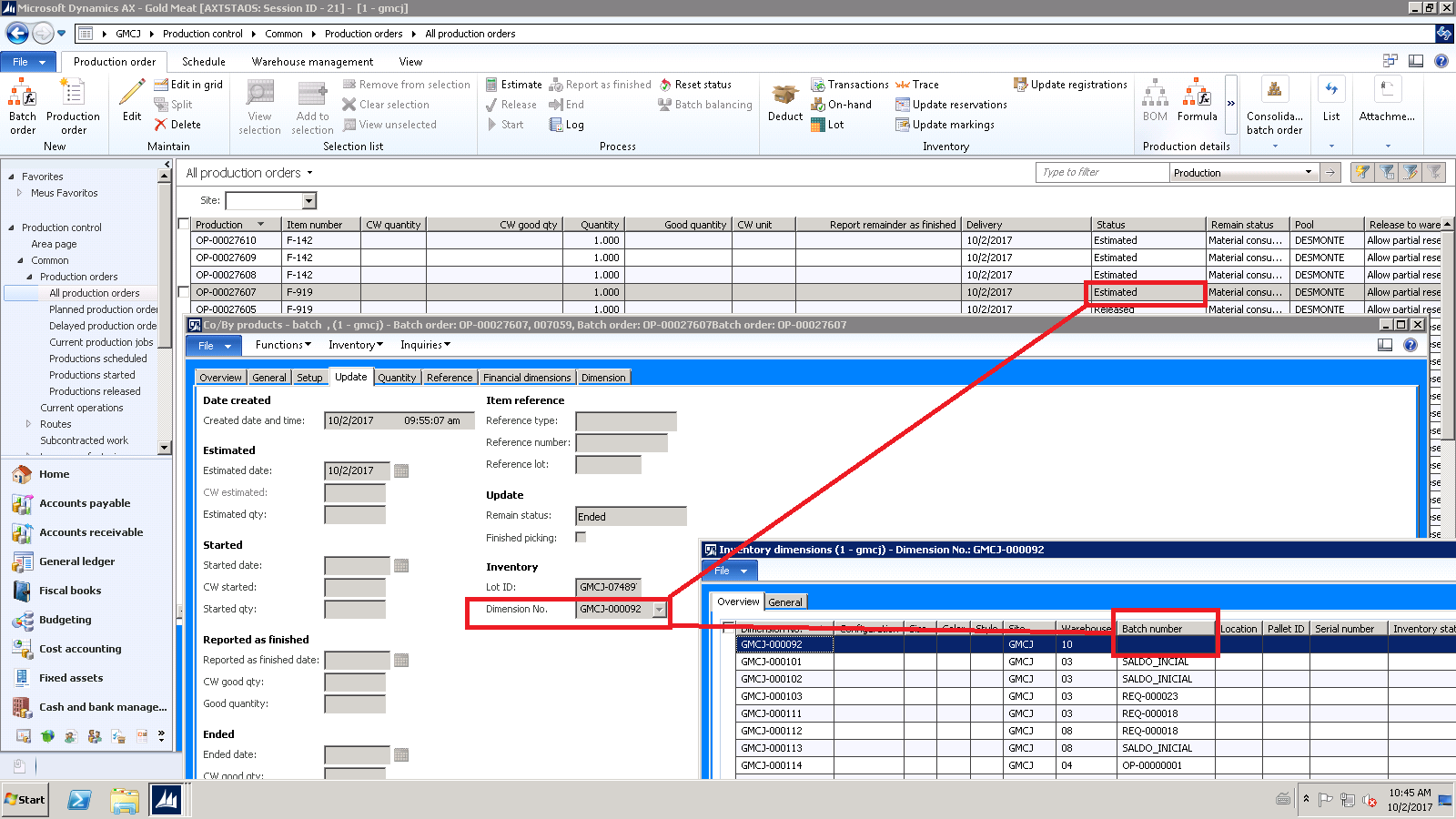
CommunityDynamics_5F00_file01.png

Does anyone know what information must be missing for updating this dimension properly?

Please let me know.

Thank you all very much.

Richardson.

*This post is locked for comments

I have the same question (0)
  • Weaveriski Profile Picture
    23,620 Moderator on at

    Is the item configured with the trackign dimension of batch? On your screen what is in the Dimension tab for the batch number?

  • Guy Terry Profile Picture
    28,970 Moderator on at

    And if item 007059 does have the Batch dimension enabled, what are the settings of its 'Batch number group'?

  • Murthy2601@hotmail.com Profile Picture
    637 on at

    1. only for Inventory transactions checked.

    2. Only on physical update - is unchecked.

    Narasimha

  • Suggested answer
    Weaveriski Profile Picture
    23,620 Moderator on at

    So for the other items you must be specifying the batch number in the formula on the batch order itself, add the batch number for that item into the formula against the batch order. AX does not need the batch at estimation so would not normally have it, which means you are forcing it in - check the Formula on the production order - post a screen shot of the batch field on the lines if it is not there.

  • Guy Terry Profile Picture
    28,970 Moderator on at

    'Only for Inventory transactions' is ticked. This means AX will not record the Batch number on the Production Order; it will only record it on the Inventory transactions. On the 'Co/By products' form in your screenshot, hit the 'Inventory' -> 'Transactions' button. You will see the Batch number on the transaction there.

Under review

Thank you for your reply! To ensure a great experience for everyone, your content is awaiting approval by our Community Managers. Please check back later.

Helpful resources

Quick Links

Introducing the 2026 Season 1 community Super Users

Congratulations to our 2026 Super Stars!

Meet the Microsoft Dynamics 365 Contact Center Champions

We are thrilled to have these Champions in our Community!

Congratulations to the March Top 10 Community Leaders

These are the community rock stars!

Leaderboard > 🔒一 Microsoft Dynamics AX (Archived)

#1
CP04-islander Profile Picture

CP04-islander 16

#2
GiacomoRovai Profile Picture

GiacomoRovai 4

#3
Douglas Noel Profile Picture

Douglas Noel 2

Last 30 days Overall leaderboard

Featured topics

Product updates

Dynamics 365 release plans
