web
You’re offline. This is a read only version of the page.
close
Skip to main content

Notifications

Announcements

No record found.

Community site session details

Community site session details

Session Id :
Finance | Project Operations, Human Resources, ...
Suggested Answer

Report of Unpaid Customer Invoices at year end

(0) ShareShare
ReportReport
Posted on by 75

How do i run a report showing the unpaid customers at year end please?

I have the same question (0)
  • Suggested answer
    SouravDam Profile Picture
    11,730 on at

    Hello Sallyann T,

    Just remember; if any invoice is settled; that means it is "Paid". If not settled yet, that means it is still "Open/Unpaid".

    There are couple of options you can try in D365 in this case.

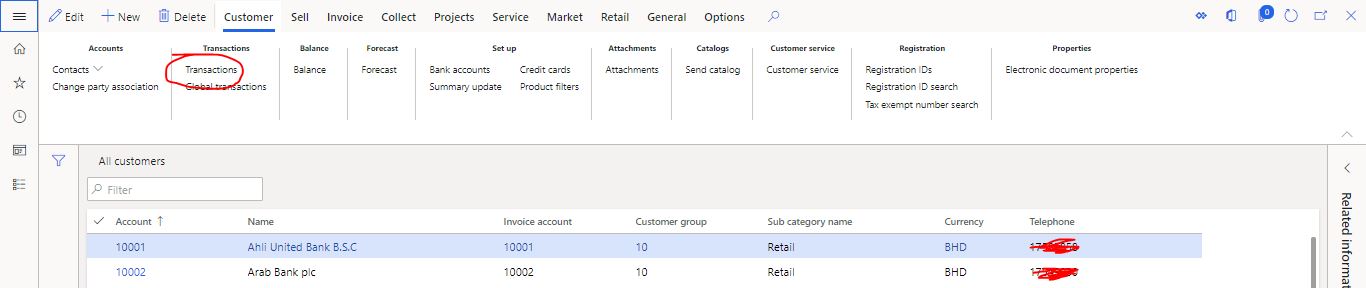
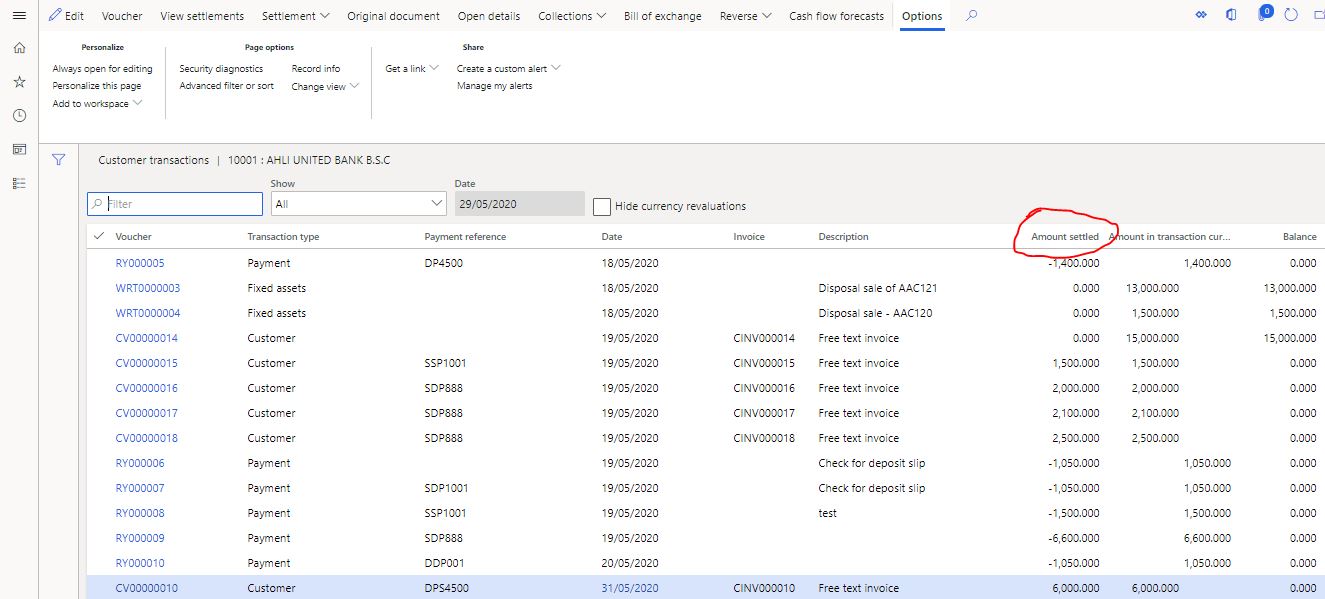
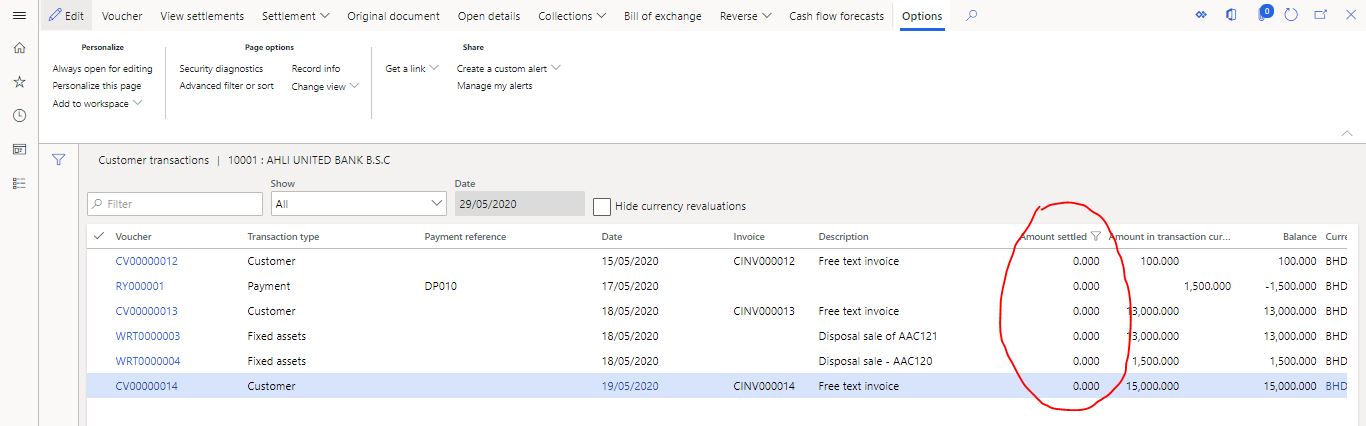
    1) Try first with All customers form. Open "Transactions" and add a column 'Amount settled' through personalization. It will display all transactions which are settled and not yet settled / unpaid.
    0574.JPG

    08732.JPG

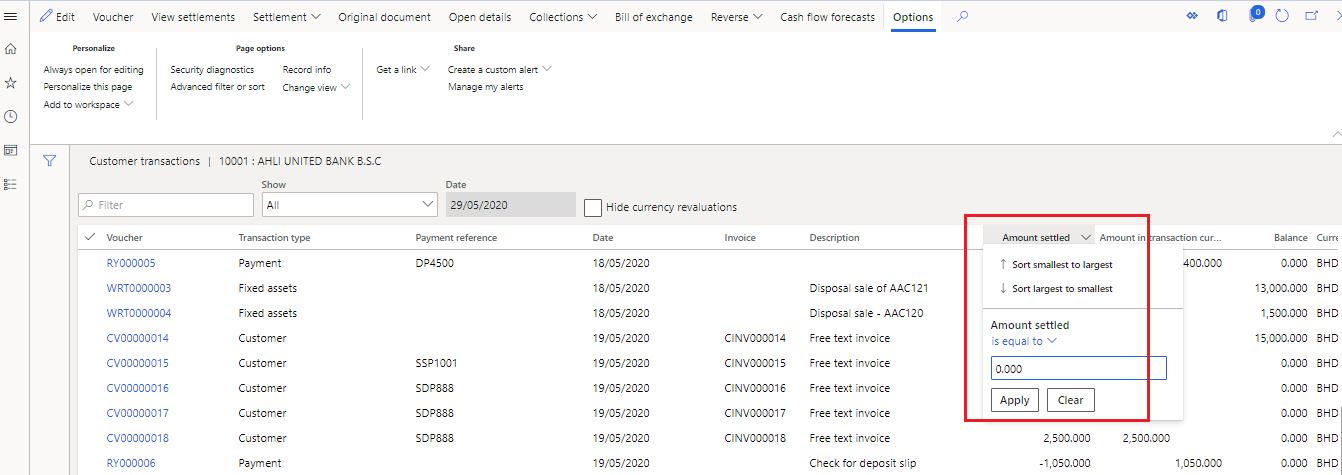
    Now filter with 0.00 in the 'Amount settled' field. It will then display only those transactions which are not yet settled / unpaid.
    31038.JPG

    044735.JPG

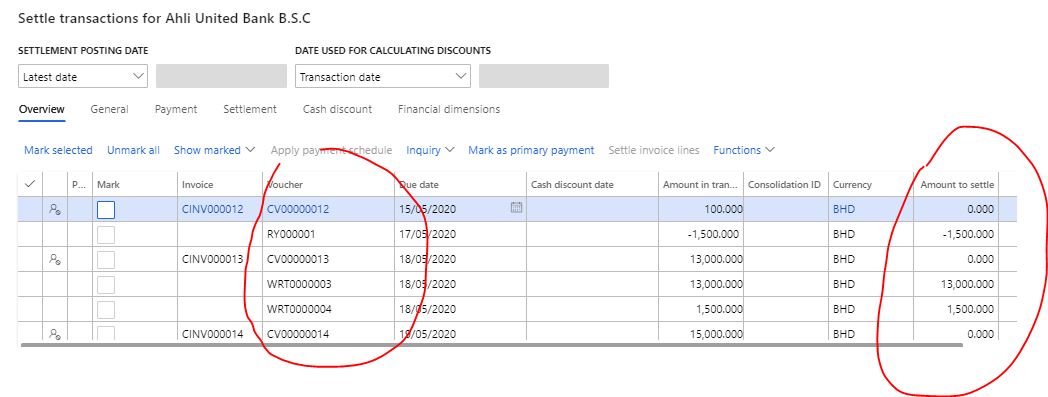
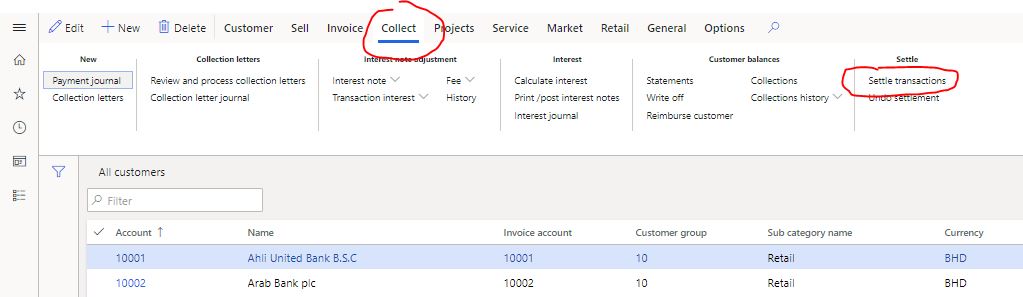
    2) Try with 'Collect > Settle transactions' in All customers form. It will show you only those transactions which are not yet settled / unpaid.
    16.JPG

    17.JPG

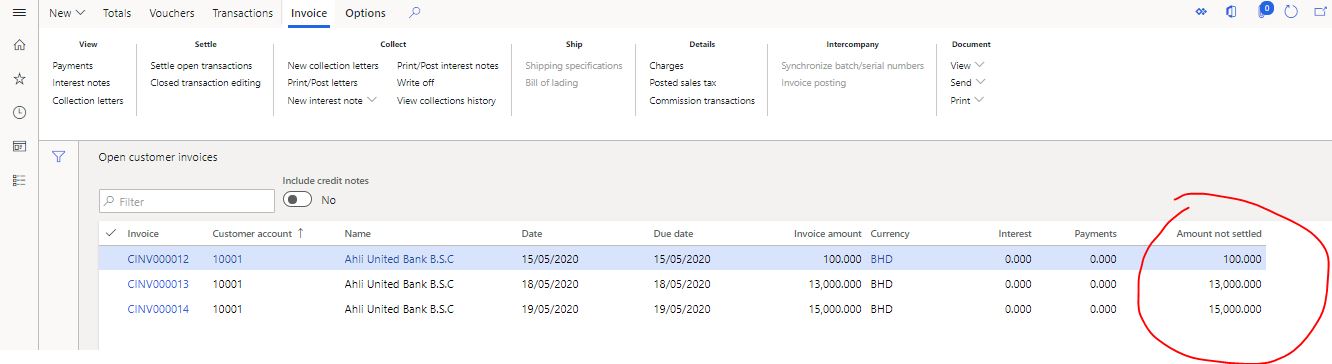
    3) Try with AR > Invoices > Open customer invoices. It will give you same output.
    5618.JPG

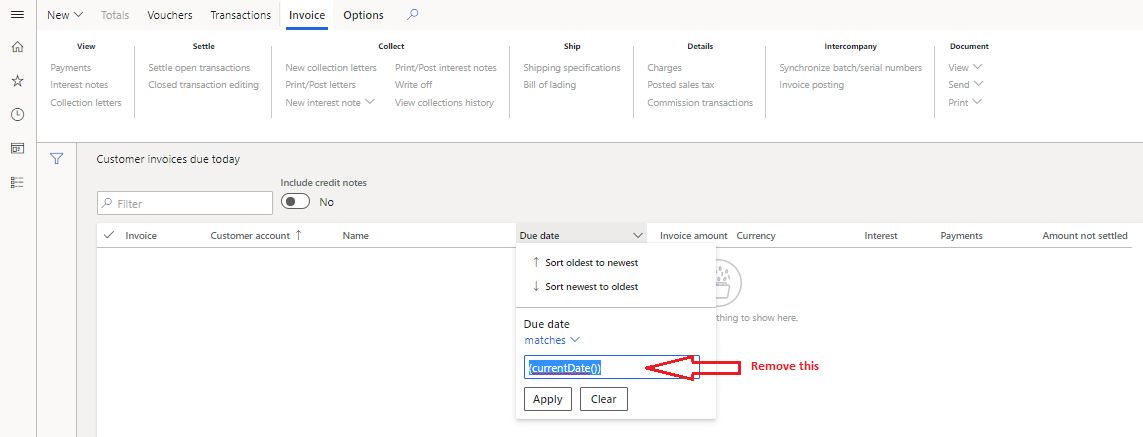
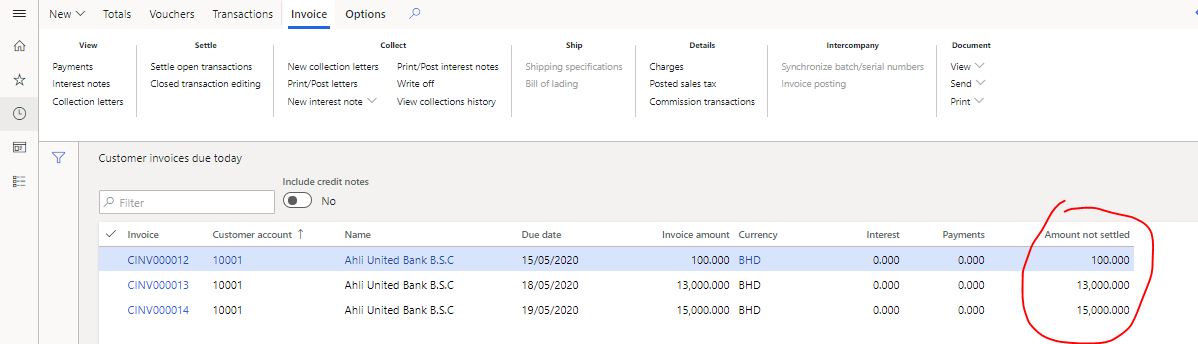
    4) Try with AR > Invoices > Customer invoices due today.
    19.JPG

    First remove this default details as highlighted above in "Due date" column.

    Then generate this report. It will give you the same output.
    68100.JPG

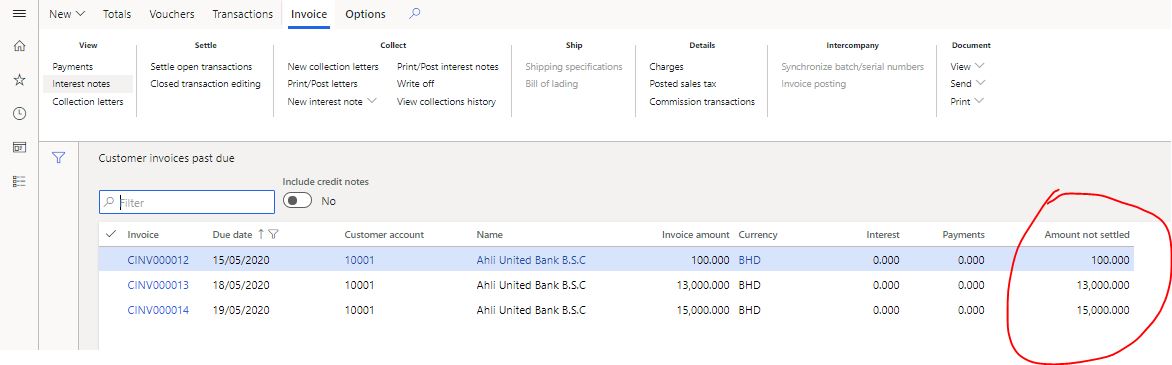
    5) Try with AR > Invoices > Customer invoices past due.
    2402.JPG

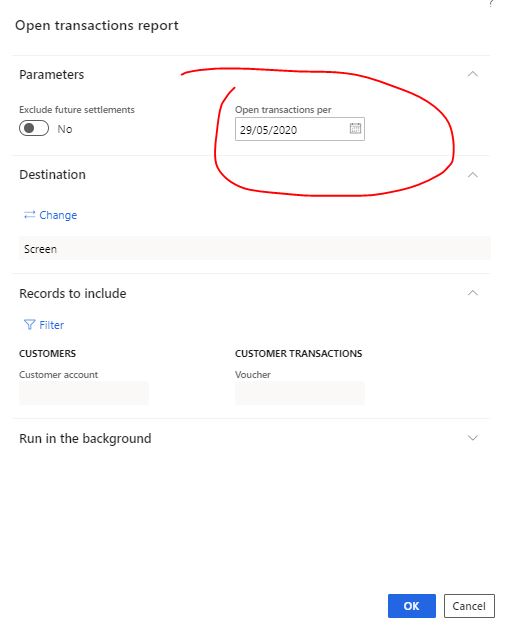
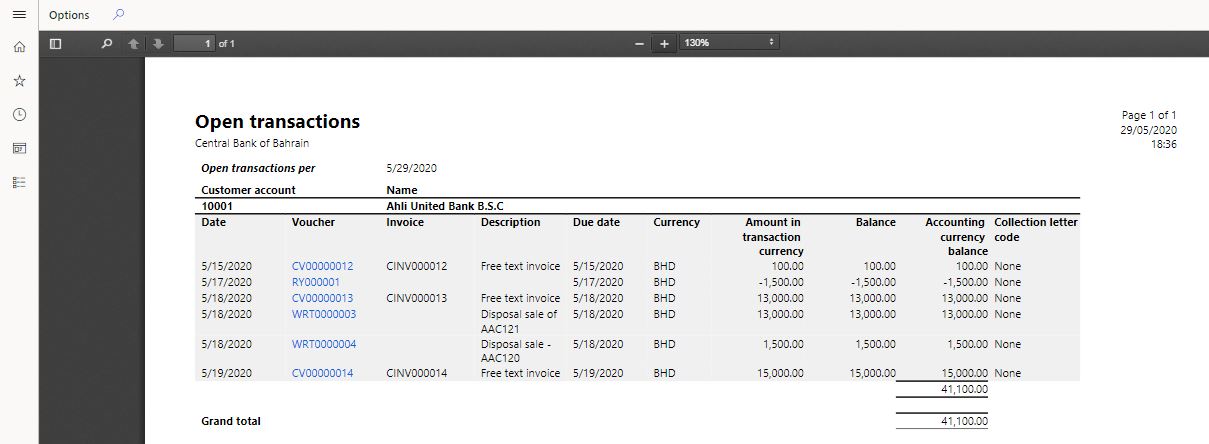
    6) Try with AR > Inquiries and reports > Open transactions report.

    Filter by 'Open transactions per' date and generate the report. You can also filter by any specific customer or for all customer.
    4403.JPG

    2133.JPG

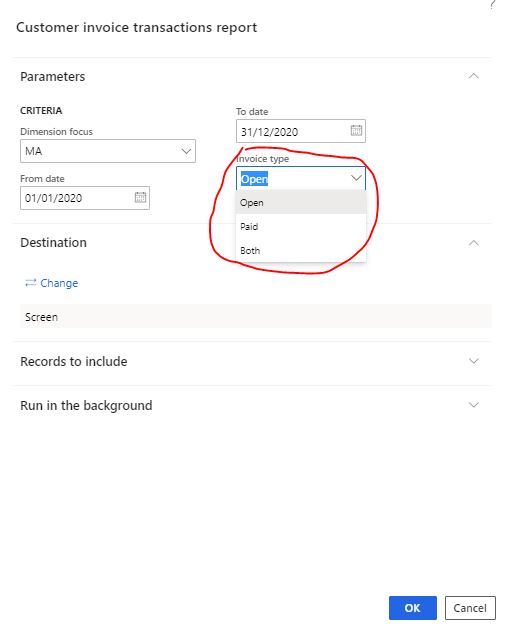
    7) Try with AR > Inquiries and reports > Invoices > Customer invoice transactions report.

    Filter by Date, Dimension focus, Customer account (or all customers), Invoice type -- "Open", "Paid", "Both" and generate the report.
    17550.JPG

    There must be many other options available to check unpaid / not settled details for customer. You can explore that in system 

    Kindly check and provide your feedback.

    Best regards,
    Sourav Dam

    Kindly mark this thread 'Yes' if this is answered your query which may help other community members in this forum.

  • Suggested answer
    SouravDam Profile Picture
    11,730 on at

    Hello Sallyann T,

    Kindly go through the detail as explained and provide your feedback in the Forum.

    Best regards,
    Sourav Dam

    Kindly mark this thread 'Yes' if this is answered your query which may help other community members in this forum.

  • nbarrow Profile Picture
    10 on at

    Hello Sourav, I am attempting to achieve the same thing as the original poster, however I am not seeing the same options as shown in you screenshots. For example, I am not seeing a tab for Transactions under Customer on the All Customers page. I am also missing the entire Collect tab in all customers page. Does this mean I am missing permissions? Thanks!

  • Suggested answer
    SouravDam Profile Picture
    11,730 on at

    Yes nbarrow, you may need to check what role and privileges have been assigned to your user id.

    If you are not a system admin, then please contact your system admin who can check and update your security privilege.

    Regards,
    Sourav

Under review

Thank you for your reply! To ensure a great experience for everyone, your content is awaiting approval by our Community Managers. Please check back later.

Helpful resources

Quick Links

Responsible AI policies

As AI tools become more common, we’re introducing a Responsible AI Use…

Neeraj Kumar – Community Spotlight

We are honored to recognize Neeraj Kumar as our Community Spotlight honoree for…

Leaderboard > Finance | Project Operations, Human Resources, AX, GP, SL

#1
André Arnaud de Calavon Profile Picture

André Arnaud de Cal... 456 Super User 2025 Season 2

#2
Martin Dráb Profile Picture

Martin Dráb 429 Most Valuable Professional

#3
BillurSamdancioglu Profile Picture

BillurSamdancioglu 239 Most Valuable Professional

Last 30 days Overall leaderboard

Product updates

Dynamics 365 release plans