web
You’re offline. This is a read only version of the page.
close
Skip to main content

Notifications

Announcements

No record found.

Community site session details

Community site session details

Session Id :
Microsoft Dynamics 365 | Integration, Dataverse...
Suggested Answer

Read Auditing

(1) ShareShare
ReportReport
Posted on by 8
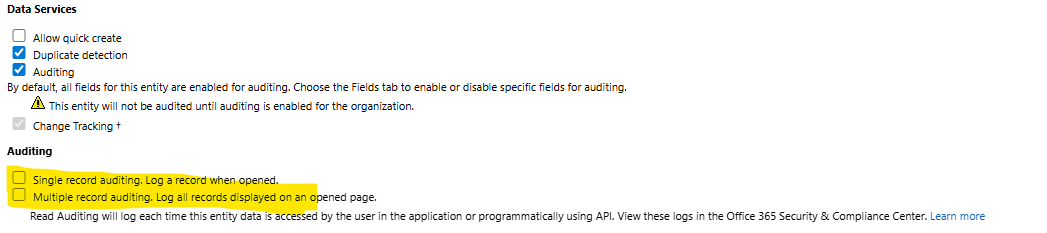
The Legacy interface contained a couple of checkboxes for each table (See below screen shot).
When you set up Read Auditing in the Modern interface these do not exist. I set up auditing and found logs coming through into Purview (Single read and Multiple read).
Are these Legacy checkboxes still required to be checked to get any additional logs, or are they no longer relevant?
Categories:
I have the same question (0)
  • Nour Abuzaid Profile Picture
    197 on at
    No — the legacy read-auditing checkboxes are no longer relevant in the Modern interface. Enabling activity logging at the environment level and auditing on the relevant tables is sufficient for logs (Single read, Multiple read) to flow into Purview.
     

    In Dataverse activity logging (when integrated with Purview), the “Single read” and “Multiple read” entries represent different patterns of data access:

    1. Single Read
    What it is: A log entry for when a user or system process retrieves a single record from a table.
     
    Typical example:
       a.Opening a record form in Dynamics 365 (e.g., opening a single Contact record to view its details).
       b.Running a query that fetches exactly one row based on a unique ID.

    Why it matters: Useful for tracking when specific sensitive records are viewed — especially important in compliance or data protection scenarios.
     
    2.Multiple Read
    What it is: A log entry for when a user or process retrieves multiple records in one operation.
    Typical example:
       a.Opening a list view or dashboard that loads several records at once.
       b.Running an advanced find or a bulk query that returns many rows.

    Why it matters: Helps detect potential bulk data access or extraction, which could indicate misuse or data leakage.


    Ref:  Microsoft Docs – Manage Dataverse auditing

  • DAnny3211 Profile Picture
    11,397 on at

    Hi,

    Great question! In the Modern interface of Dynamics 365, the legacy checkboxes for Single record auditing and Multiple record auditing are no longer required if you're seeing logs successfully flowing into Microsoft Purview.

    Key Points:

    • If Read Auditing is enabled and you're receiving logs (both single and multiple reads), then the legacy checkboxes are not necessary for additional logging.
    • The Modern interface handles auditing configuration differently, and the presence of logs in Purview confirms that the setup is working as intended.
    • You can still fine-tune auditing by enabling/disabling specific fields under the Fields tab.

    Let me know if you'd like help reviewing your auditing setup or optimizing it for compliance!

    Best regards,
    Daniele

  • CU10082147-3 Profile Picture
    8 on at
    Thanks for the responses DAnny3211 and Nour
     
    I did find, in the link you provided Nour, the following text which suggested, by MSFT, that the checkboxes are still required. The article has a fairly recent date on it (20/06/2025). Makes me even more confused.
     
  • Suggested answer
    Quartzite Profile Picture
    135 on at

    In the modern interface for Dataverse auditing, those legacy checkboxes you highlighted (Single record auditing and Multiple record auditing) are no longer relevant.

    Here’s why,

    Old behavior (Legacy UI)

    Those two checkboxes explicitly controlled whether reads were logged when opening a single record or when retrieving a list of records.
    They were part of the classic entity customization form.
     

    Modern behavior

    Microsoft consolidated read auditing into the Auditing toggle at the table level (plus the org-wide auditing setting).
    When you enable read auditing now in the modern interface, both single and multiple record reads are logged automatically into Microsoft Purview / M365 Compliance Center — there’s no need to toggle them separately.
    The modern experience doesn’t even show those checkboxes; the functionality is always on if read auditing is enabled.

    If you’re using the modern auditing setup, you do not need to go back and check those legacy boxes — the system will already log both single and multiple reads once auditing is enabled for the table and for the organization. The legacy UI options are just an old configuration artifact.

    I hope this will help you.

Under review

Thank you for your reply! To ensure a great experience for everyone, your content is awaiting approval by our Community Managers. Please check back later.

Helpful resources

Quick Links

Responsible AI policies

As AI tools become more common, we’re introducing a Responsible AI Use…

Neeraj Kumar – Community Spotlight

We are honored to recognize Neeraj Kumar as our Community Spotlight honoree for…

Leaderboard > Microsoft Dynamics 365 | Integration, Dataverse, and general topics

#1
Siv Sagar Profile Picture

Siv Sagar 93 Super User 2025 Season 2

#2
#ManoVerse Profile Picture

#ManoVerse 76

#3
Martin Dráb Profile Picture

Martin Dráb 64 Most Valuable Professional

Last 30 days Overall leaderboard

Product updates

Dynamics 365 release plans



