web
You’re offline. This is a read only version of the page.
close
Skip to main content

Announcements

News and Announcements icon
Community site session details

Community site session details

Session Id :
Microsoft Dynamics GP (Archived)

Bank Reconcile Diffrence

(0) ShareShare
ReportReport
Posted on by

Please provide  the procedure for Drill down/figure out  and rectify the bank reconciliation difference.(attached below  130.00 KD difference )
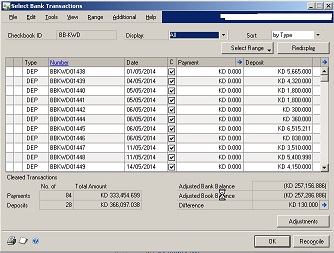
Somebody please help ..

Thanks in advance 

Belraj

*This post is locked for comments

I have the same question (0)
  • Suggested answer
    Community Member Profile Picture
    on at

    Hi Belraj,

    Please find the below link & attached KB Article that may assist you to fix the above case

    www.erpsoftwareblog.com/.../bank-statement-reconciliation-in-ms-dynamics-gp-checkbook-vs-general-ledger-how-to-guide

    support.microsoft.com/.../864652

  • Suggested answer
    Community Member Profile Picture
    on at

    @Nataraj, the article you provided tackles the difference between Banks & GL, the question is something else!

    You cannot drilldown into the variance, this figure shows the difference between your checkbook statement balance and your GP transactions balance.

  • Community Member Profile Picture
    on at

    Thanks

    Mr Mohammad.Daoud

    But how to find/rectify the diference?

    Regards

  • Suggested answer
    soma Profile Picture
    24,410 on at

    Belraj,

    First of all you should confirm your Bank Reconciliation Balances(Adjusted Bank Balance & Adjusted Book Balance). Then you need to check the Cash Account balance for the checkbook ID. Finally you should adjust the difference to zero with marking the Cleared Transactions from the Scrolling window.

    If your Bank/Book Balances are correct with marking all the Cleared Transactions but difference won't become to Zero, then you need to create some decrease/increase adjustments in Bank transactions entry.

    Note: Better contact your finance team to check all the balances and create some adjustments if needed.

    Hope this helps!!!

  • Community Member Profile Picture
    on at

    Dear Soma,

    Thank you very much for your sudden response 

    Please find below image which is from before doing any adjustment And i couldn't find any transaction with that amount. Please help .

    Thanks in advance

  • soma Profile Picture
    24,410 on at

    Is your Check Book Cash account Balance is tally with the Reconcile Adjusted Book Balance?

  • Community Member Profile Picture
    on at

    Dear Soma ,

    Thanks

    Yes.Check Book Cash account Balance is tally with the Reconcile Adjusted Book ..

    Please Advice.

  • Suggested answer
    soma Profile Picture
    24,410 on at

    First check if any batches are pending in Master Posting window(Tools-->Routines-->Master Posting). If so, then post the batch and then go the Select Bank Reconcile window to find the transaction for the difference.

    Hope this helps!!!

  • Community Member Profile Picture
    on at

    Dear soma ,

    I did it and no pending batches for that months. But .Still shows the same difference.Is there any other way to figure it out from SQL itself?

    Please advice.

    Thanks

  • Heather Roggeveen Profile Picture
    9,150 on at

    I think you need to go right back to the beginning to try and troubleshoot.  Generally this out of balance is completely related to not having a transaction in the bank rec screen or not correctly ticking off against the statement.  It has nothing to do with the GL balance in any way.

    Here are some questions that may help us:

    - Is this the first time you are doing a bank reconciliation?  If so, there may be some adjusting entries that need to happen.  If not, then move to the next question.

    - If you enter $0 as the bank statement ending balance on the reconcile bank statements window with any ending date (don't use a cut off date) and click on transactions do the balances compare with the chequebook maintenance window i.e. Adjusted Book Balance = Current Chequebook Balance and Difference = Last Reconciled Balance. If yes, then continue.

    - Now do one day only of the bank reconciliation - enter bank statement closing balance, closing date, leave cut off date open and click on transactions and mark off. Ensure to process any adjustments e.g. bank fees.

    - Let us know the results. This issue may be too complex to deal with via the forums and may need you to work with your Dynamics GP partner.

Under review

Thank you for your reply! To ensure a great experience for everyone, your content is awaiting approval by our Community Managers. Please check back later.

Helpful resources

Quick Links

Season of Sharing Community Challenge Launch!

Jump in, show your community spirit, and win prizes!

Women in Power Builds Momentum

Expanding mentorship, skilling, and AI innovation

Congratulations to the May Top 10 Community Leaders

These are the community rock stars!

Leaderboard > 🔒一 Microsoft Dynamics GP (Archived)

#1
Dan Liebl Profile Picture

Dan Liebl 2

Last 30 days Overall leaderboard

Featured topics

Product updates

Dynamics 365 release plans



