web
You’re offline. This is a read only version of the page.
close
Skip to main content

Announcements

News and Announcements icon
Community site session details

Community site session details

Session Id :
Small and medium business | Business Central, N...
Suggested Answer

Automatically refresh document after inserting a new line

(1) ShareShare
ReportReport
Posted on by 318

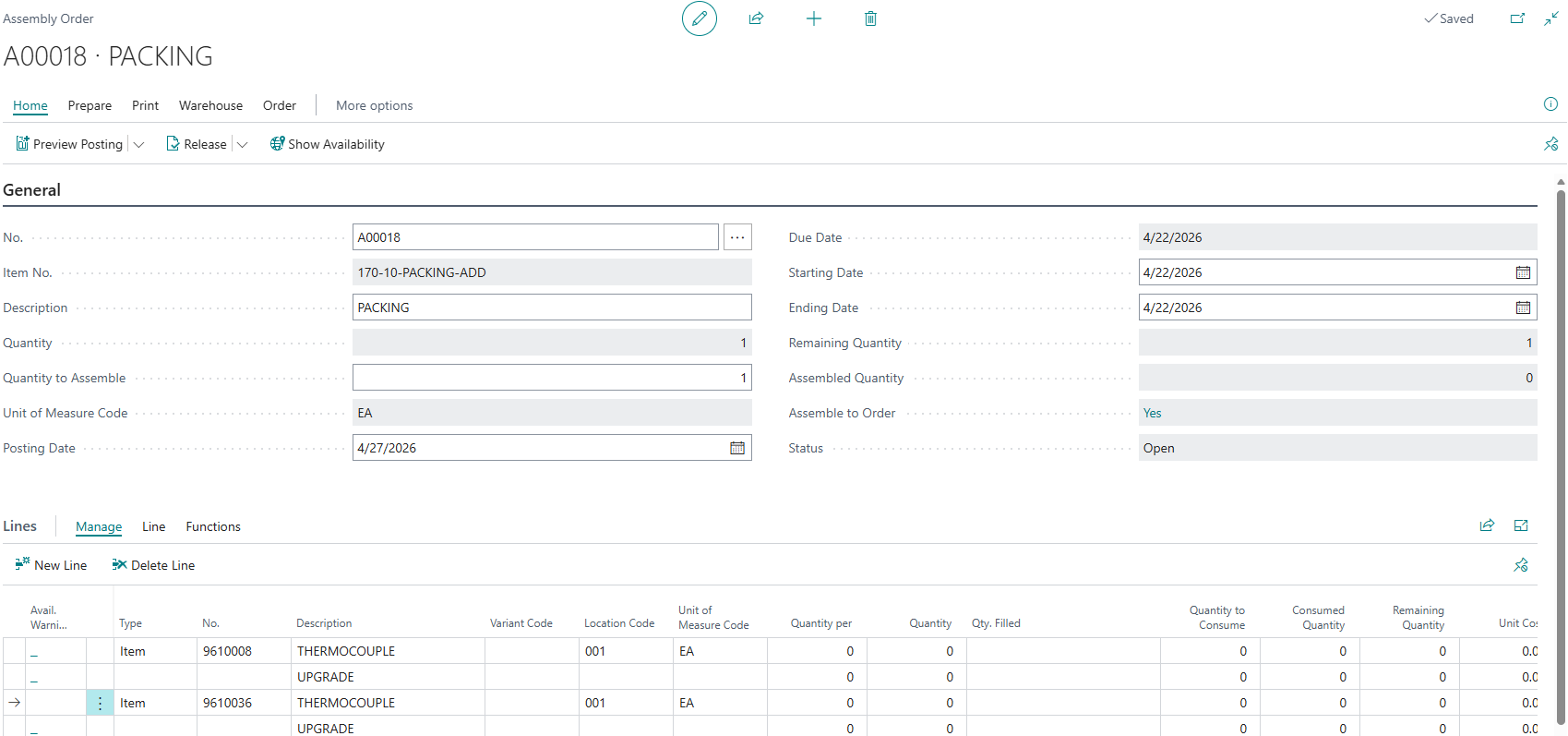
Hello. I am working on a table extension where the system would insert an “upgrade” line as shown in the screenshot below when new lines with certain items are inserted. I noticed that the upgrade line does not appear unless we refresh the page or click on the next line. Is there a way to avoid having to refresh the page or click on the next line but have the upgrade line show up immediately when the item no. is entered/selected? If that type of customization is not possible, is there any AL function we can use to automatically refresh the page after the item line is inserted? I tried using an OnAfterValidate field trigger for the No. field and an OnAfterInsert table extension trigger for the Assembly Line table but in both cases, the upgrade line does not get displayed immediately unless I refresh the page.


Any suggestions and/or code samples would be greatly appreciated. Thank you.
 

I have the same question (0)
  • Manish Sharma Profile Picture
    142 on at

    Is your custom code called via a codeunit ?
    have you used CurrPage.Update

  • Suggested answer
    Teagen Boll Profile Picture
    3,624 Super User 2026 Season 2 on at

    You are just updating the table with the OnAfterValidate and OnAfterInsert. You'll need to refresh the page itself which you should be able to use CurrPage.Update like this:

    You can read about the page updates here: Page.Update([Boolean]) Method - Business Central | Microsoft Learn


    Best,


    Teagen Boll, CPA


  • Suggested answer
    Mansi Soni Profile Picture
    10,390 Super User 2026 Season 2 on at

    Hello @AK-13051749-0 ,

    https://learn.microsoft.com/en-us/dynamics365/business-central/dev-itpro/developer/methods-auto/page/page-update-method
    https://learn.microsoft.com/en-us/dynamics365/business-central/dev-itpro/developer/triggers-auto/events/page/devenv-onaftervalidateevent-page-trigger/

    I hope this helps. If you find it helpful, please consider marking it as the verified answer.

    Regards,
    Mansi Soni

Under review

Thank you for your reply! To ensure a great experience for everyone, your content is awaiting approval by our Community Managers. Please check back later.

Helpful resources

Quick Links

Season of Sharing Community Challenge Winners!

Congratulations to our community stars!

Women in Power Builds Momentum

Expanding mentorship, skilling, and AI innovation

Congratulations to the July Top 10 Community Leaders

These are the community rock stars!

Leaderboard > Small and medium business | Business Central, NAV, RMS

#1
OussamaSabbouh Profile Picture

OussamaSabbouh 626 Super User 2026 Season 2

#2
YUN ZHU Profile Picture

YUN ZHU 425 Super User 2026 Season 2

#3
Grigorios Mavrogeorgis Profile Picture

Grigorios Mavrogeorgis 384 Super User 2026 Season 2

Last 30 days Overall leaderboard

Featured topics

Microsoft Training Manuals

Product updates

Dynamics 365 release plans
