web
You’re offline. This is a read only version of the page.
close
Skip to main content

Announcements

No record found.

News and Announcements icon
Community site session details

Community site session details

Session Id :
Microsoft Dynamics AX (Archived)

OData Service in D365

(0) ShareShare
ReportReport
Posted on by

Hi friends,

            I am trying to create odata Service but am getting error like,
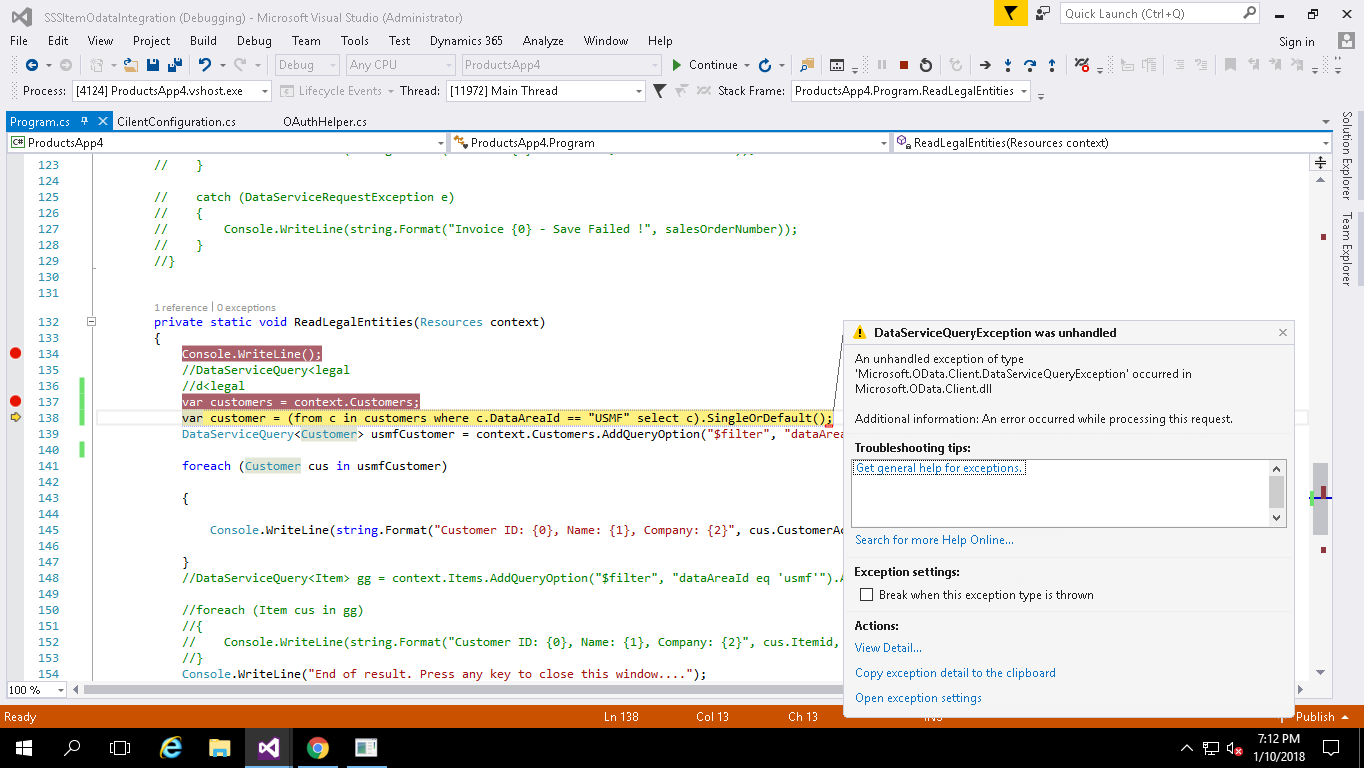
7484.image.png

my client configuration is

UriString = "usnconeboxax1aos.cloud.onebox.dynamics.com",
UserName = "padmapriya.v@*****.com"
Password = "*****@123",
ActiveDirectoryResource = "usnconeboxax1aos.cloud.onebox.dynamics.com",
ActiveDirectoryTenant = "https://login.windows.net/******.onmicrosoft.com",
ActiveDirectoryClientAppId = "*****",
ActiveDirectoryClientAppSecret = "lUs6LJtzWscKTpJZBMgkCng7es2BDkY=",

before few months it worked fine , Now it shows an error 

can any one suggest me an solution , 

Thanks & regards,

padmapriya

*This post is locked for comments

I have the same question (0)
  • Martin Dráb Profile Picture
    239,178 Most Valuable Professional on at

    What if you click "View details"? Also, have you tried AX OData service log (Event Viewer)?

    Which authentication mechanism do you want to use? I see you specified both username/password and the app secret, which is weird, as you can't use both at once. Decide which one you want, remove the other and review the setup related to your choice (e.g. it the app secret token hasn't expired).

  • Community Member Profile Picture
    on at

    Hi Martin,

        I tried to view the error detail in inner exception, It shows me the error like

    "{"AADSTS50020: User account 'padmapriya.v@*****.com' from identity provider 'sts.windows.net/.../&; does not exist in tenant '*****.com' and cannot access the application 'cb5c660e-ad09-4895-90a0-778786cdf956' in that tenant.  The account needs to be added as an external user in the tenant first.  Sign out and sign in again with a different Azure Active Directory user account.\r\nTrace ID: 8130449d-8a5b-44df-85ca-a0e612250600\r\nCorrelation ID: 22718c35-f71a-4c28-9a40-3f86e67b5484\r\nTimestamp: 2018-01-11 07:15:52Z"}"

    and one more thing , i removed  the app secret id .

    Thanks & regards,

    padmapriya

  • Martin Dráb Profile Picture
    239,178 Most Valuable Professional on at

    The error message sounds quite clear. It says that the account doesn't belong to the AAD tenant and you should add it as an external user in the AAD tenant, or you should use another account that already exists there.

  • Salman Pervaiz Profile Picture
    80 on at

    Account does not exist for your AAD. Add this account and as Martin said above you need to choose between one auth mechanism.

Under review

Thank you for your reply! To ensure a great experience for everyone, your content is awaiting approval by our Community Managers. Please check back later.

Helpful resources

Quick Links

Introducing the 2026 Season 1 community Super Users

Congratulations to our 2026 Super Stars!

Meet the Microsoft Dynamics 365 Contact Center Champions

We are thrilled to have these Champions in our Community!

Congratulations to the March Top 10 Community Leaders

These are the community rock stars!

Leaderboard > 🔒一 Microsoft Dynamics AX (Archived)

#1
CP04-islander Profile Picture

CP04-islander 16

#2
GiacomoRovai Profile Picture

GiacomoRovai 4

#3
Douglas Noel Profile Picture

Douglas Noel 2

Last 30 days Overall leaderboard

Featured topics

Product updates

Dynamics 365 release plans
