web
You’re offline. This is a read only version of the page.
close
Skip to main content

Announcements

No record found.

News and Announcements icon
Community site session details

Community site session details

Session Id :
Microsoft Dynamics AX (Archived)

Debug mode option in user settings

(0) ShareShare
ReportReport
Posted on by 3,817

Hello all,


There is an option in user settings as following:
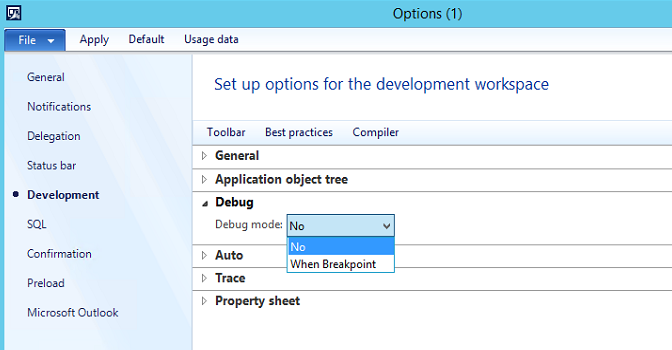
Debug-mode.png

What does change when this option is set to "No"?

How I came to this issue is:

I was releasing products and I noticed that some data was created wrong, so I wanted to stop the release. I ended task of AX under my user but it did not stop. So, I restarted the AOS. 

As I have done many times before, I wanted to delete released products but I faced with the "Debug assertion failed" error.

Then I found this thread "Debugger Assertion Failure Error !!!!!!!!!!!!" , thanks to  Pankaj Guptaas written in the last post there I switched the debug mode setting to No. Now I am able to delete the released products with no error.

By the way, these products have no transaction.

And I also wonder: Am I damaging anything in the application with doing this?


*This post is locked for comments

I have the same question (0)
  • Verified answer
    Bilal Issa Profile Picture
    4,370 on at

    Hi,

    I don't think you are damaging anything , because all of normal users will have this option set to No, it is mainly used by developers.

    Regards,

    Bilal

  • Verified answer
    Denis Macchinetti Profile Picture
    16,444 on at

    Hi Fatih

    I'm agree with Bilal.

    About your issue, my unique suggestion is to check the exception just to be aware on it.

  • Verified answer
    Travis Bagley Profile Picture
    395 on at

    You won't damage anything, but you should investigate why you are getting the error. That usually means there is something either data or code related that is incorrect. You should debug through this to find where the assertion error is being thrown and why. You shouldn't get that message with the when break point set to yes.

Under review

Thank you for your reply! To ensure a great experience for everyone, your content is awaiting approval by our Community Managers. Please check back later.

Helpful resources

Quick Links

Introducing the 2026 Season 1 community Super Users

Congratulations to our 2026 Super Stars!

Congratulations to our 2025 Community Spotlights

Thanks to all of our 2025 Community Spotlight stars!

Leaderboard > 🔒一 Microsoft Dynamics AX (Archived)

#1
Joris dG Profile Picture

Joris dG 5

#2
Alexey Lekanov Profile Picture

Alexey Lekanov 2

#2
Henrik Nordlöf Profile Picture

Henrik Nordlöf 2 User Group Leader

Last 30 days Overall leaderboard

Featured topics

Product updates

Dynamics 365 release plans
