web
You’re offline. This is a read only version of the page.
close
Skip to main content

Notifications

Announcements

Community site session details

Community site session details

Session Id :
Microsoft Dynamics CRM (Archived)

Is it possible to write back the data into CRM from a custom grid on the MS Portal?

(0) ShareShare
ReportReport
Posted on by 290
Hello!
basically, I want to achieve to write back the data into CRM from a custom grid on the MS Portal. I tested first one simple ajax call but it was rejected. Is it possible to get a client side context within JavaScript in MS Portal?
Please check the code below.

function test_ajax() {

    //debugger;
    var url2 = "adxportal1.crm4.dynamics.com/.../AccountSet"
    var account = {};
    account.Name = "Sample Account";
    var jsonAccount = window.JSON.stringify(account);
    $.ajax({
        type: "POST",
        contentType: "application/json; charset=utf-8",
        datatype: "json",
        url: url2,
        data: jsonAccount,
        beforeSend: function (XMLHttpRequest) {
            //Specifying this header ensures that the results will be returned as JSON.
            XMLHttpRequest.setRequestHeader("Accept", "application/json");
        },
        success: function (data, textStatus, XmlHttpRequest) {
            account = data.d;
        },
        error: function (XMLHttpRequest, textStatus, errorThrown) {
            alert(errorThrown);
        }
    });
}
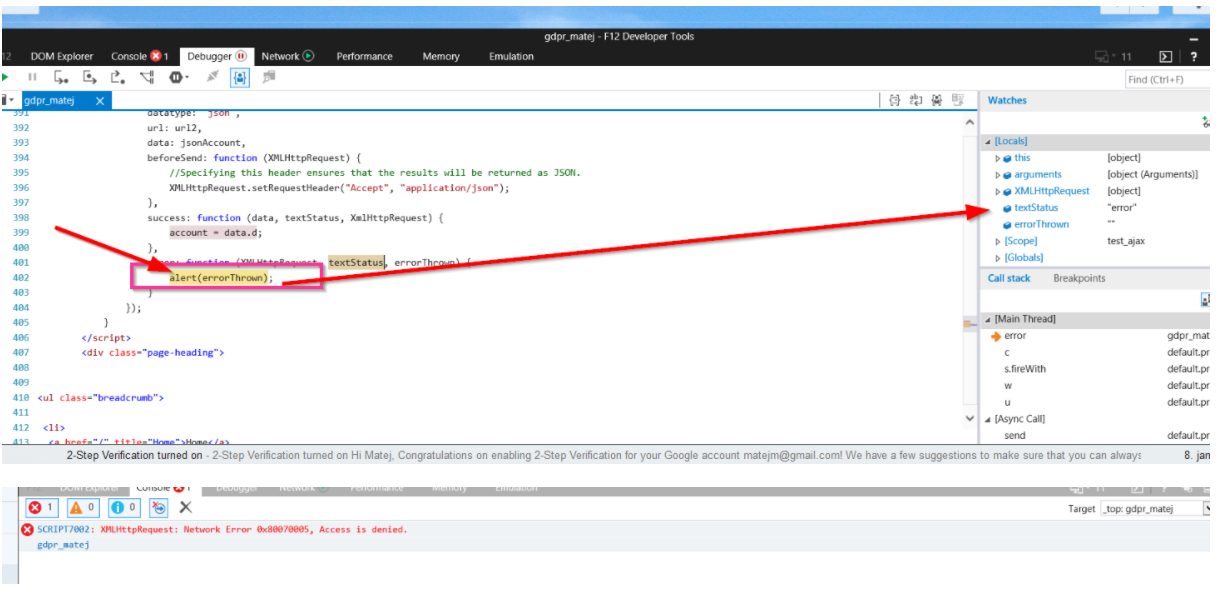
2677.Error.PNG

*This post is locked for comments

I have the same question (0)
  • tw0sh3ds Profile Picture
    5,600 on at

    I hope that you aware of the fact that if you will do it in JavaScript, then basically every user of your portal (so probably non-CRM user in most cases) will be able to access your CRM using exactly the same technique?

  • michigan Profile Picture
    100 on at

    That is true. The problem by jquery ajax call is also authorization, because dynamics crm portal is seperate application. I think ajax call is terminated, because portal user is not authorized to do CRUD operations over CRM data. Am I right? We would be very thankful if you could suggest us different approach to save changes made on portal back to CRM. I know it is possible to create .aspx site that is hosted in Azure and include it to our portal. But we are trying to find different way to postback data (without Azure hosting).  

  • Suggested answer
    tw0sh3ds Profile Picture
    5,600 on at

    You have to be more specific, because everything you change on the portal is in fact saved in CRM, because Portals is simply a CMS system with Dynamics 365 as a backend. The easiest way of doing some custom logic is to create a plugin in CRM that will run on Create/Update of entity which is saved on the portal

  • michigan Profile Picture
    100 on at

    demo_5F00_image.png

    Sorry for my late response. We have Web Template created within CRM that shows some data from CRM on portals page (we're reading data using liquids template fetchxml query).  These data are shown in HTML table. Each row has a checkbox that portal user can change. After user finish with changes, he has to save them by clicking Save button. After button click changes should be saved to CRM record. We're using online version of portal and crm. Thanks.

  • Suggested answer
    Arpit Shrivastava Profile Picture
    7,518 User Group Leader on at

    Hey Matej,

    Before come up with any solution, I am just curious to know, why you need to have HTML table to show CRM data on Portal despite of having Entity List option available in CRM Portals.
    If you expose the Entity List on portal, you could Edit/View and Update the records directly from the list. I might not be aware of actual requirement.

    Please let me know your requirement in details so that I can help you to provide the best solution.


    Cheers
    Arpit
    arpitmscrmhunt.blogspot.com

  • michigan Profile Picture
    100 on at

    Dear Arpit,

    I am new to ADX portal developing, so I am getting to know all possible options. That is the reason why I decided to ask for help on this forum.

    Scenario:

    I want to create form that is built from two sections:

    First section displays info about logged user (contact). User should have possibility to change displayed data.

    Second section displays some related data to contact (permission related to logged user -> contact record in CRM).  Permissions are custom entity records stored in CRM database and linked to contact.

    Form should look like:

    example_5F00_adxform2.png

    I tried to use oob components. So far I have created  webtemplate that shows entity form and entity list on portal page.  Entitylist contains user related appointments instead of permissions. It should be good for demo. :)

    example_5F00_adxform2.png

    Now I have problem with editing entitylist records. When I try to edit record from grid as portal user, system shows me error:

    example_5F00_adxform_5F00_error.png

    I can't figure out where is the problem.

    Thank you for your help.

  • michigan Profile Picture
    100 on at

    link_5F00_nonentity_5F00_reference.png

    I solved this problem with entity permissions. Now I have new one. :)

    How can I set link to non-entityreference attribute that opens Details (or Edit) form for EntityLists record? We are using Liquid. Thank you.

  • Suggested answer
    Arpit Shrivastava Profile Picture
    7,518 User Group Leader on at

    Hi Matej,

    I have tried below code and it's working fine in my case.

    $('.entitylist').on("loaded", function () {

    //To make the other field/column's value hyperlink
    $("td[data-attribute*='<enter field or column id/schemaname>']").each(function() {


    // Get guid of record - might need to change this line a bit to get the record guid
    var id=$(this).closest('tr').attr("data-id");

    // Partial URL of webpage where you want to redirect the user or the page from which your Edit Entity Form is associated
    var pagewhereToRedirect = "<partial URL of portal webpage where you have to redirect on click of record>";

    // Construct the URL
    var redirect=window.location.href+pagewhereToRedirect+"/?id="+id;


    // Make the field value Hyperlink
    var text=$(this).text();

    $(this).html("<a href="+redirect+">"+text+"</a>");

    });

    });


    Mark this as an answer, If it helps.


    Cheers
    Arpit
    https://arpitmscrmhunt.blogspot.com


Under review

Thank you for your reply! To ensure a great experience for everyone, your content is awaiting approval by our Community Managers. Please check back later.

Helpful resources

News and Announcements

Season of Giving Solutions is Here!

Quick Links

Responsible AI policies

As AI tools become more common, we’re introducing a Responsible AI Use…

Neeraj Kumar – Community Spotlight

We are honored to recognize Neeraj Kumar as our Community Spotlight honoree for…

Leaderboard > 🔒一 Microsoft Dynamics CRM (Archived)

#1
Calum MacFarlane Profile Picture

Calum MacFarlane 4

#2
SA-08121319-0 Profile Picture

SA-08121319-0 2

#2
Alex Fun Wei Jie Profile Picture

Alex Fun Wei Jie 2

Last 30 days Overall leaderboard

Featured topics

Product updates

Dynamics 365 release plans



