web
You’re offline. This is a read only version of the page.
close
Skip to main content

Announcements

No record found.

News and Announcements icon
Community site session details

Community site session details

Session Id :
Customer experience | Sales, Customer Insights,...
Suggested Answer

Security privileges for Opportunities

(0) ShareShare
ReportReport
Posted on by 105

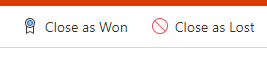
I am having trouble determine which privilege allows some to only close the opportunity as won.  Basically our sales team will create the opportunity, however, they will not be allowed to close them as WON.  This role will be handled by a different role.  I need to remove that right from the sales security role and give it to another role. 
                                                pastedimage1620658573543v1.png

If anyone has an article or can point me in the right direction, I would greatly appreciate it. I feel like I have reviewed every article online :-D 

I have the same question (0)
  • Suggested answer
    meelamri Profile Picture
    13,218 User Group Leader on at

    Hi Kim,

    I'm afraid this is not possible by configuring your security roles. It's possible to hide these buttons for some roles by using JavaScript code. You can also restrict this feature at the server level by implementing a plugin that will run when a user attempts to close an opportunity.

  • Suggested answer
    Torrado Profile Picture
    1,270 on at

    Hello,

    Unfortunately that is not possible to define using Security Roles. You will need to create an Enable Rule trough JavaScript to hide/show each button: https://docs.microsoft.com/en-us/dynamics365/customerengagement/on-premises/developer/customize-dev/define-ribbon-enable-rules 

    To edit the Opportunity ribbon to add the Enable Rule you can use Ribbon Workbench.

    Hope this helps you.

    Please mark the answer as verified if helpful. That will help others in future

Under review

Thank you for your reply! To ensure a great experience for everyone, your content is awaiting approval by our Community Managers. Please check back later.

Helpful resources

Quick Links

Introducing the 2026 Season 1 community Super Users

Congratulations to our 2026 Super Stars!

Meet the Microsoft Dynamics 365 Contact Center Champions

We are thrilled to have these Champions in our Community!

Congratulations to the March Top 10 Community Leaders

These are the community rock stars!

Leaderboard > Customer experience | Sales, Customer Insights, CRM

#1
ManoVerse Profile Picture

ManoVerse 184 Super User 2026 Season 1

#2
11manish Profile Picture

11manish 125

#3
CU11031447-0 Profile Picture

CU11031447-0 100

Last 30 days Overall leaderboard

Product updates

Dynamics 365 release plans
