web
You’re offline. This is a read only version of the page.
close
Skip to main content

Notifications

Announcements

No record found.

Community site session details

Community site session details

Session Id :
Microsoft Dynamics CRM (Archived)

I am getting error message when i try to login on office 365 to create user.

(2) ShareShare
ReportReport
Posted on by 267

1) When i click "new" to create new user in dynamics 365 then it asks me for "users and licensing" button and i click this button then  it redirects me to the sales default dashboard.

2) but when i go directly to this link "https://portal.office.com/adminportal/home"., this page shows me following message.

You don’t have permission to access this page or perform this action.
Close Support Information
Correlation ID:
ncu#fd8dda7c-1981-4d8f-a39c-e19146fc0e6c
Error code:
0

3) But i can go into "my account" and check details then it says to me following:

Details

Become the admin for your organization. As the admin, you’ll control and manage how everyone in your organization uses Office 365

Permissions

You can't revoke permission because this has been assigned to you as part of a subscription or an admin role.

I am using trial version of dynamics 365.
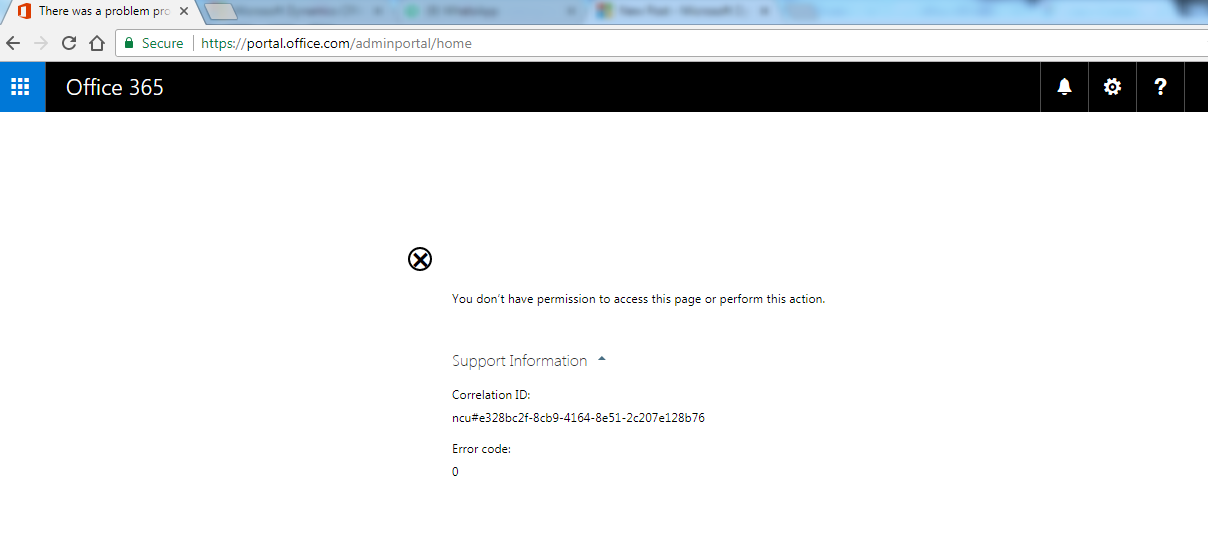
0000.png

Can anyone please let me know what to do now please?

Thank you

*This post is locked for comments

I have the same question (0)
  • Verified answer
    Syed Ibrahim Profile Picture
    6,257 on at

    Login with the admin account to O365 portal which you used to create the trial and add new user and then assign Dynamics CE product licenses to the users .it will automatically add the user in crm. Then go to crm and change the users BU and security roles which you wants to assign.

    Hope this helps.If the suggestion resolved your query .Pls mark it as answered/verified to close the thread.

  • Suggested answer
    Neeraj523 Profile Picture
    on at

    I suspect the portal.office.com login account you are using is not having global admin or user admin privilege. Remember that Dynamics 365 administrator login doesn't have Office portal admin rights by default.    

  • zaub Profile Picture
    267 on at

    @syed, I am using same email address Syed.

  • zaub Profile Picture
    267 on at

    Yes Neeraj, i think so. because i am using same email for dynamics 365 trial version and office 365 so to give global admin privilege to my email what should i do please advise . thanks

    when i created dynamics 365 trial version i was not admin at that time and i was not having all privileges then after login into dynamics 365 i went to my account and i selected my account and then i clicked "promote to admin" for my user then i got all admin privileges for admin in dynamics 365 but for office 365 i dont have such permission i think that is why it is showing me error message i mentioned in question.

  • zaub Profile Picture
    267 on at

    even when i go to user edit page in dynamics 365 and tries to change its "Client Access License (CAL) Information" from "read-only" to "administrative". it gives following message...

    Insufficient Permissions

    You do not have permission to access these records. Contact your Microsoft Dynamics 365 administrator. If you contact support, please provide the technical details.

    Activity ID: 533b2b91-9037-425a-a1b5-73c86a56b734

    then i assign all roles to my user but again same message as mentioned above ....

  • Verified answer
    Community Member Profile Picture
    on at

    You have to assign Dynamics product licenses to everyone who is going to use Dynamics from the office 365 Admin center before they can access Dynamics.

    Go to the Admin center, click Users on the left side, then active users, then click the user who you want to give a license to and click edit next to Product licenses.

    user-roles.JPG

    In order to assign those licenses, you need to be a Global administrator or User management administrator in Office 365 Admin. For managing Dynamics once your licence is assigned you'll want to be either a Global administrator or a Dynamics 365 service administrator in O365 Admin. If you don't already have those admin roles you'll need to get your Global admin to give you them.

    user-roles.JPG

    Once your O365 users have the licenses assigned you should automatically see them in Dynamics 365, though you'll still need to configure their roles and email synchronization.

    Hope that helps,

    Matt

  • zaub Profile Picture
    267 on at

    Hi Matt Horvay,

    thanks for reply. please have a look at image i have shown in my question. i have only those options when i login into office 365. please check image in my question

    Thanks

  • Community Member Profile Picture
    on at

    Zaub,

    I don't see any options at all in that image. It says you don't have permission to access the page. If that's all you see when you go to https://portal.office.com/adminportal/home then you don't have any Office 365 admin roles. You'll need to get whoever is the Office 365 Global Administrator to give you the roles I mentioned above before you'll get any farther.

  • zaub Profile Picture
    267 on at

    Matt Horvay,

    Does it mean now i can not do any thing in office 365, because i am only one who subscribed dynamics 365 trial version ?

    when i created dynamics 365 trial version i was not admin at that time and i was not having all privileges then after login into dynamics 365 i went to my account and i selected my account and then i clicked "promote to admin" for my user then i got all admin privileges for admin in dynamics 365.

  • zaub Profile Picture
    267 on at

    and one thing i noticed that when i go to URL "portal.office.com/" directly then it redirects me to my dynamics 365 organization home page.

Under review

Thank you for your reply! To ensure a great experience for everyone, your content is awaiting approval by our Community Managers. Please check back later.

Helpful resources

Quick Links

Responsible AI policies

As AI tools become more common, we’re introducing a Responsible AI Use…

Neeraj Kumar – Community Spotlight

We are honored to recognize Neeraj Kumar as our Community Spotlight honoree for…

Leaderboard > 🔒一 Microsoft Dynamics CRM (Archived)

#1
SA-08121319-0 Profile Picture

SA-08121319-0 4

#1
Calum MacFarlane Profile Picture

Calum MacFarlane 4

#3
Alex Fun Wei Jie Profile Picture

Alex Fun Wei Jie 2

Last 30 days Overall leaderboard

Featured topics

Product updates

Dynamics 365 release plans



