web
You’re offline. This is a read only version of the page.
close
Skip to main content

Announcements

News and Announcements icon
Community site session details

Community site session details

Session Id :
Microsoft Dynamics CRM (Archived)

Access & Privilege needed, to re-name an Existing user in Dynamic 365 MS CRM

(0) ShareShare
ReportReport
Posted on by

Hi Team,

Thanks in Advance!

Am stuck in something very simple I think.

I have set of user/supporters in my Organization, who have access to create users in MS DYANMICS 365 CRM. They are not system admin, but have roles more than a normal user. They can "create" users in CRM and view most of the setting which ideally a normal user can not see, only he/she cannot edit/create them.

Everything going normal, but "error" comes - when there is request to "re-name" an existing user.

This support team when tries to rename the existing user, they get an error message.
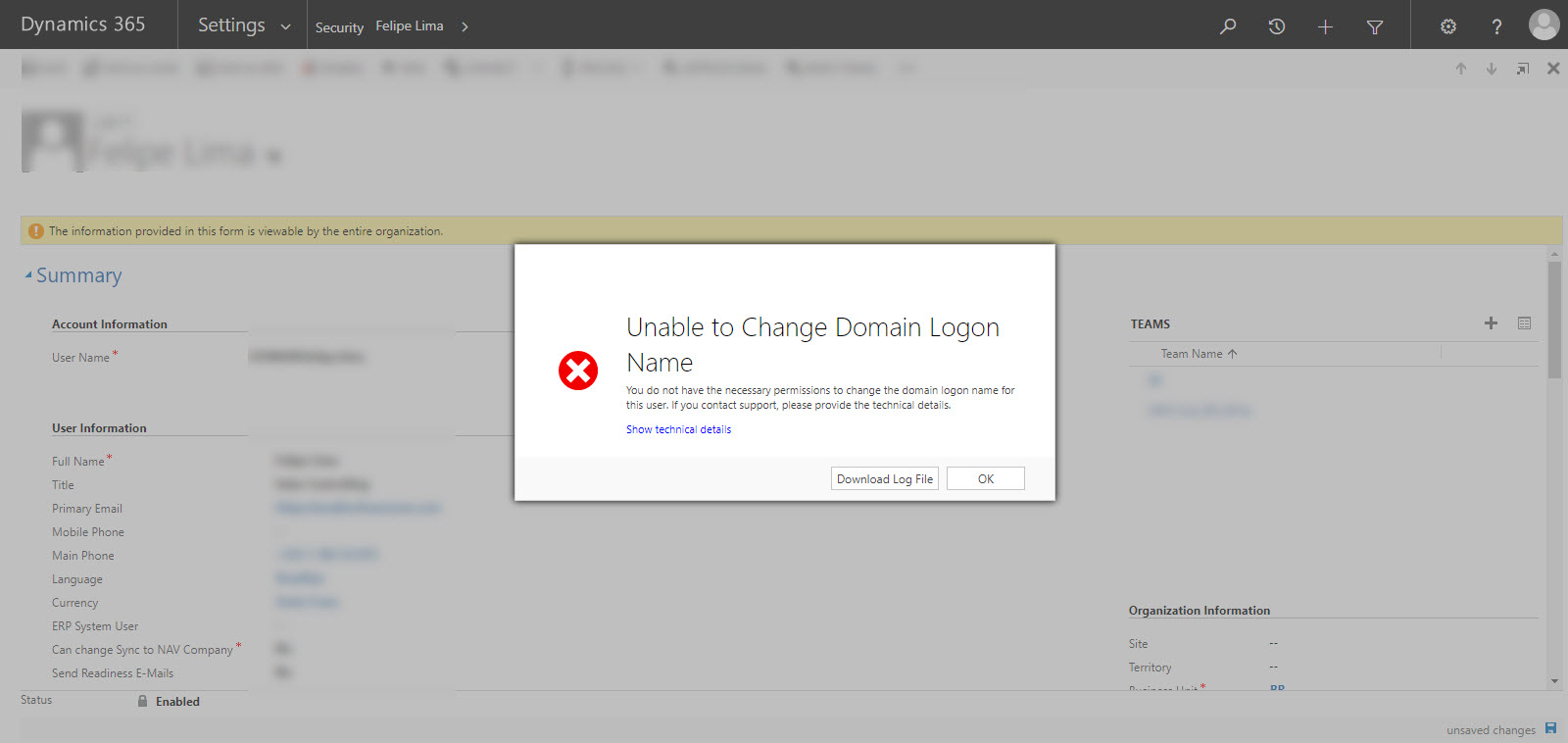
CRM_2D00_Renaming.jpg

 Below is the Log file:

Unhandled Exception: System.ServiceModel.FaultException`1[[Microsoft.Xrm.Sdk.OrganizationServiceFault, Microsoft.Xrm.Sdk, Version=8.0.0.0, Culture=neutral, PublicKeyToken=31bf3856ad364e35]]: Access is denied.Detail:
<OrganizationServiceFault xmlns:i="www.w3.org/.../XMLSchema-instance" xmlns="schemas.microsoft.com/.../Contracts">
  <ActivityId>fcc8f256-6b47-43ec-8529-8d12cca58f9e</ActivityId>
  <ErrorCode>-2147187707</ErrorCode>
  <ErrorDetails xmlns:d2p1="schemas.datacontract.org/.../System.Collections.Generic" />
  <Message>Access is denied.</Message>
  <Timestamp>2019-01-22T12:45:32.5557354Z</Timestamp>
  <ExceptionRetriable>false</ExceptionRetriable>
  <ExceptionSource i:nil="true" />
  <InnerFault i:nil="true" />
  <OriginalException i:nil="true" />
  <TraceText i:nil="true" />
</OrganizationServiceFault>

We are using:

MS Dynamics 365 version 1612 (8.2.2.112) (DB 8.2.2.112) on-premises

It will great to hear from you all :)

Best Regards.

*This post is locked for comments

I have the same question (0)
  • Suggested answer
    gdas Profile Picture
    50,091 Moderator on at

    Hi Jasveer,

    You should have System Administrator to create/update user . I dont think without System Administrator role you can create user .

  • Community Member Profile Picture
    on at

    Hi Goutam,

    Thanks for quick revert.

    I have built a "new" security roles for our Support team - so they can do basics task of an system admin, like creating user. But this team "does not" have System Admin access, because of obvious reason, as we don't want any other actions to be taken by this team, which is ideally our L1 support.

    Any other feedback.

    Best Regards

    Jasveer

  • Suggested answer
    Mahendar Pal Profile Picture
    45,095 on at

    Hi,

    Assuming they have edit permission already but it seems they are missing some specific privilege, can you check event viewer of the server after this error and see if there is any log , another option is to enable tracing in the server it will help you to identify specific privilege which these user is missing.

    You can use this tool to enable tracing in the CRM server: archive.codeplex.com

    and this tool to read trace: archive.codeplex.com

    You can share your finding here.

  • Suggested answer
    Kokulan Profile Picture
    18,054 on at

    You will have to give Business Unit or Org Level Write permission in your custom role for user entity.  Once that's given, they will be able to update user records that are owned by other users in the business. if they have user level write privilege to user entity, they can only rename the ones they own.

  • Community Member Profile Picture
    on at

    Thanks Mahender, sure let me try this.

    Best regards

  • Community Member Profile Picture
    on at

    Thanks Kokulan, the custom role already have Org Level write. And still they are not able to re-name any BU user.

    Though they can create user across globe.

    Best Regards.

  • Suggested answer
    Srikanta Mahapatro Profile Picture
    190 on at

    Hi Jasveer,

    After giving the required security role, can you try to give the Access Mode of user to "Administrative" in Client Access License (CAL) Information section.

    Thanks,

    Srikanta

  • Community Member Profile Picture
    on at

    Thanks Srikanta, this doesnot work we have given that access mode already and tested.

    But thanks again!

    Best Regards.

  • Suggested answer
    Sreevalli Profile Picture
    3,264 on at

    Hi Jasveer,

    As per Error it say you are trying to change the domain name of the user, only CRM Global admin can do such changes.

  • Community Member Profile Picture
    on at

    HI Sreevali,

    Thanks for the feedback.

    This custom roles- is very similar to an admin role. Only - the tab "Customization", has "Read" only Privileges for most of the entities here.

    I think I will run the enable tracer in CRM server (as suggested by Mahender) to check the missing privilege and then share result here.

    Best regards.

Under review

Thank you for your reply! To ensure a great experience for everyone, your content is awaiting approval by our Community Managers. Please check back later.

Helpful resources

Quick Links

Season of Sharing Community Challenge Winners!

Congratulations to our community stars!

Women in Power Builds Momentum

Expanding mentorship, skilling, and AI innovation

Congratulations to the June Top 10 Community Leaders

These are the community rock stars!

Leaderboard > 🔒一 Microsoft Dynamics CRM (Archived)

Last 30 days Overall leaderboard

Featured topics

Product updates

Dynamics 365 release plans
