web
You’re offline. This is a read only version of the page.
close
Skip to main content

Notifications

Announcements

Community site session details

Community site session details

Session Id :
Customer experience | Sales, Customer Insights,...
Answered

Lead Score is not appearing in Lead Record anymore

(0) ShareShare
ReportReport
Posted on by

Hi All,

Recently I'm trying to test the Scoring Lead Model function in Dynamics 365 for Marketing, to see how lead scores function could be used in my next project.

I created a model called "lead scoring" in which condition was set for "Field > City = Tokyo". This means if a lead's address is in Tokyo, then its score would have an extra 70 points. As you can see:

pastedimage1570085350274v1.png

I followed the instructions on docs which suggests using the "Lead to Opportunity Marketing Sales Process" business process flow. I did associate the lead with the existing contact under the "inquiry" stage. The first try of the "Blue Ava" record, as you could see in the following picture, was successful. You can see the score appears in the Lead Score section:

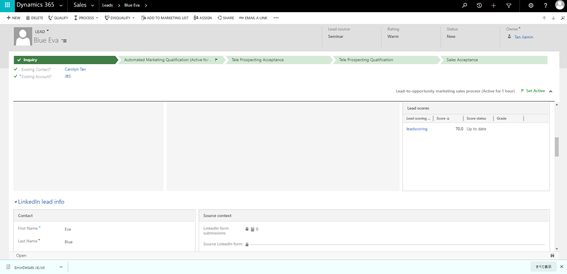
pastedimage1570085490436v2.png

pastedimage1570085501380v3.png

I wanna try a few more times before I create more models. However, the lead score never appears again even if the condition was met, like this one:
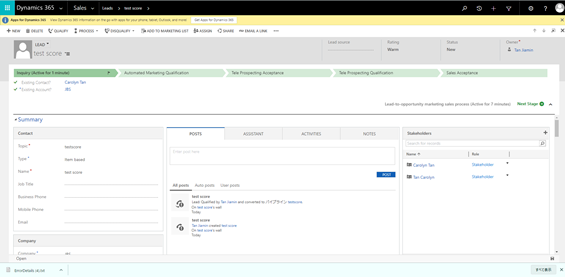
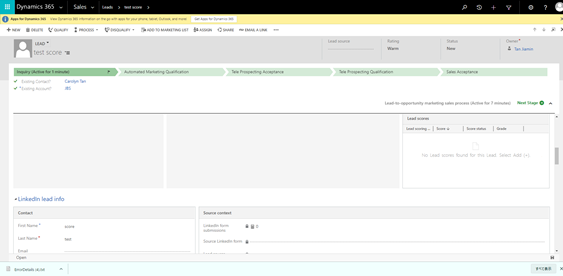
pastedimage1570085572790v4.png

pastedimage1570085583195v5.png

"No Lead scores found for this Lead. Select Add (+)" was pretty much the result for the rest of my tries. Can somebody tell me which parts did this go wrong? Also why there is no "+" for the Lead Scores section. This is quite confusing because I assume there could be an option to add existing lead score models by yourself?

Much thanks to anyone who could help me with this issue!

I have the same question (0)
  • RisaNaka Profile Picture
    on at

    Hi Jiamin,

    I'm having some trouble looking at the screenshots, but it appears that you've created 2 different leads, the "Blue Eva" and the "test score" lead, and you're viewing it in the Sales app. Can you confirm the following?

    1. For the "test score" lead, is its Company > City field set to Tokyo? The Lead Scoring Model described above checks the City field of the Lead record rather than the City field of the Contact associated with this Lead.
    2. When you open the "test score" lead in Dynamics 365 Marketing, does this issue persist?
  • Verified answer
    ShaileshJain Profile Picture
    on at

    Hi Jiamin,

    As Risa mentions, we need additional details for investigations, please raise a support ticket, and share the number OR, reach out to us via d365mktcomm AT microsoft DOT com

Under review

Thank you for your reply! To ensure a great experience for everyone, your content is awaiting approval by our Community Managers. Please check back later.

Helpful resources

News and Announcements

Season of Giving Solutions is Here!

Quick Links

Responsible AI policies

As AI tools become more common, we’re introducing a Responsible AI Use…

Neeraj Kumar – Community Spotlight

We are honored to recognize Neeraj Kumar as our Community Spotlight honoree for…

Leaderboard > Customer experience | Sales, Customer Insights, CRM

#1
Pallavi Phade Profile Picture

Pallavi Phade 98

#2
Tom_Gioielli Profile Picture

Tom_Gioielli 79 Super User 2025 Season 2

#3
TAHER Mehdi Profile Picture

TAHER Mehdi 58

Last 30 days Overall leaderboard

Product updates

Dynamics 365 release plans
