web
You’re offline. This is a read only version of the page.
close
Skip to main content

Notifications

Announcements

No record found.

Community site session details

Community site session details

Session Id :
Small and medium business | Business Central, N...
Suggested Answer

Error when creating Warehouse Receipt

(0) ShareShare
ReportReport
Posted on by 25

I have a user that is not a Super User but has all Permission Sets for WM and INVT, along with many more permission sets.  When she goes to create a Warehouse Receipt, she gets the following message (Note: 0 out of a total of 1):
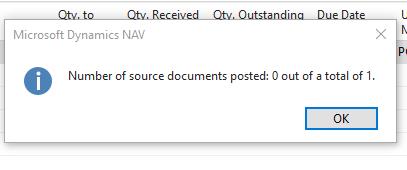
pastedimage1631124930035v1.jpeg

I had her go to the Inventory Posting Setup b/c I thought maybe it had something to do with the data there, but it appears everything is setup.
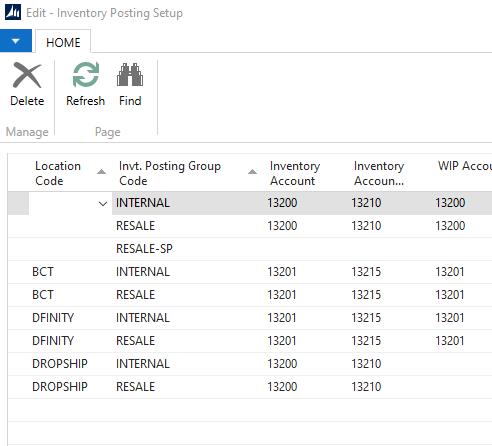
pastedimage1631124985926v2.jpeg

I then went to her User Card and added Super User access.  She tried again and she was able to post the info. (Note: 1 out of total of 1)
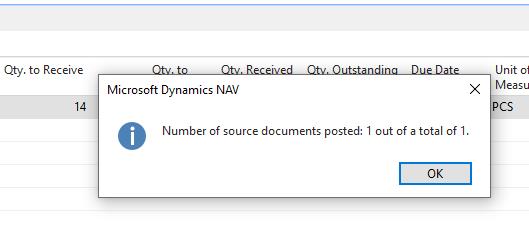
pastedimage1631125025557v3.jpeg

So, my question is, is this a permission issue?  Usually NAV will give the user a message with the Table Name and I can simply add to an existing Permission Set.  Any idea what Security Object is causing this issue, or do you think it is still a setup issue?

Thanks in advance for any help!!!

Kevin

I have the same question (0)
  • Suggested answer
    JAngle Profile Picture
    133 on at

    If no setup has been altered then seems unlikely. I would debug the users session when they are set back to there regular permissions and see if a silent error takes place

  • Suggested answer
    Community Member Profile Picture
    on at

    Kevin,

    I am guessing you have your location setup somewhat like mine below, which has Require Receipt.

    pastedimage1631131797362v1.pngDoes the Location have Require Receipt checked so the Warehouse Receipt can be created?Thanks,Steve

  • YUN ZHU Profile Picture
    95,638 Super User 2025 Season 2 on at

    Hi, Is Warehouse Employees not set for this user?

    pastedimage1631145432893v1.png

    Hope this will help.

    Thanks.

    ZHU

  • ktipton Profile Picture
    25 on at

    Yes, the locations do have that check marked.

  • ktipton Profile Picture
    25 on at

    ZHU, thanks for your info but we are using NAV 2015 and will be moving to Business Central by Jan.

  • Suggested answer
    RockwithNav Profile Picture
    8,637 Super User 2025 Season 2 on at

    Did you tried debugging and see which line of code is creating the Issue?

  • ktipton Profile Picture
    25 on at

    I cannot find anyone in the company that has Dynamics NAV Debugger.  Things are kind of a mess here due to our company purchasing other companies, 27 to be exact during pandemic, so no one seems to know anything.

  • Suggested answer
    Community Member Profile Picture
    on at

    Hello,

    You will need to have your Partner run the DEV client and debug your issue. I would contact them.

    Thanks,

    Steve

Under review

Thank you for your reply! To ensure a great experience for everyone, your content is awaiting approval by our Community Managers. Please check back later.

Helpful resources

Quick Links

Responsible AI policies

As AI tools become more common, we’re introducing a Responsible AI Use…

Neeraj Kumar – Community Spotlight

We are honored to recognize Neeraj Kumar as our Community Spotlight honoree for…

Leaderboard > Small and medium business | Business Central, NAV, RMS

#1
OussamaSabbouh Profile Picture

OussamaSabbouh 2,577

#2
YUN ZHU Profile Picture

YUN ZHU 888 Super User 2025 Season 2

#3
Jainam M. Kothari Profile Picture

Jainam M. Kothari 778 Super User 2025 Season 2

Last 30 days Overall leaderboard

Featured topics

Product updates

Dynamics 365 release plans



