web
You’re offline. This is a read only version of the page.
close
Skip to main content

Notifications

Announcements

Community site session details

Community site session details

Session Id :
Microsoft Dynamics GP (Archived)

Last Year (same period) and Last YTD in Management Reporter

(0) ShareShare
ReportReport
Posted on by

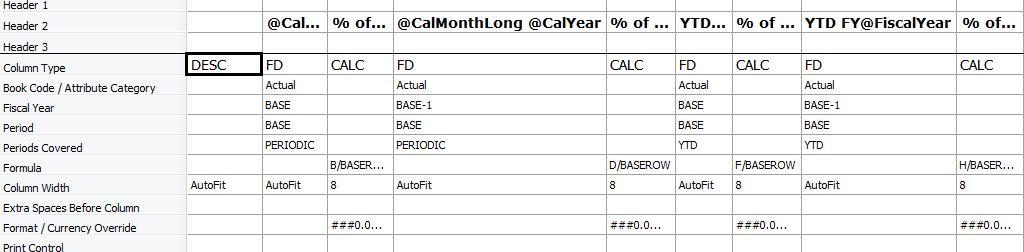
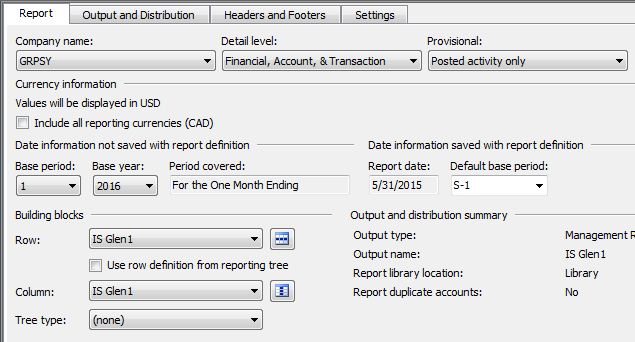
I'm trying to do a very basic Income Statement in Management Reporter.  I'm struggling to get the same period last year (May 2014), and also the last year YTD columns to populate correctly.  (NOTE:  May is the first fiscal period for us, so these numbers will/should be the same.)  My setup is below.  Curiously, if I run the report with a base period of last year, it does seem to give me 2014/2013 comparative information correctly.  But for some reason I can't figure out the settings to get it to work for 2015/2014.  Any thoughts appreciated.  Thanks.
1512.Capture1.JPG

4336.Capture2.JPG

Results:

3678.Capture3.JPG

*This post is locked for comments

I have the same question (0)
  • Bill Campbell Profile Picture
    12 on at

    Just because someone else will ask first, let it be me - you can confirm that for the accounts presented in your report, you can show account values for May 2014.

    Just have to ask.

  • Community Member Profile Picture
    on at

    Hi Bill,  Because we're very new to GP, let me ask this:  Is there a setting to allow or disallow showing account values?  Thanks.

  • Community Member Profile Picture
    on at

    UPDATE:  I was incorrect.  If I run it for 2014/2013 it gives me 2013 info but not 2014.  Bill's probably on to something that there's a setting to allow values to show?

  • Suggested answer
    Bill Campbell Profile Picture
    12 on at

    Have you closed the latest fiscal year?

    If your year is April to March 2014 and April to March 2015 and April to March 2016 and you have not closed 2015 and are running the report for 2016 and 2015 you will not get data, as the system requires you to close the year or do some very creative report writing to get to see the information.

    Work in TEST company if possible.  Do not test work in LIVE production system.  Even with Management Rporter - clone or copy the report definitions before you start making a ton of changes.  Safer in the long run to take the time to work in TEST world.

  • Community Member Profile Picture
    on at

    I have closed FY2014 (May2013 thru Apr2014).

    I have NOT closed FY2015 (May2014 thru Apr2015) because I don't have auditor YE entries yet.

    I have NOT closed FY2016 (May2015 thru Apr2016) because it's the current year.

    The report gives me FY2016 data, but not FY2015 data.  It does give FY2014 data.

    So it sounds like from your post that I'll be golden when I get FY2015 closed?  Thanks.

  • Verified answer
    Bill Campbell Profile Picture
    12 on at

    That is correct - once 2015 is closed the data is then available for reporting - go figure.

    Glad to have helped.

  • Community Member Profile Picture
    on at

    It sounds like only one period at a time can be open for reporting purposes.  Hopefully I get my auditor entries soon , then I'll work with our partner to perform fiscal year-end.  (Since this is our first.)  Then it'll be back on the reports.

    Thanks for working through this Bill, you've been very helpful.

Under review

Thank you for your reply! To ensure a great experience for everyone, your content is awaiting approval by our Community Managers. Please check back later.

Helpful resources

News and Announcements

Season of Giving Solutions is Here!

Quick Links

Responsible AI policies

As AI tools become more common, we’re introducing a Responsible AI Use…

Neeraj Kumar – Community Spotlight

We are honored to recognize Neeraj Kumar as our Community Spotlight honoree for…

Leaderboard > 🔒一 Microsoft Dynamics GP (Archived)

#1
mtabor Profile Picture

mtabor 1

Last 30 days Overall leaderboard

Featured topics

Product updates

Dynamics 365 release plans