web
You’re offline. This is a read only version of the page.
close
Skip to main content

Notifications

Announcements

No record found.

Community site session details

Community site session details

Session Id :
Microsoft Dynamics 365 | Integration, Dataverse...
Suggested Answer

Model Driven App - Show/Hide of apps based on security roles NOT working for roles of different business units

(1) ShareShare
ReportReport
Posted on by 5

Hi,

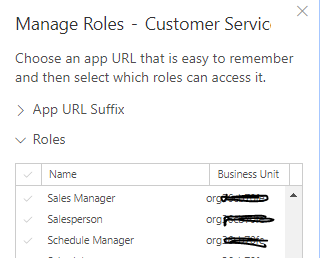
I am facing a strange issue. I had set access to customer service hub app and custom app for some security roles. For example Sales Manager can see ONLY customer service hub app and Salesperson can see ONLY custom app i created. This show/hide for manager and sales person works well the roles belong to root business unit. But the same thing which is show/hide of apps DOES NOT work for manager role or salesperson role of any other business unit. 

See when you try to select roles that should have access for an app, they are also mentioning root business unit only.
pastedimage1586516835375v1.png

So not sure if thats the reason show/hide works for root business unit roles and not for same roles but of other business units

This is the first time i have came across such issue and there seems to be no way to fix it. Hence posting this question here to know if anyone else faced same issue and does anyone know any resolution for this? Please help

I have the same question (0)
  • Suggested answer
    Ahmed Shaalan Profile Picture
    on at

    Hi,

    I did a quick test, created child business unit named test2 and new security role named BCM on the child business unit, I can always see the BCM security role of test2 BU in the model driven app> manage roles, as well as all the security roles of root business unit. is this the correct scenario?

    can you also double check in the manage roles list you dont see the security role of other business units

    pastedimage1586548004556v1.png

    thanks

    Ahmed

  • crmdeveloper28 Profile Picture
    5 on at

    Hi Ahmed,

    No i was not able to see security roles of other business units. They are showing roles of only root business unit-i still checked now. I tried same scenario in trial and there show/hide worked for bu roles despite there too i could select only root BU roles. In client environment nothing working and hence this post

  • Ahmed Shaalan Profile Picture
    on at

    can you please log a support ticket for this issue.

    thanks

    Ahmed

  • Orjan Aadalen Profile Picture
    125 on at

    Hi! Did you find a solution for this?

  • Jenn_STEP Profile Picture
    126 on at

    Was there any solution to this? 

    I can also not see other Business Units in the roles section. 

    Thanks in advance

  • Suggested answer
    Alejandro BT Profile Picture
    5 on at

    Hi,

    I've got the same problem, How did you solve this issue?

    Thanks,

  • VirginiaH Profile Picture
    5 on at

    I know it's been six months since the last post on this, but I'm also having this issue. Has anyone figured out the issue?

  • Joseph Nasr Profile Picture
    183 on at

    Are there any solutions to this?

    I'm having the same problem. I only see roles of the parent Business Unit.

    Users of a child business unit need to access another app of their own.

  • Suggested answer
    Bipin D365 Profile Picture
    28,983 Moderator on at

    Hi,

    Did you check if User is part of any Team and Team has security role assigned ??

    We will only get to select Root BU security roles and users in child BU should be able to access App because Roles are inherited.

    If it still does not work then submit Microsoft support ticket

Under review

Thank you for your reply! To ensure a great experience for everyone, your content is awaiting approval by our Community Managers. Please check back later.

Helpful resources

Quick Links

Responsible AI policies

As AI tools become more common, we’re introducing a Responsible AI Use…

Neeraj Kumar – Community Spotlight

We are honored to recognize Neeraj Kumar as our Community Spotlight honoree for…

Leaderboard > Microsoft Dynamics 365 | Integration, Dataverse, and general topics

#1
Martin Dráb Profile Picture

Martin Dráb 62 Most Valuable Professional

#2
#ManoVerse Profile Picture

#ManoVerse 57

#3
Pallavi Phade Profile Picture

Pallavi Phade 49

Last 30 days Overall leaderboard

Product updates

Dynamics 365 release plans



