web
You’re offline. This is a read only version of the page.
close
Skip to main content

Announcements

No record found.

News and Announcements icon
Community site session details

Community site session details

Session Id :
Microsoft Dynamics 365 | Integration, Dataverse...
Answered

Can kind of personalized dashboard be created

(0) ShareShare
ReportReport
Posted on by 80

Hello dear collegues,

Is there any way to create kind of personalized view or dashboard to see activities which were create

before and after proposal (date is in the record field) on specific opportunity which can be selected.

Thanks,

Bohdan

I have the same question (0)
  • Verified answer
    Community Member Profile Picture
    on at

    Hi Bohdan,

    What you need is show personalized view or dashboard of activities based on opportunity, right?

    You can go Settings > Customization > Customize the system > Entities > Activity > Views to create a new view.

    Add columns of activity entity you need firstly, and ‘Regarding’ field is must.

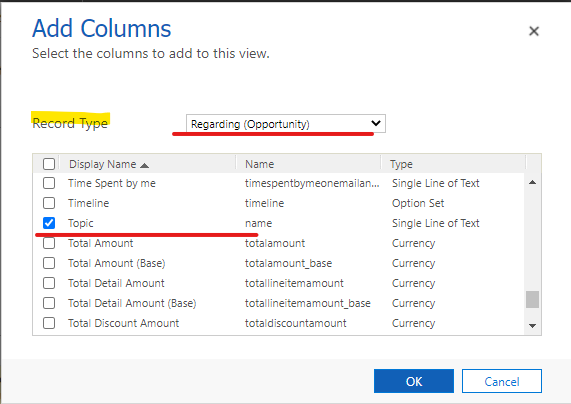
    Then select ‘Regarding(opportunity)’ in record type, add fields of opportunity entity you need.
     pastedimage1609815281429v1.png

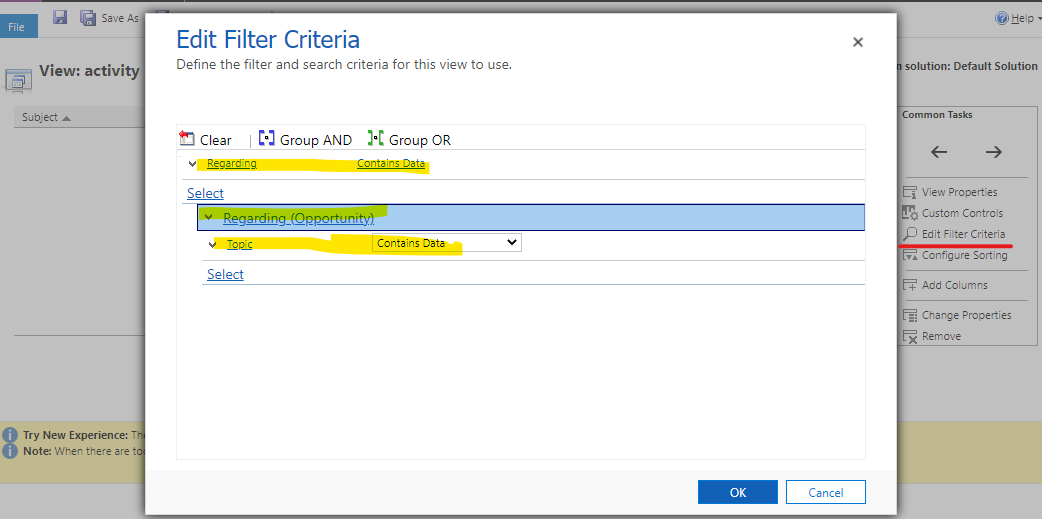
    click ‘Edit Filter Criteria’ button to set filter to make the view just show activities that regarding type is opportunity.
    pastedimage1609815439349v2.png

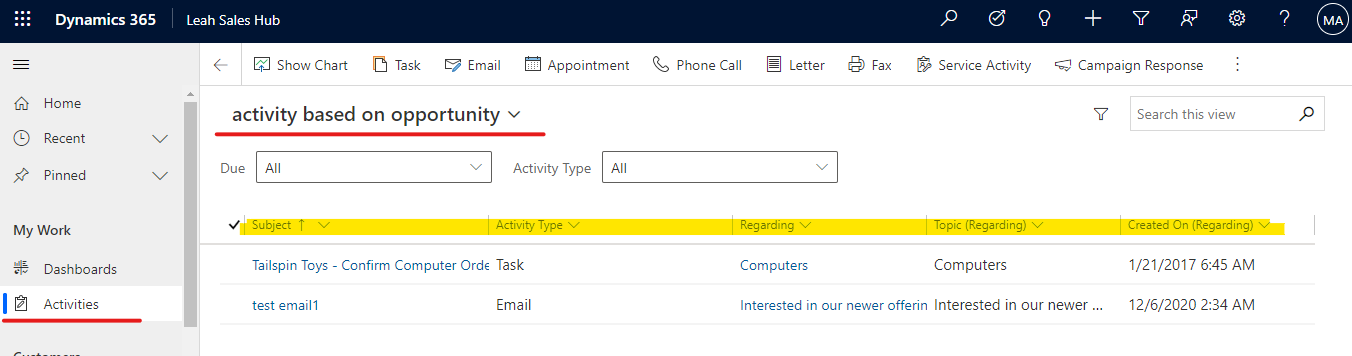
    save and publish all customization, go to the view and select you just crested, the view will show records that regarding type is opportunity.
    pastedimage1609816001121v3.png

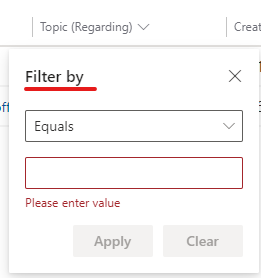
    if you want to show records based on one specify opportunity, you can expand 'topic(Regarding)' column and click filter by to insert opportunity name you need.

    pastedimage1609816214770v4.png pastedimage1609816309114v5.png

    and you can add the view you created to the dashboard, but if you want to filter column in dashboard, you need enable editable control.

    pastedimage1609816655204v6.png

    Regards,

    Leah Ju

    Please mark as verified if the answer is helpful. Welcome to join hot discussions in Dynamics 365 Forums.

  • Verified answer
    Wahaj Rashid Profile Picture
    11,323 on at

    Hi,

    Thank you for your query.

    You cannot compare two date fields in the View Criteria (or Advanced Find).

    To elaborate, Activity.CreatedOn<Opportunity.ProposalDate kind of expressions are not supported within CRM views.

    You have following options to achieve this:

    • If you are using On Premise, create a SSRS report and do this comparison in SQL Query.
    • For online, either use Power BI or other BI tools. You may export your data to a datawarehouse for such analysis.
    • Another simple approach is to export data to Excel (Activities along with Opportunities) and make a Pivot. You can use Dynamic Worksheets to have the latest data always.

    Let me know if you need further clarification.

    Best,

    Wahaj

  • Bohdan_Y Profile Picture
    80 on at

    Thank you, it looks pretty close to the solution I was looking for but Wahaj is right and I can`t compare two dates.

    Best regards,

    Bohdan

  • Wahaj Rashid Profile Picture
    11,323 on at

    Hi Bohdan,

    To make it easier for other readers, can you please mark the suitable answer as verified:

    pastedimage1609909445059v1.png

    Best,

    Wahaj

Under review

Thank you for your reply! To ensure a great experience for everyone, your content is awaiting approval by our Community Managers. Please check back later.

Helpful resources

Quick Links

Introducing the 2026 Season 1 community Super Users

Congratulations to our 2026 Super Stars!

Meet the Microsoft Dynamics 365 Contact Center Champions

We are thrilled to have these Champions in our Community!

Congratulations to the March Top 10 Community Leaders

These are the community rock stars!

Leaderboard > Microsoft Dynamics 365 | Integration, Dataverse, and general topics

#1
11manish Profile Picture

11manish 156

#2
André Arnaud de Calavon Profile Picture

André Arnaud de Cal... 71 Super User 2026 Season 1

#3
ManoVerse Profile Picture

ManoVerse 54 Super User 2026 Season 1

Last 30 days Overall leaderboard

Product updates

Dynamics 365 release plans
