web
You’re offline. This is a read only version of the page.
close
Skip to main content

Notifications

Announcements

No record found.

Community site session details

Community site session details

Session Id :
Microsoft Dynamics GP (Archived)

Document attachment issue

(0) ShareShare
ReportReport
Posted on by 30

I have read several threads on here regarding a similar issue but have not found anything to resolve my specific case.

Here is my GP version info.

GPInfo.png

My specific problem is with attaching documents using the File Explorer search bar and documents with special characters (dash - , underscore _ , period . , blank space).

The problem only exist if I search for the file using the search bar:
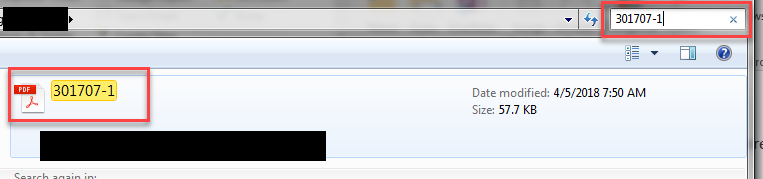
Search-Example.png

If I scroll through the folder and select the same document it works just fine. Only when utilizing the search bar and the filename contains a character listed above, I receive the error message:
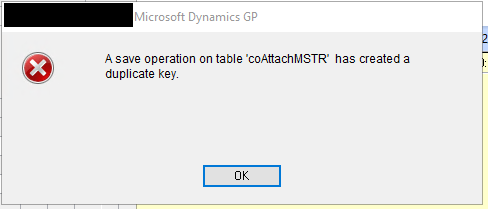
Attachment-Error.png

If the document name does not contain a special character then this works just fine.

I have run SQL Server Profiler and can see that it is attempting to INSERT the record with an empty Attachment_ID when calling the zDP.CO00101SI. A file with a blank attachment_ID already exist in the table, hence, the duplicate key. I do not want to remove the existing file with the blank attachment_ID as that keeps someone else from adding another attachment without an attachment_ID as in this case.

Why does this only break when using the search bar and having special characters in the name?

*This post is locked for comments

I have the same question (0)
  • MG-16101311-0 Profile Picture
    26,225 on at

    Is that search bar a function of some third-party product? I cannot seem to activate a search bar next to my navigation address bar

  • Beat Bucher  GP Geek  GPUG All Star Profile Picture
    28,058 Moderator on at

    Mariano,

    I think the search bar the OP is referring to is the standard function of every Windows Explorer dialog box when looking up a file to open..

    Marshall,

    I recall that there had been issues in 2015 with Doc Attachments.. could that be related ? Have you applied the latest updates to your GP setup ?

    see here : community.dynamics.com/.../118691

  • Marshall Hudnall Profile Picture
    30 on at

    Mariano,

    You are correct, the search bar is the default Windows Explorer search bar in the attachment window that opens when you click on Attach at the bottom of the attachment screen.

    Yes, we have the updates mentioned applied. Again, we can attach documents all day long with no issue. The only time we get the error is using the Search bar AND the file name contains a special character, which is unfortunate since some of the folders can contain thousands of documents.

  • Beat Bucher  GP Geek  GPUG All Star Profile Picture
    28,058 Moderator on at

    Hi Marshall,

    I've tested this with my GP 2018 setup and used the Windows Explorer search function to filter my files and attached several files with '_' & '-', and had  absolutely no issues.. I've also files with '(' & ')' and they posed no problem. I was able also to delete the files within the attachment form..

    Does this happen in any kind of GP window where doc attach is available ? or in just one specific area ? I've tested this in the POP module only.

    I'll see if I can reproduce this on a GP 2015 box.. with the same build 14.00.0898 than you have..

  • Marshall Hudnall Profile Picture
    30 on at

    Beat, Yes this happens in any GP window where the Doc attach is available. We still haven't found a solution for it. Unfortunately it looks like this will probably be just something we have to deal with until we upgrade and see that fixes it.

  • Verified answer
    Marshall Hudnall Profile Picture
    30 on at

    Problem Resolved.

    There is currently an issue (According to Lucas Miller Support Escalation Engineer Microsoft via the GPUG Community) that if the File Path is exactly 58 characters then GP fails a check and the attachment ID is left blank.

    When scrolling through the Windows File Explorer and attaching files, the file path is Z:\folder\folder2\filename.ext but when using the search, the path name is changed to fully qualified \\server\public\folder1\folder2\filename.ext which when adding the -1, -2, -3 etc..... to the existing filename it then equals exactly 58 characters and the attachment Id issue is seen. By adding or subtracting 1 character from the filename or changing the path +/- one character, the issue is no longer seen.

  • Marshall Hudnall Profile Picture
    30 on at

    link to GPUG forum.

    https://www.gpug.com/communities/community-home/digestviewer/viewthread?GroupId=247&MessageKey=3e3bba5e-ecfe-4708-b64a-078c69a582bb&CommunityKey=4754a624-39c5-4458-8105-02b65a7e929e&tab=digestviewer

  • Beat Bucher  GP Geek  GPUG All Star Profile Picture
    28,058 Moderator on at

    Thanks Marshall for posting this solution (!)..

    It' s the kind of bug that would happen in very unique circumstances.. Glad Microsoft is working on a fix.

Under review

Thank you for your reply! To ensure a great experience for everyone, your content is awaiting approval by our Community Managers. Please check back later.

Helpful resources

Quick Links

Responsible AI policies

As AI tools become more common, we’re introducing a Responsible AI Use…

Neeraj Kumar – Community Spotlight

We are honored to recognize Neeraj Kumar as our Community Spotlight honoree for…

Leaderboard > 🔒一 Microsoft Dynamics GP (Archived)

#1
mtabor Profile Picture

mtabor 1

Last 30 days Overall leaderboard

Featured topics

Product updates

Dynamics 365 release plans
