web
You’re offline. This is a read only version of the page.
close
Skip to main content

Notifications

Announcements

No record found.

Community site session details

Community site session details

Session Id :
Microsoft Dynamics CRM (Archived)

Link in email does not work

(0) ShareShare
ReportReport
Posted on by 1,067

Hi all,

I have a workflow that sends an email and this email has a link to a Record in CRM.

To create the link I added the following lines:

<hyperlink>

<name>Example name</name>

<value>{Record URL(Dynamic)(ExampleValue)} </value>

</hyperlink>    

 The thing is that the link doesn't work and I'm getting the following error:
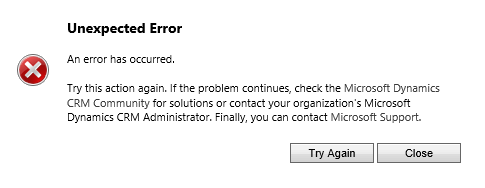
crm-error.png

I was taking a look to the URL in the browser(after I click the link) and it's not the same as the one that appears when I put the mouse on the link.

Do you guys what could be the problem here?

Thanks in advance,

Regards.

*This post is locked for comments

I have the same question (0)
  • Aiden Kaskela Profile Picture
    19,696 on at

    Hi Crm user,

    What happens when you insert the URL dynamically on its own, instead of including it in a link? I supposed it won't be a clickable link, but does it open the right record?

    Thanks,

     Aiden

  • Chris Vine Profile Picture
    on at

    I recall seeing this type of error in an earlier build of Microsoft CRM. It was fixed with a roll up.

  • EnriqueMdz Profile Picture
    1,067 on at

    Hi Guys. As always, thanks for your help.

    Going deeper in this problem I can see some weird things:

    1. If I copy and paste to the browser the URL that the {Record URL(Dynamic)(ExampleEntity)} has, I'm still getting the same error.Another thing is that after I click on enter when I paste the URL, CRM redirects to another page(because of the error I guess).

    2.- If I click on Email a Link button, the URL that adds to the email is not the same as the one created by {Record URL(Dynamic)(ExampleEntity)},these are the differences:

    3487.Untitled-picture.png

    The one in the left part is created by  {Record URL(Dynamic)(ExampleEntity)}(Not working) and the other is created by Email a link, this last one is working correctly.

    I don't really understand why this is happening, any ideas?

    Thanks in advance.

    Regards.

  • Suggested answer
    Aiden Kaskela Profile Picture
    19,696 on at

    Hi Crm user,

    Correct me if I'm wrong, but it looks like you're running CRM without IFD and accessing it using server/org, but the workflow is generating the field as if you were using IFD, so it's not including the organization.

    There may be a server setting to change how that URL is generated but I'm not sure. If you can't make any progress there, you may have to build up the URL yourself. You'd have to get the etc and id from a custom workflow assembly, but the rest of the URL would be static and you just pop in those values.

    Hope this helps! Let me know if you're able to find a setting for that URL. I'd appreciate if you would mark this as a Verified answer.

    Thanks,

     Aiden

  • EnriqueMdz Profile Picture
    1,067 on at

    Hi Aiden,

    I think the first solution will be difficult to do since I don't have access to the server settings but I could try the second one, I just have a question, how can I modify the URL that {Record URL(Dynamic)(ExampleValue)} is genereting or how can I build the URL for the email? I think it would be a plugin/Create/Email and in the plugin i will modify the URL.

  • Verified answer
    Aiden Kaskela Profile Picture
    19,696 on at

    Hi again,

    The easiest way to build the URL would be to have a custom workflow activity that has a record ID and the object type code as output parameters. As luck would have it, I wrote that exact thing earlier:

    public class RetrieveWorkflowData : CodeActivity
    {
    protected override void Execute(CodeActivityContext context) { IWorkflowContext workflowContext = context.GetExtension<IWorkflowContext>(); IOrganizationServiceFactory serviceFactory = context.GetExtension<IOrganizationServiceFactory>(); IOrganizationService service = serviceFactory.CreateOrganizationService(workflowContext.InitiatingUserId); this.WorkflowRecord_LookupID.Set(context, workflowContext.PrimaryEntityId.ToString()); Microsoft.Xrm.Sdk.Messages.RetrieveAllEntitiesRequest metadataRequest = new Microsoft.Xrm.Sdk.Messages.RetrieveAllEntitiesRequest(); Microsoft.Xrm.Sdk.Messages.RetrieveAllEntitiesResponse metadataResponse = service.Execute(metadataRequest) as Microsoft.Xrm.Sdk.Messages.RetrieveAllEntitiesResponse; Microsoft.Xrm.Sdk.Metadata.EntityMetadata entityMetadata = metadataResponse.EntityMetadata.FirstOrDefault(em => em.LogicalName == workflowContext.PrimaryEntityName); if (entityMetadata != null) { this.WorkflowRecord_LookupObjectTypeCode.Set(context, entityMetadata.ObjectTypeCode); } } [Output("Workflow Record - Object Type Code")] public OutArgument<int> WorkflowRecord_LookupObjectTypeCode { get; set; } [Output("Workflow Record - Record ID")] public OutArgument<string> WorkflowRecord_LookupID { get; set; }
    }

    In your workflow when you send the email, call that step first and then you'll be able to get the Record ID and the Object Type Code from the dynamic menu. In your email template, set your text to something like:

    http://theserveraddress/environment/main.aspx?etc={Dynamic OTC}&id={Dynamic Record ID}&pagetype=entityrecord

    Let me know if you have any issues, but you should be good to go. As always, I'd appreciate if you would mark this as a Verified answer.

    Thanks!

      Aiden

  • Verified answer
    EnriqueMdz Profile Picture
    1,067 on at

    Hi Aiden,

    Thank you very much for your help, I made a new workflow that builds the URL based on the code that you sent me but with some changes. The thing is that after I finished the workflow, I found the real issue and this is kind of funny.

    The real problem of why the {URL(Dynamic)(Value)} was not working is that in the HTML tags that make the URL retrieved a real Link were having two spaces at the start and at in the end of the <value> tags, here's the example:

    <hyperlink><name>URL Link</name><value> {Record URL(Dynamic)(Value)} </value></hyperlink>

    As you can see, there are two 'Invisible' blank spaces in the start and end of the<value> tags, and as a result of that, those spaces are also added to the URL.

    Thanks for your help I really appreciate it, hope this help someone in the future.

Under review

Thank you for your reply! To ensure a great experience for everyone, your content is awaiting approval by our Community Managers. Please check back later.

Helpful resources

Quick Links

Responsible AI policies

As AI tools become more common, we’re introducing a Responsible AI Use…

Neeraj Kumar – Community Spotlight

We are honored to recognize Neeraj Kumar as our Community Spotlight honoree for…

Leaderboard > 🔒一 Microsoft Dynamics CRM (Archived)

#1
SA-08121319-0 Profile Picture

SA-08121319-0 4

#1
Calum MacFarlane Profile Picture

Calum MacFarlane 4

#3
Alex Fun Wei Jie Profile Picture

Alex Fun Wei Jie 2

Last 30 days Overall leaderboard

Featured topics

Product updates

Dynamics 365 release plans



