web
You’re offline. This is a read only version of the page.
close
Skip to main content

Notifications

Announcements

No record found.

Community site session details

Community site session details

Session Id :
Microsoft Dynamics CRM (Archived)

Subgrid Lookup Search Icon action behavior

(0) ShareShare
ReportReport
Posted on by

Hello

I have a Sub Grid in a Form , in that when I click the + symbol, a search grid is coming up. When I click the search Icon - top 10 rows are shown of the related entity. Problem is - those top 10 rows are sorted differently than the Lookup view of the related entity. How do we change this behavior? Thanks for your time.
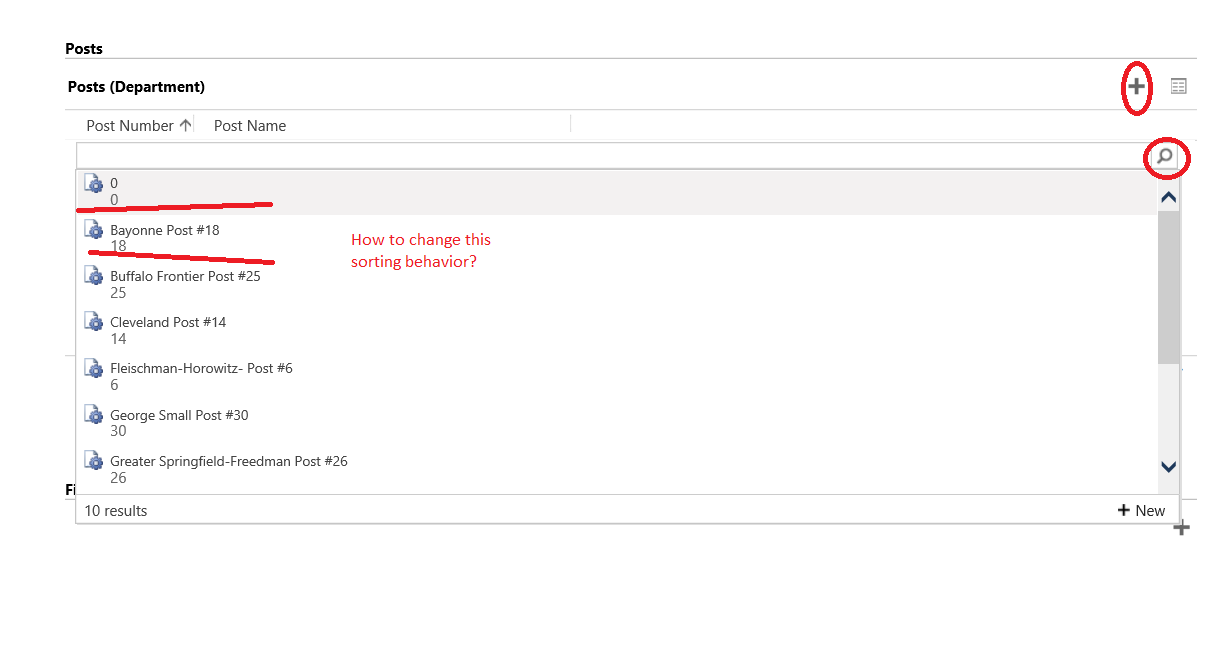
6521.Untitled.png

*This post is locked for comments

I have the same question (0)
  • Hari Narayanan Profile Picture
    589 on at

    Can you  confirm that your lookup have only two fields as shown in the list? usually the search grid will show the  first three columns of the view and sorting will be similar as your lookup. but that is a behaviour of a lookup column. this is a Subgrid, and i suspect the view it takes is the view which is set as default in the properties when you add the subgrid. Also post your lookup column list.

  • Verified answer
    Shidin Haridas Profile Picture
    3,497 on at

    Head over to the views of the Lookup entity.

    And find a view called 'Quick Find Active Posts' view.

    In this view, on the right hand side, you will be able to see 'Configure sorting'

    Specify the sorting you require here and Publish your changes.

  • Community Member Profile Picture
    on at

    Thanks Shidin, We tried this. Lookup search is not taking 'Quick Find Active Posts' View.

  • Community Member Profile Picture
    on at

    Hello Hari,

    Default view given in subgrid properties is taken only for the subgrid display. For lookup it is not taking the view given in subgrid properties.

    We initially had only two columns. Today we added one more column for the Lookup View and configured the sorting based on post number. But the lookup search shows three columns but not sorting the results based on the sorting order configured in Lookup View. Shown screenshots below. 

    And one more thing When i tried moving the column in Lookup View, Name column is not movable and removable. 

    PostLookupColumn.png

    PostLookupColumn.png

    Lookup-search-results.png

  • Verified answer
    Hari Narayanan Profile Picture
    589 on at

    1. Lookup view name is default you cannot change it,  we usually set it to have minimum length so it doesnt interfere with other fields.

    2. Can you please tell me which column are you sorting based on? Also if possible please show us the lookup view to see which order the record is loading in a view by clicking lookup more records

    Edit 1:: seems that the inline lookup view cannot be sorted by any other column except name please refer below

    https://community.dynamics.com/crm/f/117/t/156781

    https://crmtipoftheday.com/2015/09/07/sorting-lookup-field-quick-preview/

  • Community Member Profile Picture
    on at

    Thanks, Shidin. This worked for us.

  • Suggested answer
    Community Member Profile Picture
    on at

    Hello Hari,

    Thank you so much. We are sorting based on Post Number, and Look up more records page shows results as expected (sorting based on Post Number). Only inline lookup search results is not sorting as configured in Lookup View. It always does based on Post Name or Primary attribute of the Entity.

Under review

Thank you for your reply! To ensure a great experience for everyone, your content is awaiting approval by our Community Managers. Please check back later.

Helpful resources

Quick Links

Responsible AI policies

As AI tools become more common, we’re introducing a Responsible AI Use…

Neeraj Kumar – Community Spotlight

We are honored to recognize Neeraj Kumar as our Community Spotlight honoree for…

Leaderboard > 🔒一 Microsoft Dynamics CRM (Archived)

#1
SA-08121319-0 Profile Picture

SA-08121319-0 4

#1
Calum MacFarlane Profile Picture

Calum MacFarlane 4

#3
Alex Fun Wei Jie Profile Picture

Alex Fun Wei Jie 2

Last 30 days Overall leaderboard

Featured topics

Product updates

Dynamics 365 release plans



