web
You’re offline. This is a read only version of the page.
close
Skip to main content

Notifications

Announcements

No record found.

Community site session details

Community site session details

Session Id :
Customer experience | Sales, Customer Insights,...
Suggested Answer

Blocker - Unable to see the project/survey in the list - Power Automate

(0) ShareShare
ReportReport
Posted on by 180

Hi,

We need to automate sending survey via power automate for our business need. However when using "Send Survey" step in Power automate we don't see full list of our projects. it only shows 2 projects which i create quiet a while ago.  For example if i create a test project with a survey recently and it still doesn't appear in the list.

It is currently blocking us from completion of build work in the project.

We have also raised a support call and still waiting for initial response.

About 5 projects below
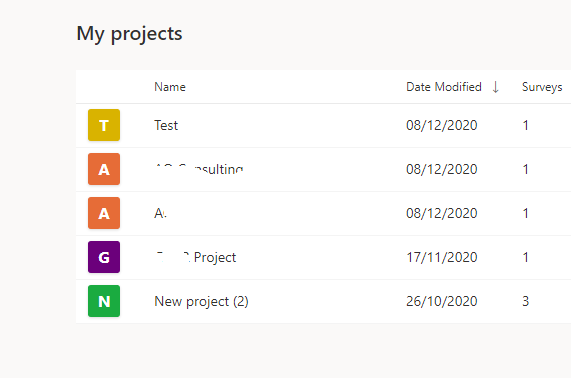
pastedimage1607510888095v1.png

I am only able to see only 2 projects in the list therefore select
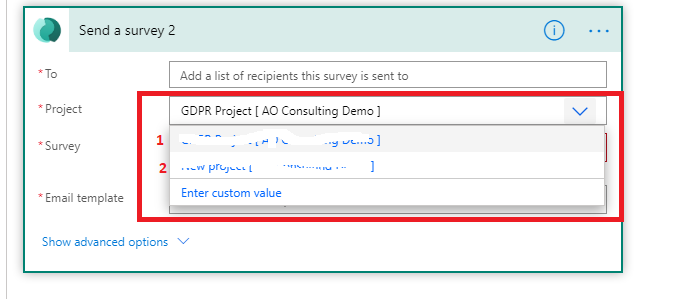
pastedimage1607511001111v2.png

Any idea why? 

Thanks

I have the same question (0)
  • Arjun N Profile Picture
    on at

    Hi Umer,

    Can you drop an email with the Tenant Id, user email address who created the projects and the Project URLs for the projects that are missing in power automate to customervoice@microsoft.com.

    Thanks,

    Arjun

  • Umer Javed Profile Picture
    180 on at

    Thanks Arjun, just sent the email with requested information.

  • CU21081326-5 Profile Picture
    20 on at

    Did it work? How did it fix?

    I also have similar issues..

  • Suggested answer
    Umer Javed Profile Picture
    180 on at

    Apparently you got to wait 24 hours before you could see the project In flow which is shared with your user account

Under review

Thank you for your reply! To ensure a great experience for everyone, your content is awaiting approval by our Community Managers. Please check back later.

Helpful resources

Quick Links

Responsible AI policies

As AI tools become more common, we’re introducing a Responsible AI Use…

Neeraj Kumar – Community Spotlight

We are honored to recognize Neeraj Kumar as our Community Spotlight honoree for…

Leaderboard > Customer experience | Sales, Customer Insights, CRM

#1
Tom_Gioielli Profile Picture

Tom_Gioielli 70 Super User 2025 Season 2

#2
Gerardo Rentería García Profile Picture

Gerardo Rentería Ga... 33 Most Valuable Professional

#3
Daniyal Khaleel Profile Picture

Daniyal Khaleel 32 Most Valuable Professional

Last 30 days Overall leaderboard

Product updates

Dynamics 365 release plans
