web
You’re offline. This is a read only version of the page.
close
Skip to main content

Announcements

No record found.

News and Announcements icon
Community site session details

Community site session details

Session Id :
Microsoft Dynamics AX (Archived)

Inventory value report cannot be printed to file or to printer

(0) ShareShare
ReportReport
Posted on by 1,683

AX2009.

Standard report Inventory management->Reports->Status->Inventory value->Inventory value report.

It seems that current options do not work. When we select print to printer(from options button) -> it is not selected in the dialog and report is printed to screen instead:
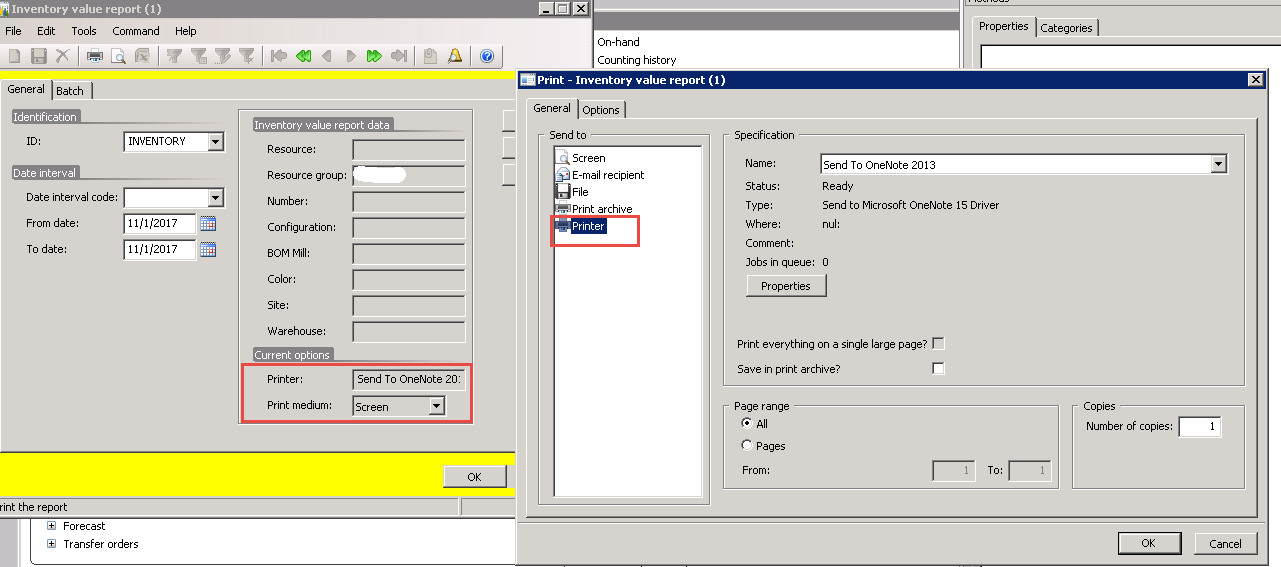
AX2009InventReportIssue.png

Is there a hotfix for this issue? 

*This post is locked for comments

I have the same question (0)
  • Suggested answer
    Ludwig Reinhard Profile Picture
    Microsoft Employee on at

    Hi,

    Can you chose a printer other than 'OneNote'?

    Best regards,

    Ludwig

  • Adrian Pascari A Profile Picture
    1,683 on at

    Even if I select other option and click ok button -> the value is not refreshed in main dialog form:

    AX2009InventReportIssue2.png

  • Ludwig Reinhard Profile Picture
    Microsoft Employee on at

    Have you tried cleaning your usage data for this report?

  • Adrian Pascari A Profile Picture
    1,683 on at

    Yes tried. It did not help.

  • Community Member Profile Picture
    on at

    Few things you can try:

    1. Try different users

    2. Try different environment

    3. Last resort, restart AOS, although this really shouldnt be the fix.

  • guk1964 Profile Picture
    10,888 on at

    The printjobsettings that will be used are usually the ones found for the user in syslastvalues.

    You can use the "Print management" to define the print destination for different documents,

    You might also check out Sohaib's prior post :

    community.dynamics.com/.../get-list-of-all-printers-and-save-selected-choice.

    Print management is typically set up by module not by user - technet.microsoft.com/.../dd309660.aspx

Under review

Thank you for your reply! To ensure a great experience for everyone, your content is awaiting approval by our Community Managers. Please check back later.

Helpful resources

Quick Links

Introducing the 2026 Season 1 community Super Users

Congratulations to our 2026 Super Stars!

Meet the Microsoft Dynamics 365 Contact Center Champions

We are thrilled to have these Champions in our Community!

Congratulations to the April Top 10 Community Leaders

These are the community rock stars!

Leaderboard > 🔒一 Microsoft Dynamics AX (Archived)

#1
CP04-islander Profile Picture

CP04-islander 39

#2
Michel ROY Profile Picture

Michel ROY 14

#3
imran ul haq Profile Picture

imran ul haq 8

Last 30 days Overall leaderboard

Featured topics

Product updates

Dynamics 365 release plans
