web
You’re offline. This is a read only version of the page.
close
Skip to main content

Notifications

Announcements

No record found.

Community site session details

Community site session details

Session Id :
Small and medium business | Business Central, N...
Suggested Answer

Email Account from another Microsoft tenant

(0) ShareShare
ReportReport
Posted on by 395

Hi everyone, 

We are trying to add a new email account in Business Central using Office365 server settings and the credentials of an account that resides in another Microsoft tenant (i.e. BC runs on tenant A and the account is created in tenant B). The account has an Office 365 E5 license. 

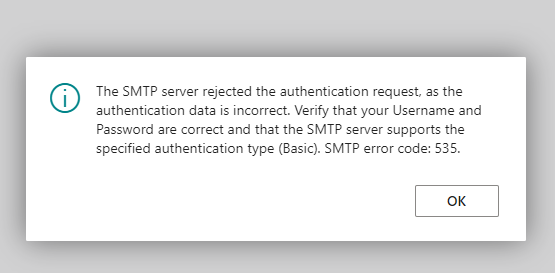
When we try to send a test email from BC, we get the below error; 
pastedimage1681456525522v2.png

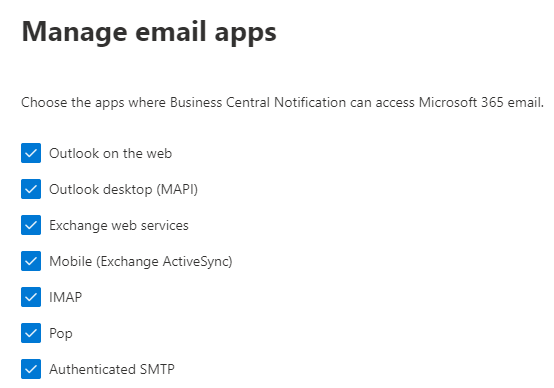
We tried using both Basic and OAuth2.0 authentication. SMTP Auth is switched on in the mailbox as per below; 
pastedimage1681456510788v1.png

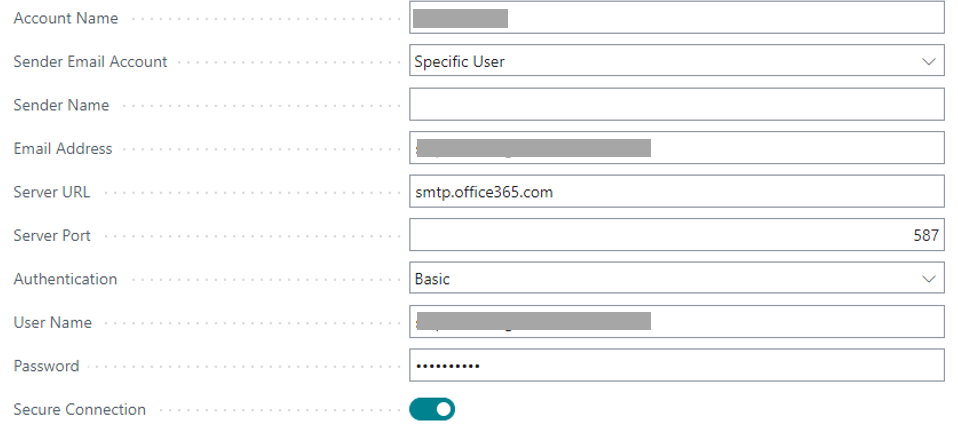
When adding the account in BC we choose SMTP , and input the below details. As previously mentioned, we tried both Basic and OAuth2.0. 
pastedimage1681456756473v4.png

Any suggestions as to why this is not working, please? 

I have the same question (2)
  • Suggested answer
    Govinda Kumar Profile Picture
    2,304 Moderator on at

    Hi Y_A,

    Make sure that you have entered the correct email address in both the "Email Address" and "User Name" fields

    pastedimage1681457235808v1.png

    If it still doesn't solve then try selecting the current user instead of the specific user and add the same email address in the user contact email field.

    Regards

  • Y_A Profile Picture
    395 on at

    Hi, just tried the above but still does not work. A personal outlook account as the one you have in your screenshot works but it is being suspended for suspicious activity every now and then since an external app , in this case business central, is sending emails using that account.

    In my scenario I am not trying to add a personal account (that ends with @outlook.com) but an email account on a microsoft tenant.

  • Suggested answer
    Govinda Kumar Profile Picture
    2,304 Moderator on at

    Hi, try setting the email in your contact email, in smpt set your email as the default email address for the current user

    pastedimage1681460081213v1.png

    and set the same email in your SMTP setting

  • Suggested answer
    Govinda Kumar Profile Picture
    2,304 Moderator on at

    It is possible that your account may not be subscribed to Office 365, can be the reason why you are facing issues with SMTP settings

Under review

Thank you for your reply! To ensure a great experience for everyone, your content is awaiting approval by our Community Managers. Please check back later.

Helpful resources

Quick Links

Responsible AI policies

As AI tools become more common, we’re introducing a Responsible AI Use…

Neeraj Kumar – Community Spotlight

We are honored to recognize Neeraj Kumar as our Community Spotlight honoree for…

Leaderboard > Small and medium business | Business Central, NAV, RMS

#1
OussamaSabbouh Profile Picture

OussamaSabbouh 3,226

#2
Jainam M. Kothari Profile Picture

Jainam M. Kothari 2,047 Super User 2025 Season 2

#3
YUN ZHU Profile Picture

YUN ZHU 1,257 Super User 2025 Season 2

Last 30 days Overall leaderboard

Featured topics

Product updates

Dynamics 365 release plans
