web
You’re offline. This is a read only version of the page.
close
Skip to main content

Announcements

No record found.

News and Announcements icon
Community site session details

Community site session details

Session Id :
Supply chain | Supply Chain Management, Commerce
Answered

Dynamics 365 Commerce website does not display the category hierarchy nodes

(0) ShareShare
ReportReport
Posted on by 50

On Commerce website the category hierarchy does not display all the nodes.
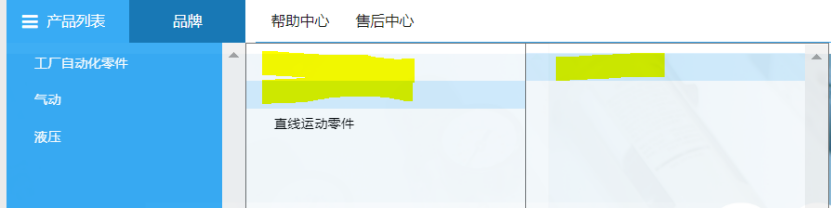
 pastedimage1596100611131v1.png

Actually from D365 F&O we setup the category hierarchy as below
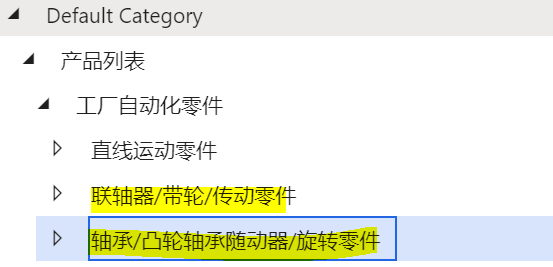
 pastedimage1596100623787v2.png

So we can see that the 2 highlighted nodes should be displayed on Commerce but they are not.


Could any one help provide some advice how can we resolve this issue?

I have the same question (0)
  • Mueckeflo Profile Picture
    Microsoft Employee on at

    Have you published the channel updates after you have added the nodes?
    And are you sure that you have modified the hierarchy used for navigating the channel?

    Take a look at the hierarchy types here:

    https://docs.microsoft.com/en-us/dynamics365/commerce/retail-hierarchies

  • Erick Li Profile Picture
    50 on at

    Hi Florian,

    Thanks for the response.

    Actually we did not do any update, we just create the category hierarchy, then run distribution shedule jobs to publish the category hierarchy.

    And on the eCommerce website we see that actual result. Some of the node display as expected, and some are not. We can see a 'blank option', and if we click on the option we can see the details.

    So the issue here is that the just does not display the expected text.

    Do you have any advice onn this? Thanks

  • Verified answer
    Mueckeflo Profile Picture
    Microsoft Employee on at

    Can you please try to publish the channel updates first, and then synchronize the distribution jobs?

    For this, go to "Channel categories and product attributes"

    pastedimage1596189583546v1.png

    select your online channel and then click on "Publish channel updates"

    pastedimage1596189621655v2.png

    After that, run your distribution jobs.

Under review

Thank you for your reply! To ensure a great experience for everyone, your content is awaiting approval by our Community Managers. Please check back later.

Helpful resources

Quick Links

Introducing the 2026 Season 1 community Super Users

Congratulations to our 2026 Super Stars!

Meet the Microsoft Dynamics 365 Contact Center Champions

We are thrilled to have these Champions in our Community!

Congratulations to the March Top 10 Community Leaders

These are the community rock stars!

Leaderboard > Supply chain | Supply Chain Management, Commerce

#1
Mallesh Deshapaga Profile Picture

Mallesh Deshapaga 330

#2
Laurens vd Tang Profile Picture

Laurens vd Tang 244 Super User 2026 Season 1

#3
Syed Haris Shah Profile Picture

Syed Haris Shah 145 Super User 2026 Season 1

Last 30 days Overall leaderboard

Product updates

Dynamics 365 release plans
