web
You’re offline. This is a read only version of the page.
close
Skip to main content

Announcements

News and Announcements icon
Community site session details

Community site session details

Session Id :
Small and medium business | Business Central, N...
Suggested Answer

New Import Journal lines on General Journal Functions

(0) ShareShare
ReportReport
Posted on by 5

Has anyone used this CSV new functionality?

Can somebody help me how to use it?

 pastedimage1631643487500v1.png

I have the same question (0)
  • JAngle Profile Picture
    159 on at

    Which version? Suspect it is custom. What pops up when you select it? If it’s any good as a new feature, as a minimum it should be data exchange definition driven.

  • Marcellaa Profile Picture
    5 on at

    when I select it - I can choose a csv file.

  • Suggested answer
    Community Member Profile Picture
    on at

    Marcella,

    That option is not with my standard US, CA, or GB version. Seems like a customization. Look under Extensions to see if you have something called Excel Import. I know there is an APP out there.

    Thanks,

    Steve

  • Suggested answer
    JAngle Profile Picture
    159 on at

    This is a more configurable option: joshanglesea.wordpress.com/.../

    If it just lets you choose a csv then you would need the source code to check what format/fields it is expecting

  • Suggested answer
    YUN ZHU Profile Picture
    102,791 Super User 2026 Season 2 on at

    Hi, BC19 Preview W1 version also does not have this function. It should be customization.

    If you can find the source code, there may be a clue to the CSV template in there.

    pastedimage1631661322912v1.png

    Hope this will help.

    Thanks

    ZHU

  • Suggested answer
    S.Kawamura Profile Picture
    1,532 on at

    Hi,

    A similar feature is Edit-in-Excel, which allows you to import many rows in Excel into BC.

    Thank,

    S.Kawamura

  • Suggested answer
    Dirk Profile Picture
    Microsoft Employee on at

    Hi,

    You can find this in US BC18.5 for example when you use the Accountant or the Business Manager role center.
    This function is supposed to be used for importing the G/L transactions from your payroll service provider.
    When you use this function in CRONUS you get the following selection:

                     pastedimage1631685079542v1.png

    In other local versions, like DK, you can find a set up in the General Ledger Setup page
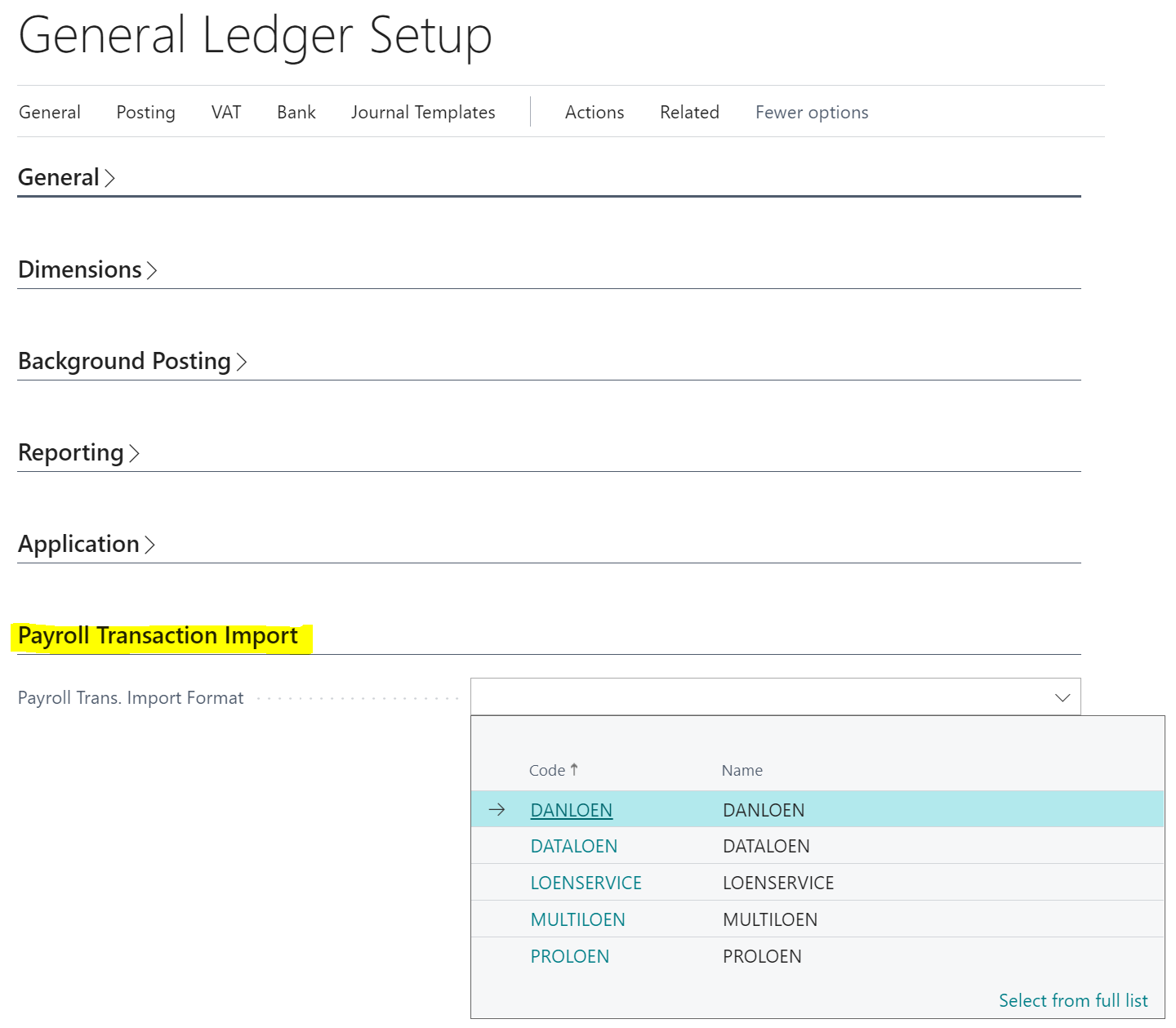
                     pastedimage1631685347873v2.png

    And yes, in the Data Exchange Defnitions there is  option field Type with an option "Payroll Import".
    This concept is used within the DK DB.

  • Dirk Profile Picture
    Microsoft Employee on at
  • Suggested answer
    Community Member Profile Picture
    on at

    Dirk,

    I learned something new today as I have never used the Payroll Service functionality.

    Thanks,

    Steve

Under review

Thank you for your reply! To ensure a great experience for everyone, your content is awaiting approval by our Community Managers. Please check back later.

Helpful resources

Quick Links

Season of Sharing Community Challenge Winners!

Congratulations to our community stars!

Women in Power Builds Momentum

Expanding mentorship, skilling, and AI innovation

Congratulations to the July Top 10 Community Leaders

These are the community rock stars!

Leaderboard > Small and medium business | Business Central, NAV, RMS

#1
OussamaSabbouh Profile Picture

OussamaSabbouh 626 Super User 2026 Season 2

#2
YUN ZHU Profile Picture

YUN ZHU 425 Super User 2026 Season 2

#3
Grigorios Mavrogeorgis Profile Picture

Grigorios Mavrogeorgis 384 Super User 2026 Season 2

Last 30 days Overall leaderboard

Featured topics

Microsoft Training Manuals

Product updates

Dynamics 365 release plans
