web
You’re offline. This is a read only version of the page.
close
Skip to main content

Notifications

Announcements

No record found.

Community site session details

Community site session details

Session Id :
Customer experience | Sales, Customer Insights,...
Suggested Answer

Customer Journey and suppression list in KPI/Insights

(0) ShareShare
ReportReport
Posted on by

Hi dear community members!

We were wondering about the insights generated in a customer journey, after the first email to a static marketing list has been sent out.

In the first email insights, we see when, why and to whom the hard & soft bounces occured. After that, every other email is not showing those information. The contacts are then listed in the suppression list here:
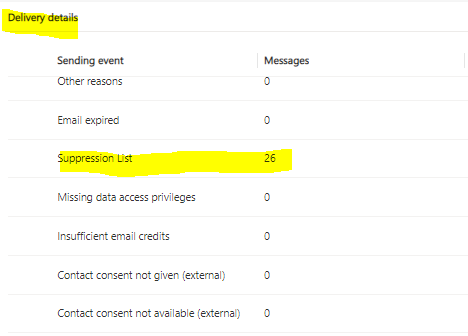
pastedimage1624523505440v2.png

This of course lowers the actual delivery rate, and we were wondering why this is happening - is this a newer feature we were not aware of? Is there a workaround to gather the "actual" insights, where the bounces are not being taken under consideration (as in the first email that is being send via the customer journey)?

Thank you a lot for your support and helping us understand the issue!

Simona

I have the same question (0)
  • Suggested answer
    Nya Profile Picture
    29,060 on at

    Hi Simona,

    You can find the statement in the following documentation,

    Maximize email deliverability (Dynamics 365 Marketing) | Microsoft Docs

    which says that:

    Dynamics 365 Marketing won't try to send to a known hard-bouncing address during the six-month quarantine period. However, your email insights will still indicate a hard-bounce result for each such delivery that you have requested. These "virtual" hard bounces don't impact your sending IP reputation, but they do count against your monthly send quota in Dynamics 365 Marketing—and these addresses will be tried again after the six-month quarantine. We therefore recommend that you regularly check your results for hard bounces, and remove the hard-bouncing addresses from your contact records.


    If this helped you, I'd appreciate it if you'd mark this as a Verified Answer, which may in turn help others as well.

    Best Regards,

    Nya

  • Kris Latulippe Profile Picture
    30 on at

    Hi Nya, I have a secondary question regarding this - on this last bit "We therefore recommend that you regularly check your results for hard bounces, and remove the hard-bouncing addresses from your contact records." - do you know how to automate this? Thanks!

  • Suggested answer
    Nya Profile Picture
    29,060 on at

    Hi,

    You can refer to my answer in the following issue:

    (+) Automatically remove hardbounces after sending emails - Dynamics 365 Marketing Forum Community Forum

Under review

Thank you for your reply! To ensure a great experience for everyone, your content is awaiting approval by our Community Managers. Please check back later.

Helpful resources

Quick Links

Responsible AI policies

As AI tools become more common, we’re introducing a Responsible AI Use…

Neeraj Kumar – Community Spotlight

We are honored to recognize Neeraj Kumar as our Community Spotlight honoree for…

Leaderboard > Customer experience | Sales, Customer Insights, CRM

#1
Tom_Gioielli Profile Picture

Tom_Gioielli 70 Super User 2025 Season 2

#2
Gerardo Rentería García Profile Picture

Gerardo Rentería Ga... 43 Most Valuable Professional

#3
Daniyal Khaleel Profile Picture

Daniyal Khaleel 32 Most Valuable Professional

Last 30 days Overall leaderboard

Product updates

Dynamics 365 release plans
