web
You’re offline. This is a read only version of the page.
close
Skip to main content

Announcements

No record found.

News and Announcements icon
Community site session details

Community site session details

Session Id :
Microsoft Dynamics AX (Archived)

purchase order confirmation report doesn't display tax table

(0) ShareShare
ReportReport
Posted on by 576

hello...

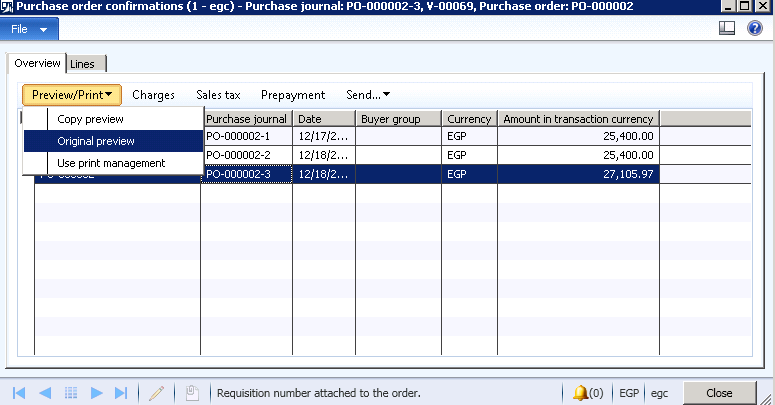
 purchase order confirmation  report in next pic
1732.1.png

when select any report (Copy , Original, ,) 

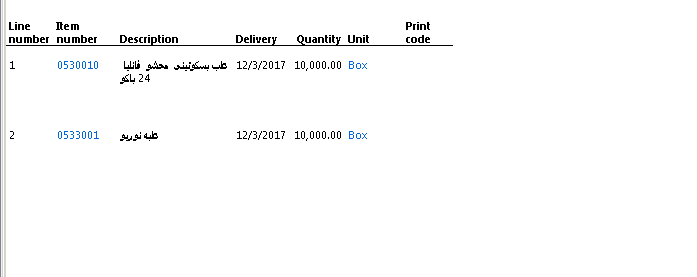
the preview shown as next pic
3808.2.png

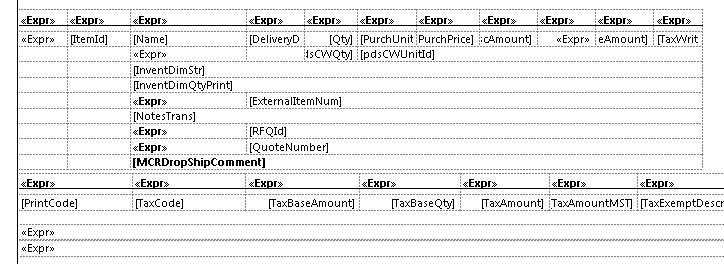
but when edit report in VS i found 

other table for tax , but it didn't display in the report 
6523.3.png

How i can display the tax that in Purchase order in the report 

thanks

*This post is locked for comments

I have the same question (0)
  • Suggested answer
    Shah Keyur Profile Picture
    365 on at

    Can you check do you have anything in Form Setup in Accounts Payable -> Setup -> Forms -> Form Setup. Which can enable this.

  • Suggested answer
    Moeen Ahmed Sultan Profile Picture
    1,402 on at

    The table would be hidden and it would be visible on some criteria like from which form the report is generated etc.

    Where do you want to show the Tax and where is the tax amount in the form?

  • Ismail Mohamed Profile Picture
    576 on at

    i opened it from

    CompanyName/Procurement and sourcing/Common/Purchase orders/All purchase orders

    on purch order there's tab Purchase , there is Purchase order confirmation button ,

    2821.4.png

  • Ismail Mohamed Profile Picture
    576 on at

    nothing enabled there

  • Suggested answer
    Chaitanya Golla Profile Picture
    17,225 on at

    Hi,

    Please try to generate the report by setting the value for Sales tax specification from None to some other value on the FormSetup form
    (Path: Accounts payable/Setup/Forms/Form setup)

    APFormSetup.png

  • Suggested answer
    Shah Keyur Profile Picture
    365 on at

    71114.Capture.PNG

    Setting GST/Sales tax Specification to Registration Currency will bring Tax on the report.

  • Ismail Mohamed Profile Picture
    576 on at

    not working

  • Suggested answer
    Shah Keyur Profile Picture
    365 on at

    Hi,

    Can you try setting up below parameter on vendor and generate new confirmation for Purcase order and than print your report to see if that works for you?

    Basically it is controlled by the EnableAmountControls field in PurchPurchaseOrderHeader table. Which is driven from vendor master.

    GST.PNG

Under review

Thank you for your reply! To ensure a great experience for everyone, your content is awaiting approval by our Community Managers. Please check back later.

Helpful resources

Quick Links

Introducing the 2026 Season 1 community Super Users

Congratulations to our 2026 Super Stars!

Meet the Microsoft Dynamics 365 Contact Center Champions

We are thrilled to have these Champions in our Community!

Congratulations to the March Top 10 Community Leaders

These are the community rock stars!

Leaderboard > 🔒一 Microsoft Dynamics AX (Archived)

#1
CP04-islander Profile Picture

CP04-islander 16

#2
GiacomoRovai Profile Picture

GiacomoRovai 4

#3
Douglas Noel Profile Picture

Douglas Noel 2

Last 30 days Overall leaderboard

Featured topics

Product updates

Dynamics 365 release plans
