web
You’re offline. This is a read only version of the page.
close
Skip to main content

Announcements

No record found.

News and Announcements icon
Community site session details

Community site session details

Session Id :
Customer experience | Sales, Customer Insights,...
Answered

Integrate External Marketing Form

(1) ShareShare
ReportReport
Posted on by 140

Hi All,

we have problems with integrating external marketing contact forms with Dynamics for Marketing.

The form capture worked - but no contacts will be created via the marketing form in the marketing app.

The support can not find the problem and can not say what we have done wrong.

Does anyone know if we can send the contact form data to an API in Dynamics for Marketing? So that we can implement the form submission by ourselves to the marketing App?

Thank you!

I have the same question (0)
  • Philipp Focust Profile Picture
    147 on at

    Hello Jenni,

    do you only use simple forms without subscriptions? And do you need the DoI process? I figured out a way to call the Marketing Cloud via WebRequest (simulating the Submission of the form) however it is unsupported.

    But we had no other solution as the form capturing does not support subscription lists and form embedding was not possible due to the complexity of different external forms and the bad multilanguage support in Dynamics Marketing.

    If you do not need the double opt in for subscriptions, simply use a Flow to create the contacts in Dynamics.

    Best regards,

    Philipp

  • cloflyMao Profile Picture
    25,210 on at

    Hi Jenni,

    > As Philipp said, "Subscription center functionality" is not supported by Captured external form,

    you could switch to "Embbed marketing form" if you had requirement for subscription management.

    https://docs.microsoft.com/en-us/dynamics365/marketing/embed-forms

    > For your capture form itself, have you checked following records?

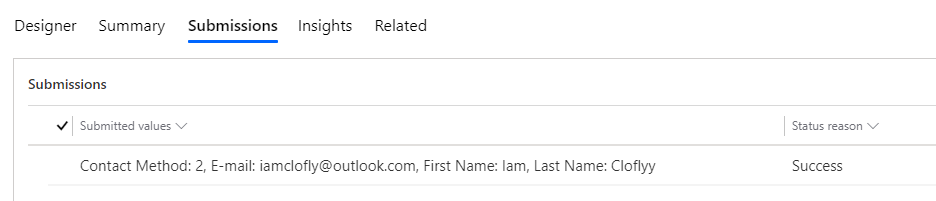
    * submission value(enable "Store form submission" field in Summary tab to Yes)
    pastedimage1585104999152v1.png

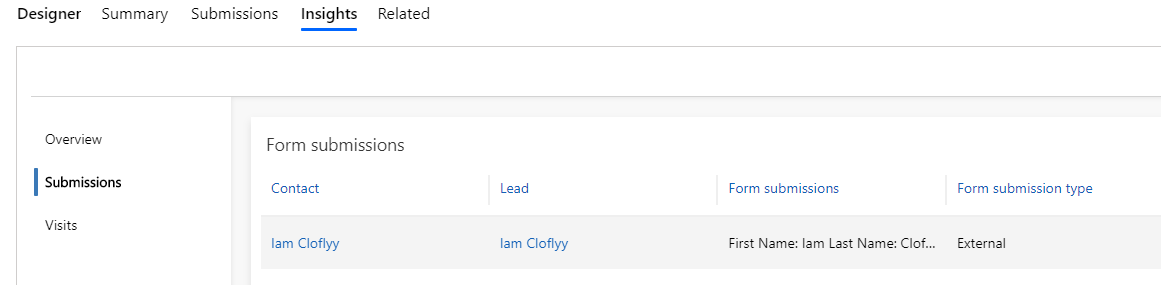
    * submission in insights data

    pastedimage1585105090308v2.png

    What's more, what's version of your form-loader.js? Mine is 1.59.1039.0(it was created by system automatically.) and the feature works for me.

    https://mktdplp102cdn.azureedge.net/public/latest/js/form-loader.js?v=1.59.1039.0

    > There are following methods to insert data into Dynamics without authorization from client side.

    * Marketing form.(Landing page type)

    * Entity form.(disable Entity permission of the form, and Portal integration is required.)

    * Power Automate(Philipp suggested), link your Dynamics environment with other platform by connectors.

    > In addition, how did you build your captured form?

    In this previous thread, the user built his captured form by a plugin in Wordpress,

    and the plugin added extra attributes "action=..." and "method=POST", normally these attributes are used to request our own web service on our own server, 

    which might causes collision with form-loader submission detecting behavior, you could also check this.

    Regards,

    Clofly

  • Suggested answer
    Defne Ayanoglu Profile Picture
    Microsoft Employee on at

    Hi Jenni,

    Would you please share with me your details such as org ID, the page with the form and the object URL where you create the form in a private message so that I can look into it?

    Best regards,

    Defne

    Microsoft Dynamics 365 for Marketing team

  • Jenni221 Profile Picture
    140 on at

    Dear Philipp,

    I agree with you regarding the problems with Dynamics for Marketing.

    I have a question about your integration:

    When you say you have "simulated the submission" - do you see a submission on the marketing form or do you just create the contacts in the marketing app without reference to a marketing form?

    I ask because I would like to use the marketing form and its submissions as a starting point for my own customer journey.

    And in the case of a lead, also the source form with with which the lead was created in the system.

    Thank you for your answer!

    Best Regards

    Jenni

  • Philipp Focust Profile Picture
    147 on at

    Hi Jenny,

    in our solution, which is once again not supported, we simulate the default behavior of the submit button without actually showing any form on the frontend. We just have a simple form containing all relevant fields on the backend as marketing form, which we address. So you will still see all submissions and all logic attached to your marketing form, like contact and/or lead creation and the insights that you’re offered OOB.

    BR,

    Philipp

  • Jenni221 Profile Picture
    140 on at

    Dear Philipp,

    I understand that it is not supported - but I am interested in the solution. Could you explain it a bit more technically - how you proceeded exactly? Then I can take this to the developers for testing. Thank you!

    Best Regards

    Jennifer

  • Verified answer
    Philipp Focust Profile Picture
    147 on at

    Hi Jenni,

    sorry for the late reply, I was really busy the last days. I am going to write a blog about our approach, however I'll try to explain you the solution:

    - Creating a form that includes all relevant fields in DYN365 backend

    - Following the default process for form embedding, which includes the creation of a form page

    - Copying the generated JavaScript (without the first <div> definition, as this would lead to the form itself being displayed on the frontend)

    - Including the JavaScript on your frontend and writing a small script to capture the correlationId, generated by the form-load.js (which is needed for the web request and renewing itself every 300 seconds)

    - Creating an http webrequest (form-encoded) with the following format:

    var xhttp = new XMLHttpRequest(); 
    
    xhttp.open("POST", formUrl   "/formpage/”   formId   “/correlation/”   correlationId, true); 
    
    xhttp.setRequestHeader("Content-Type", " application/x-www-form-urlencoded"); 
    
    xhttp.send("7d58e055-d1c2-4bb3-a42f-faf6762e0acc=FirstName&3cdeebb-7c54-4cff-a1bc-772562d25c38=firstname.lastname@sample.com&submit=");

    The send part must include all formIds from the fields you want to fill. To enable a subscription list, just include the ID of that list followed by true.

    I hope that explained our approach in more detail, in the end we are just simulating the request of the SUBMIT button.

    Important the domain needs to be at least whitelisted on the form itself.

    BR

    Philipp

  • Nishant Rana Profile Picture
    11,325 Microsoft Employee on at

    Hi Philipp thanks for the solution. What will be the formUrl, formId in this case ?

  • Philipp Focust Profile Picture
    147 on at

    Hi Nishant,

    if you have a Marketing Form you have to go to the 'Form Hosting' tab, where you must have at least one Form Page related to the Form.

    There you should have a section where it states 'External form hosting format' which should be defined as 'I want to host it as script'.

    Then below you'll find the script starting with '<div....'

    The formUrl can be found in the Hostname attribute (see screenshot below) while the formId is the ID within the 'data-form-block-id'

    pastedimage1679386945724v1.png

    Keep in mind to also include all necessary headers within you're request:
    pastedimage1679387013688v2.png

    To get the Correlation ID, instead of using the above script you could also directly call the iFrame, where the correlation ID is in the response of the request. The URL to get the correlation ID is within the HTML document that implements the form:

    pastedimage1679387166642v3.png

    Simply grab the correlation id from the response:

    pastedimage1679387360195v4.png

Under review

Thank you for your reply! To ensure a great experience for everyone, your content is awaiting approval by our Community Managers. Please check back later.

Helpful resources

Quick Links

Introducing the 2026 Season 1 community Super Users

Congratulations to our 2026 Super Stars!

Congratulations to our 2025 Community Spotlights

Thanks to all of our 2025 Community Spotlight stars!

Leaderboard > Customer experience | Sales, Customer Insights, CRM

#1
ManoVerse Profile Picture

ManoVerse 180 Super User 2026 Season 1

#2
11manish Profile Picture

11manish 123

#3
CU11031447-0 Profile Picture

CU11031447-0 100

Last 30 days Overall leaderboard

Product updates

Dynamics 365 release plans