web
You’re offline. This is a read only version of the page.
close
Skip to main content

Announcements

No record found.

News and Announcements icon
Community site session details

Community site session details

Session Id :
Finance | Project Operations, Human Resources, ...
Suggested Answer

Account numbers showing like garbage in default GP reports

(0) ShareShare
ReportReport
Posted on by 855

Hi,

Any other ideas on fixing this issue?

The report is a the default (out of the box) TB report.. 

The issue happens on both detail and summary reports. 

Recreated the reports.dic (just in case and because the user who reported it was using a modified report). Turns out, it happens also on the canned reports... 
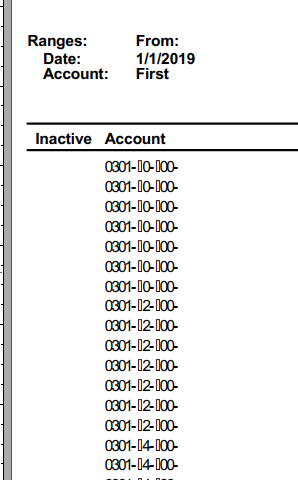
pastedimage1637606708878v1.png

I also did a synchronize (dex.ini) thing.

Any other ideas would be highly appreciated..

Thanks!

Categories:
I have the same question (0)
  • Suggested answer
    DexDev Profile Picture
    100 on at

    Did you check with changing field width in report ? or changing font?

  • Suggested answer
    Beat Bucher  GP Geek  GPUG All Star Profile Picture
    28,061 Moderator on at

    Hi Elena,

    Did anyone recently change the CoA framework to extend the number of digits in each segments? to me this "garbage" looks like an invisible character that GP tries to print and simply returns a 'dummy' character instead of a blank space.

    Can you show a screen shot of the Account Maintenance form with one of those accounts pulled in? Could you check your Account setup and segment setup in GP ?

  • Robert Yao Profile Picture
    492 on at

    Try rebuilt reports dictionary first, if not fixed then see if you have any modified form needed to be mapped other wise you may have screen DPI issue.

    Rob

  • Suggested answer
    Cheryl Waswick Profile Picture
    Microsoft Employee on at

    It sounds like you tried all the correct steps that often fixes this.    If the forms and reports dictionaries didn't get upgraded properly, this can happen after an upgrade.  Here is the blog on this topic with the proper steps during the upgrade:

    community.dynamics.com/.../microsoft-dynamics-gp-upgrade-fall-2021---modified-dictionary-upgrade

    ---------------------

    Usually just recreating the forms and reports dictionaries fixes this (links below), or running the Synchronize option in Utilities for the dynamics.dic will fix this.    

    850465 How to re-create the Reports.dic file in Microsoft Dynamics GP

    support.microsoft.com/.../850465

    951767 How to re-create the Forms.dic file in Microsoft Dynamics GP

    support.microsoft.com/.../951767

    --------------------

    If neither above worked for you, then export out all your mod forms and reports, add SYNCHRONIZE=TRUE to the dex.ini, and in Utilities run the 'Synchronize forms and reports dictionaries' in Utilities first to re-synchronize the Dynamics.dic.  Test to see if fixed.  If not, then then run the 'update forms and reports dictionaries' in Utilities, followed by the same 'synchronize' option again.  Then test.   If that doesn't work, then rebuild the forms and reports dictionaries again.   It should get fixed with one of these options.

    Hope the helps,

    Cheryl

    Dynamics GP Support

Under review

Thank you for your reply! To ensure a great experience for everyone, your content is awaiting approval by our Community Managers. Please check back later.

Helpful resources

Quick Links

Introducing the 2026 Season 1 community Super Users

Congratulations to our 2026 Super Stars!

Meet the Microsoft Dynamics 365 Contact Center Champions

We are thrilled to have these Champions in our Community!

Congratulations to the April Top 10 Community Leaders

These are the community rock stars!

Leaderboard > Finance | Project Operations, Human Resources, AX, GP, SL

#1
Giorgio Bonacorsi Profile Picture

Giorgio Bonacorsi 622

#2
André Arnaud de Calavon Profile Picture

André Arnaud de Cal... 553 Super User 2026 Season 1

#3
CP04-islander Profile Picture

CP04-islander 430

Last 30 days Overall leaderboard

Product updates

Dynamics 365 release plans
