web
You’re offline. This is a read only version of the page.
close
Skip to main content

Notifications

Announcements

No record found.

Community site session details

Community site session details

Session Id :
Microsoft Dynamics CRM (Archived)

Unable to import solution using workbench

(0) ShareShare
ReportReport
Posted on by 3,634

I'd to do some customization in the ribbon and I done it through the ribbon workbench. But I while publishing solution I came across with following error:
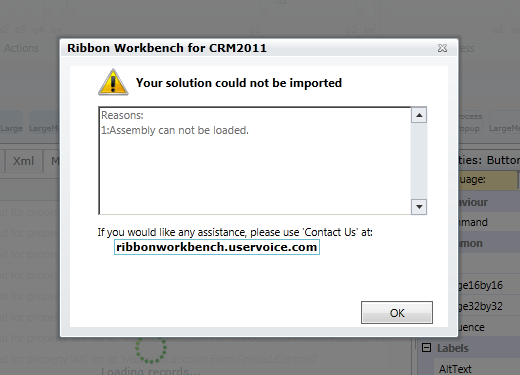
2313.RibbonWorkBench.PNG

I've only 2 to 3 entities in the solution that are added as required components. I didn't see such error before even.

I need your kind assistance to nailed down it. TIA!

*This post is locked for comments

I have the same question (0)
  • Rajkumar Rajaraman Profile Picture
    on at

    Is there any plugin there in those entities?

  • Mohsin Ali Profile Picture
    3,634 on at

    Raj thank you for your reply. There is no plugin assembly.

  • Rajkumar Rajaraman Profile Picture
    on at

    Once again check all the required components are added in this solution (like workflows, any global option set)

  • Suggested answer
    Community Member Profile Picture
    on at

    Expand the solution and open the file "Solution.xml" and check the route components. If there is any components which were not in solution, comment those line and zip the file and give a try.

  • Mohsin Ali Profile Picture
    3,634 on at

    Sivaa, Thank you for your reply. I've matched everything was present in the solution.

  • Mohsin Ali Profile Picture
    3,634 on at

    Sivaa and Raj as per recommendations of ribbon workbench support. I exported the solution and then re-import but my solution was failed to import here in the following is the error message.failed-solution.PNG

  • Rajkumar Rajaraman Profile Picture
    on at

    Moshin,

    You can try to follow the instructions from the below mentioned link:-

    crmandsilverlight.wordpress.com/.../fix-for-importingsolution

    Hope this helps.

    Regards,

    R.Rajkumar

  • Mohsin Ali Profile Picture
    3,634 on at

    It didn't resolve my problem. The message is "The custom process step is not valid. For further information, contact your system administrator."

  • Verified answer
    Mohsin Ali Profile Picture
    3,634 on at

    I've resolve it by crazy way. I just add only the required entity into solution instead of adding the required components as well and it works.

  • Suggested answer
    Nishant Rana Profile Picture
    11,325 Microsoft Employee on at

    make sure you are using the latest version of the tool. This also might help.

    nishantrana.me/.../

Under review

Thank you for your reply! To ensure a great experience for everyone, your content is awaiting approval by our Community Managers. Please check back later.

Helpful resources

Quick Links

Responsible AI policies

As AI tools become more common, we’re introducing a Responsible AI Use…

Neeraj Kumar – Community Spotlight

We are honored to recognize Neeraj Kumar as our Community Spotlight honoree for…

Leaderboard > 🔒一 Microsoft Dynamics CRM (Archived)

#1
SA-08121319-0 Profile Picture

SA-08121319-0 4

#1
Calum MacFarlane Profile Picture

Calum MacFarlane 4

#3
Alex Fun Wei Jie Profile Picture

Alex Fun Wei Jie 2

Last 30 days Overall leaderboard

Featured topics

Product updates

Dynamics 365 release plans



