web
You’re offline. This is a read only version of the page.
close
Skip to main content

Notifications

Announcements

No record found.

Community site session details

Community site session details

Session Id :
Microsoft Dynamics AX (Archived)
Answered

Default sorting on Form screen

(0) ShareShare
ReportReport
Posted on by 32

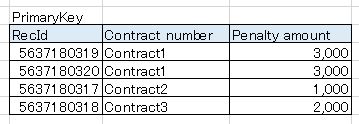
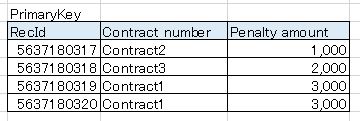
Hi, I have a form with datasource from a table called penaltytable, and I didn't input any sorting, so from my understanding its supposed to be sorted by primary key as default. But everytime I open the form screen, its sorted by another field instead of primary key. I'm not asking how to change the default sorting which is I already know how to do it, I just want to know why its not sorted by primary key as default? See below pictures for details.

  • Currently how the form screen sorted (sorted by "Contract number" field =
8524.image1.JPG

  • How it should be from my understanding (sorted by "RecId" field which is primary key) =
6866.image2.JPG

Best regards

*This post is locked for comments

I have the same question (0)
  • Verified answer
    nmaenpaa Profile Picture
    101,160 Moderator on at

    I don't think the form does any sorting if you don't specify it. Instead it shows the data in the same order that it's stored in the database: the cluster index.

  • Verified answer
    guk1964 Profile Picture
    10,888 on at

    The initial sort order for the records shown in a form is prioritized by the system:

    • If sort fields are added to the data source query, the sort specification is used.

    • If an index is specified in the index property on the data source, the sort order that is implicitly specified in that index is used.

    • If the data source is auto joined to another data source, the system finds the index for this join and sorts the data according to that index.

    • If nothing else is specified, the sort order is the one that is implicitly specified in the first index (the one with the lowest ID) on the table that is used in the form data source.

    When no index hints are specified, it is up to the database management system to find an applicable access path that is based on the information in the supplied query.

    The sort order can be changed by the user, by using the different sort options that are presented on the controls and in the query dialog box.

Under review

Thank you for your reply! To ensure a great experience for everyone, your content is awaiting approval by our Community Managers. Please check back later.

Helpful resources

Quick Links

Responsible AI policies

As AI tools become more common, we’re introducing a Responsible AI Use…

Neeraj Kumar – Community Spotlight

We are honored to recognize Neeraj Kumar as our Community Spotlight honoree for…

Leaderboard > 🔒一 Microsoft Dynamics AX (Archived)

#1
Priya_K Profile Picture

Priya_K 4

#1
Martin Dráb Profile Picture

Martin Dráb 4 Most Valuable Professional

#3
Ali Zaidi Profile Picture

Ali Zaidi 2

Last 30 days Overall leaderboard

Featured topics

Product updates

Dynamics 365 release plans
